
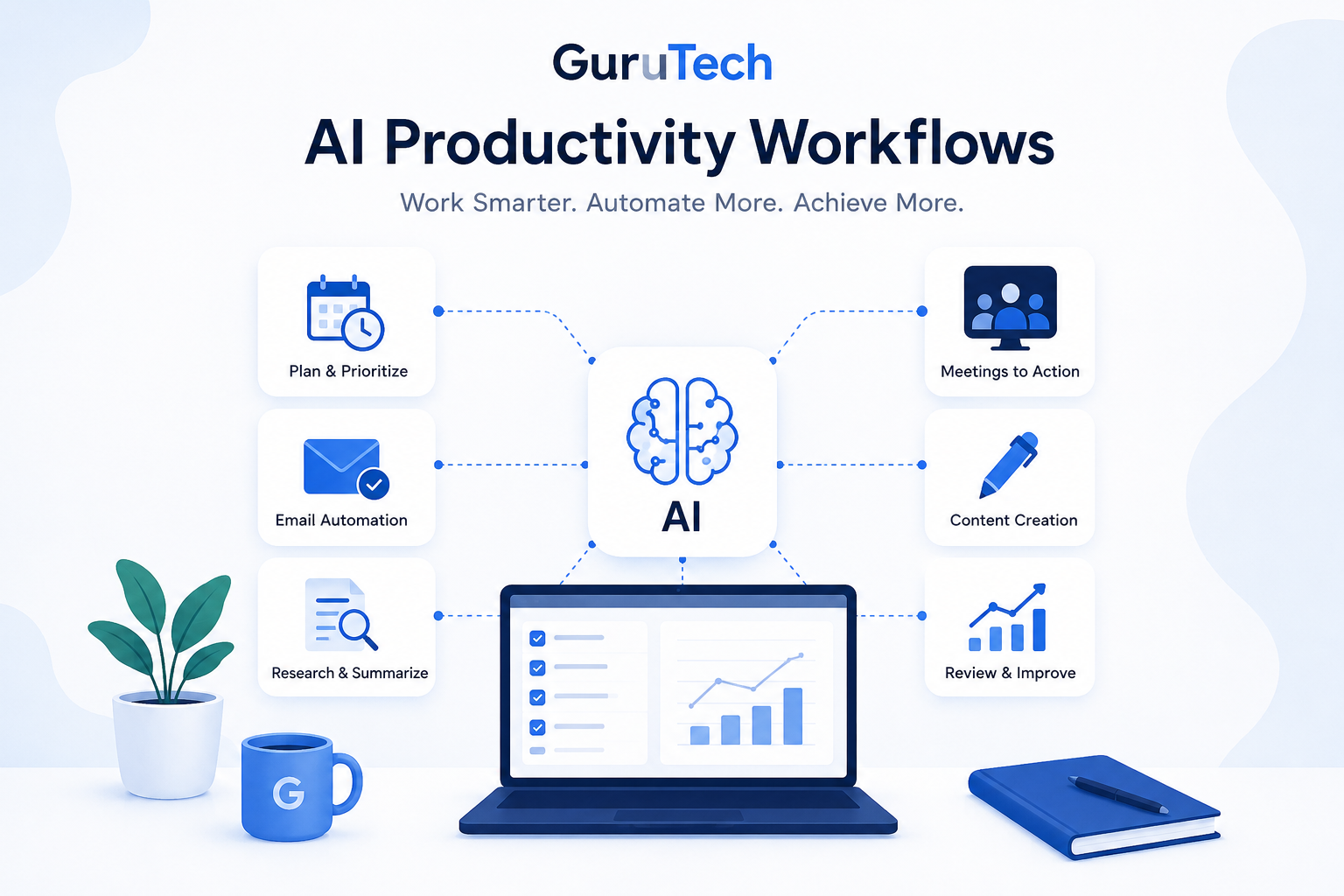
Modern professionals aren’t short on tools — they’re short on time, focus, and mental bandwidth. Email never stops, task lists grow faster than they shrink, and context switching has become the default state of work. Artificial intelligence can help, but only when it’s used intentionally.
That’s where AI productivity workflows come in.
Instead of using AI occasionally or reactively, professionals are increasingly building structured workflows that integrate AI into daily routines — planning, communication, prioritization, research, meeting follow-ups, and execution. These workflows don’t replace human judgment. They reduce friction, automate low-value work, and free up time for higher-impact decisions.
The difference between simply using AI and building AI productivity workflows is consistency. Asking ChatGPT, Gemini, Claude, or another AI assistant a random question can be useful, but the benefit is limited. A workflow turns that one-time usefulness into a repeatable system. The more often the workflow is used, the more time it saves.
This guide breaks down practical AI productivity workflows professionals can adopt today without technical expertise or complex setups. You’ll learn how to use AI for daily planning, email management, meeting notes, research, reporting, content creation, and task automation — while keeping human review in the process.
Table of Contents
- What Are AI Productivity Workflows?
- Why Workflows Matter
- Daily Planning Workflow
- Email Automation
- Meeting Workflow
- AI Tools
- ROI of AI Workflows
- Common Mistakes
What Is an AI Productivity Workflow?
An AI productivity workflow is a repeatable process where artificial intelligence supports specific work tasks in a structured way. Rather than asking an AI tool random questions throughout the day, a workflow defines when, how, and why AI is used.
For example, instead of manually reviewing notes, emails, and tasks every morning, a workflow might involve using AI to summarize priorities, flag risks, and organize the day before work begins.
A simple AI productivity workflow usually has three parts:
- Input: The information you give the AI, such as notes, emails, tasks, transcripts, or documents.
- AI processing: The prompt or instruction that tells AI what to do with the information.
- Output: A useful result such as a summary, task list, decision table, draft response, or action plan.
The key difference is consistency. Casual AI use can be helpful, but workflows compound over time. When AI becomes part of how work is planned, reviewed, and executed, productivity gains become predictable rather than accidental.
As artificial intelligence becomes more embedded in professional work, organizations are moving from ad-hoc usage toward more structured workflows.
Why AI Productivity Workflows Matter More Than AI Tools
Many professionals focus too much on choosing the “best” AI tool and not enough on building better systems. The tool matters, but the workflow matters more. A powerful AI assistant used randomly may save a few minutes. A simple AI assistant used consistently inside a clear workflow can save hours.
The real value comes from reducing repeated mental effort. Professionals spend a large amount of time deciding what to do next, rewriting similar messages, organizing notes, reviewing long threads, and turning scattered information into usable plans. AI can support all of these tasks when it is placed inside a repeatable process.
| Approach | How It Works | Result |
|---|---|---|
| Random AI use | Ask AI questions occasionally | Helpful, but inconsistent |
| AI-assisted task | Use AI for one repeated task | Moderate time savings |
| AI productivity workflow | Use AI inside a repeatable system | Reliable productivity gains |
| AI automation system | Connect AI with tools and triggers | Scalable workflow efficiency |
This is why AI productivity workflows are becoming so important. They help professionals turn AI from a novelty into a practical work system.
Core Principles of Effective AI Productivity Workflows
Successful AI workflows share a few common principles. Professionals who get the most value from AI tend to follow these rules:
- Reduce context switching: AI should consolidate information, not create more tools to manage.
- Automate repetitive thinking: AI is most useful when it reduces repeated planning, summarizing, drafting, and organizing.
- Keep humans in the loop: Review and validation are essential, especially for communication, analysis, and decisions.
- Optimize for consistency: A “good enough” workflow used daily beats a perfect one used occasionally.
- Start with one problem: The best AI workflows usually begin with a single pain point, not a complete productivity overhaul.
These principles help prevent over-automation and ensure AI supports productivity rather than becoming another distraction. The goal is not to use AI everywhere. The goal is to use it where it removes friction.
Workflow #1: Daily Planning and Task Prioritization
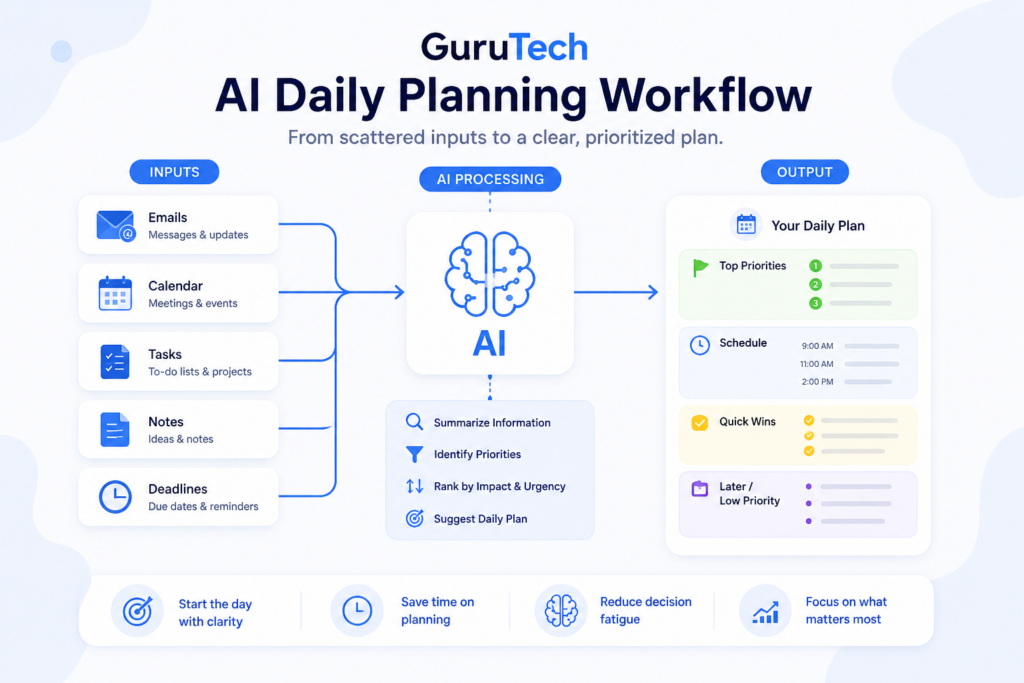
One of the most effective uses of AI for professionals is daily planning. Many people start their day by checking emails, messages, and calendars in no particular order, which immediately puts them in reactive mode.
An AI-assisted planning workflow flips that approach. Instead of letting the day control you, AI helps you organize the day before you begin responding to everything.
The problem:
Task lists are fragmented across emails, notes, calendars, and project tools, making it difficult to identify true priorities.
The workflow:
- At the start or end of the day, gather key inputs: meeting notes, open tasks, emails, and deadlines.
- Use AI to summarize these inputs into a concise list of priorities.
- Ask AI to rank tasks based on urgency, impact, and effort.
- Review and adjust the list manually before committing to the day’s plan.
- Move the final plan into your calendar, notes app, or task manager.
Example prompt:
“Here are my open tasks, notes, and deadlines. Organize them into urgent, important, quick wins, and later tasks. Then suggest a realistic plan for today based on impact and effort.”
Where AI helps:
- Condensing large amounts of information
- Identifying patterns or recurring tasks
- Highlighting deadlines or risks that might be overlooked
- Turning messy notes into a structured plan
- Reducing decision fatigue before the workday begins
The result:
Professionals often start the day with clearer priorities, fewer distractions, and less decision fatigue. Even saving 15–20 minutes of planning time per day compounds significantly over a week or month.
For more beginner-friendly examples, see How to Use AI to Automate Daily Tasks.
Workflow #2: Email and Communication Management
Email remains one of the largest productivity drains for professionals. Writing, reading, and responding to messages consumes hours each week, often without clear returns.
AI can help manage communication without sacrificing professionalism or accuracy. The goal is not to let AI send messages blindly. The goal is to use AI to summarize, draft, and structure communication faster while you remain in control.
The problem:
Inbox overload leads to rushed responses, delayed replies, or excessive time spent drafting messages.
The workflow:
- Use AI to summarize long email threads and extract key action items.
- Draft responses using AI, focusing on clarity and structure rather than speed alone.
- Edit for tone, accuracy, and context before sending.
- Use AI to generate follow-up reminders or summaries when needed.
- Save reusable prompts for common response types.
| Email Task | Without AI | With AI Workflow |
|---|---|---|
| Summarizing long thread | Read manually and scan for context | AI extracts key points and action items |
| Drafting response | Start from blank page | AI creates first draft for review |
| Following up | Manually remember next steps | AI creates follow-up message and checklist |
| Changing tone | Rewrite manually | AI rewrites as concise, friendly, or professional |
Example prompt:
“Summarize this email thread in five bullet points. Identify any decisions, action items, deadlines, and unanswered questions. Then draft a professional reply under 150 words.”
When to automate — and when not to:
AI is well suited for drafting routine responses, summaries, and internal communication. Sensitive, high-stakes, legal, financial, or emotional communications should always be reviewed carefully or written manually.
The result:
Professionals can respond faster while maintaining quality, reducing inbox stress and freeing time for more meaningful work.
For reusable prompt ideas, read 10 ChatGPT Prompts That Save You Hours.
Workflow #3: Meeting Notes to Action Items
Meetings often create hidden work: scattered notes, unclear ownership, forgotten decisions, and follow-ups that happen too late. A simple AI workflow turns meeting content into a clean action plan you can actually execute.
This workflow is especially useful for professionals who attend many meetings, manage projects, lead teams, or need to send recap emails.
The problem:
Meetings produce information, but not always clear next steps. Notes may be incomplete, decisions may be buried, and accountability may be unclear.
The workflow:
- Paste your raw meeting notes, agenda, or transcript into your AI assistant.
- Ask for a structured summary: decisions, open questions, and risks.
- Ask for action items with owners, due dates, and dependencies.
- Copy the action items into your task manager.
- Send a short recap to attendees for confirmation.
Example prompt:
“Turn these meeting notes into a structured recap. Include: summary, decisions made, action items, owners, deadlines, risks, and unanswered questions.”
| Meeting Output | Why It Matters |
|---|---|
| Summary | Creates shared understanding |
| Decisions | Prevents confusion later |
| Action items | Turns discussion into execution |
| Risks | Flags problems early |
| Open questions | Shows what still needs resolution |
Why it works:
You reduce rework, clarify accountability, and prevent “meeting amnesia.” Even one saved follow-up thread per week can pay back the time immediately.
Workflow #4: Research and Information Summarization
Professionals often need to process information quickly: reports, articles, product comparisons, market updates, documentation, policy changes, and internal documents. AI can reduce the time required to understand and organize this information.
The problem:
Information is abundant, but attention is limited. Reading everything manually is not always realistic.
The workflow:
- Collect the source material you need to understand.
- Ask AI to summarize the main points.
- Ask for risks, opportunities, assumptions, and unclear areas.
- Use follow-up prompts to compare options or create a decision table.
- Verify important facts from reliable sources before acting.
Example prompt:
“Summarize this article for a busy professional. Extract the key takeaways, practical implications, risks, and questions I should investigate further.”
This workflow is useful for consultants, managers, analysts, business owners, marketers, writers, and technical professionals. It does not eliminate the need to read important material, but it helps you understand what deserves attention first.
Workflow #5: Content Creation and Drafting
AI productivity workflows are also useful for professionals who create content, documentation, proposals, reports, presentations, or internal guides. AI can speed up the early stages of writing by helping with structure and first drafts.
The problem:
Many writing tasks take too long because professionals start from a blank page. The first version is often the hardest part.
The workflow:
- Start with a rough idea or topic.
- Ask AI to create an outline.
- Review the outline and adjust the structure.
- Ask AI to draft one section at a time.
- Edit for accuracy, tone, experience, and originality.
- Use AI again for title ideas, meta descriptions, summaries, or FAQs.
Example prompt:
“Create a detailed outline for an article about AI productivity workflows for professionals. Include practical examples, tables, common mistakes, and FAQ ideas.”
This workflow is especially useful for recurring content tasks. For example, a business owner can use it to create weekly newsletters, a consultant can use it to draft client reports, and a blogger can use it to structure SEO articles faster.
The key is human editing. AI can create structure and drafts, but your experience, examples, and judgment make the final content trustworthy.
Tools Commonly Used in AI Productivity Workflows
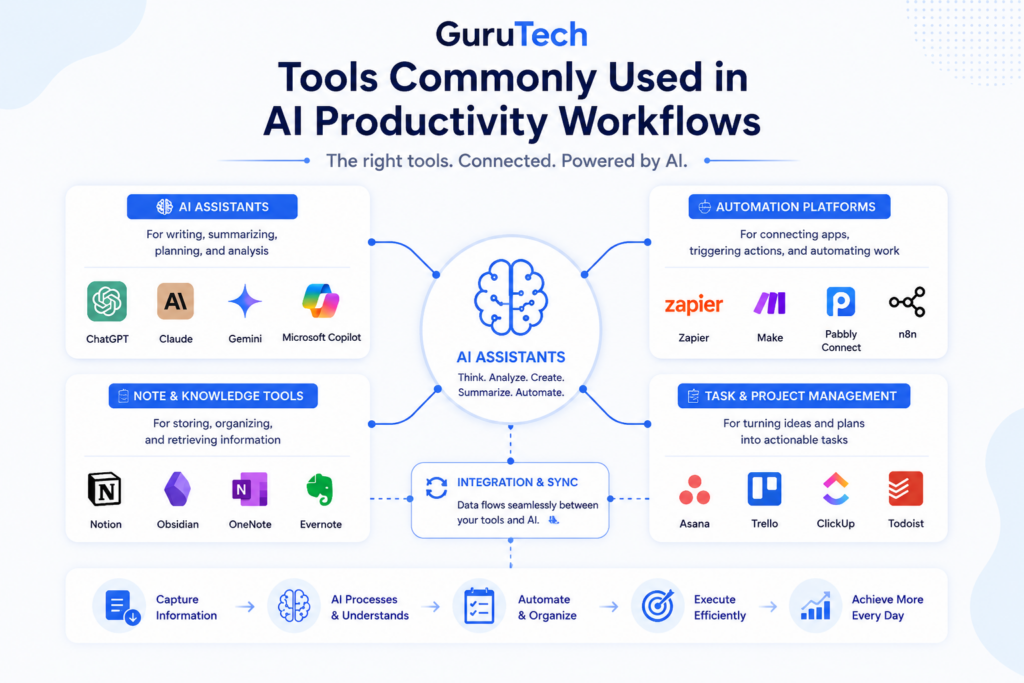
Most AI productivity workflows rely on a combination of tool categories rather than a single platform. The specific tools matter less than how they are combined.
- AI assistants: For writing, summarizing, planning, and analysis
- Automation platforms: For connecting tasks, calendars, forms, and workflows
- Knowledge and note tools: For storing, organizing, and retrieving information
- Task managers: For turning AI outputs into trackable action items
- Calendar tools: For time-blocking and scheduling priorities
| Tool Category | Best For | Example Workflow |
|---|---|---|
| AI assistant | Writing, summaries, planning | Turn meeting notes into action items |
| Automation platform | Moving data between apps | Send form submissions to a task board |
| Notes app | Knowledge storage | Save AI summaries for later reference |
| Task manager | Execution tracking | Convert AI-generated tasks into deadlines |
| Calendar | Time blocking | Schedule priority work blocks |
The specific tools matter less than how they are combined. Effective workflows are designed around tasks and outcomes, not around chasing the latest software.
For more tool ideas, see Best AI Tools for Productivity.
AI Workflow vs Automation Workflow
AI workflows and automation workflows are related, but they are not the same thing.
A traditional automation workflow follows rules. For example, if a form is submitted, send the data to a spreadsheet. AI workflows are different because AI can interpret, summarize, draft, classify, and reason through unstructured information.
| Workflow Type | How It Works | Best Use Case |
|---|---|---|
| Traditional automation | Follows fixed rules | Move data between apps |
| AI workflow | Processes and generates information | Summarize, draft, prioritize, analyze |
| Hybrid workflow | Combines AI with automation tools | Generate summaries and route tasks automatically |
The most powerful systems combine both. AI handles the thinking-heavy part, while automation tools move information between apps.
Advanced Workflow: AI + Automation + Knowledge Base
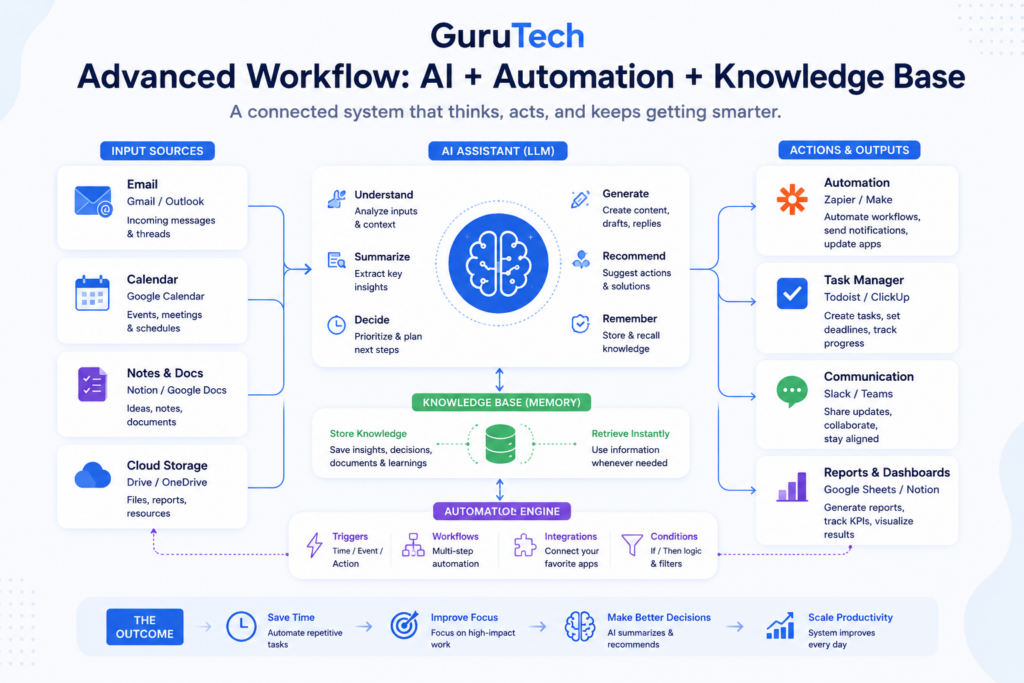
Once you are comfortable with simple workflows, you can build more advanced systems. A strong professional workflow often combines three layers:
- AI layer: Summarizes, drafts, analyzes, and organizes information.
- Automation layer: Moves information between tools.
- Knowledge layer: Stores useful outputs for future use.
Example advanced workflow:
- A client email comes in.
- AI summarizes the request and identifies urgency.
- A task is created in your task manager.
- A draft reply is generated for review.
- The summary is saved in your notes or CRM.
This kind of workflow does not need to be fully automated immediately. You can start manually and automate only the parts that are clearly repetitive.
How Much Time Can AI Productivity Workflows Save?
The time savings depend on how often you use the workflows and which tasks you target. The biggest savings usually come from repeated tasks: email, meetings, planning, research, and writing.
| Workflow | Typical Manual Time | AI-Assisted Time | Potential Savings |
|---|---|---|---|
| Daily planning | 15–25 minutes | 5–10 minutes | 5–15 minutes/day |
| Email drafting | 5–10 minutes/email | 1–3 minutes/email | Several hours/month |
| Meeting recap | 20–30 minutes | 5–10 minutes | 10–20 minutes/meeting |
| Research summary | 30–60 minutes | 10–20 minutes | 20–40 minutes/task |
| Content outline | 30–45 minutes | 5–15 minutes | 15–30 minutes/draft |
Even modest savings compound. Saving 30 minutes per workday equals roughly 10 hours per month. Saving one hour per workday can recover more than a full workweek each month.
Common Mistakes Professionals Make with AI Workflows
Despite the benefits, many professionals struggle to see results from AI because of avoidable mistakes.
- Over-automating too early: Trying to automate everything before understanding what actually saves time.
- Using too many tools: Fragmentation defeats the purpose of productivity.
- Skipping review steps: Blind trust in AI outputs can create errors and rework.
- Expecting perfect results: AI is a support system, not a replacement for judgment.
- Not saving prompts: Rewriting prompts every day makes the workflow slower than necessary.
- Ignoring privacy: Sensitive business, client, financial, or personal information should be handled carefully.
Avoiding these pitfalls helps ensure AI workflows remain helpful rather than frustrating.
How to Start Building Your Own AI Productivity Workflow
Getting started doesn’t require a full system redesign. A simple approach works best.
- Identify one repetitive or time-consuming task. Choose a task you already do often.
- Introduce AI support for that task. Use AI to summarize, draft, organize, or prioritize.
- Test the workflow for one week. Measure whether it saves time or improves clarity.
- Refine based on results. Adjust your prompts and process.
- Expand gradually to other areas of work. Add one workflow at a time.
This incremental approach keeps complexity low and makes benefits easier to measure.
A good starting point is to choose one of these:
- Morning planning workflow
- Email response workflow
- Meeting recap workflow
- Weekly review workflow
- Research summary workflow
Once one workflow becomes natural, add another. This is how small productivity gains turn into a larger system.
Prompt Templates to Make These Workflows Repeatable
The easiest way to make an AI workflow stick is to standardize the prompts you use. Save a few templates in a note app or text file so you don’t reinvent the wheel every day.
- Daily priorities: “Here are my tasks and deadlines. Rank the top 5 by impact and urgency, then suggest a realistic plan for today.”
- Email reply draft: “Draft a concise, professional reply. Keep it friendly, include next steps, and limit it to 6–8 sentences.”
- Meeting recap: “Summarize decisions, action items with owners, risks, and questions to resolve.”
- Research summary: “Summarize this document for a busy professional. Include key takeaways, risks, and action items.”
- Weekly review: “Review these completed tasks and open items. Identify wins, blockers, and priorities for next week.”
These templates help you get consistent outputs faster — which is the whole point of building workflows instead of one-off AI chats.
FAQ: AI Productivity Workflows
What are AI productivity workflows?
AI productivity workflows are repeatable systems that use artificial intelligence to support tasks such as planning, writing, summarizing, prioritizing, and organizing work.
Do AI workflows require technical skills?
No. Many AI productivity workflows can be created with simple prompts and everyday tools. More advanced workflows may use automation platforms, but they are not required at the beginning.
What is the best AI workflow to start with?
The best workflow to start with is usually daily planning or email summarization because both are common, repetitive, and easy to improve quickly.
Can AI productivity workflows replace employees?
No. AI workflows are best used to support professionals by reducing repetitive tasks and improving structure. Human judgment, review, and accountability remain important.
How often should I use AI workflows?
The most useful workflows are used consistently. A simple workflow used every day is more valuable than a complex workflow used once.
Real-World Example: A Full AI Workday Workflow
A professional day using AI workflows might look like this:
- Morning: AI organizes priorities
- Midday: AI summarizes emails and drafts replies
- Afternoon: AI processes meetings into tasks
- Evening: AI reviews progress and prepares next day
This creates a continuous productivity loop powered by AI.
To apply these strategies in consulting specifically, see our guide on AI workflows for consultants.
Final Thoughts
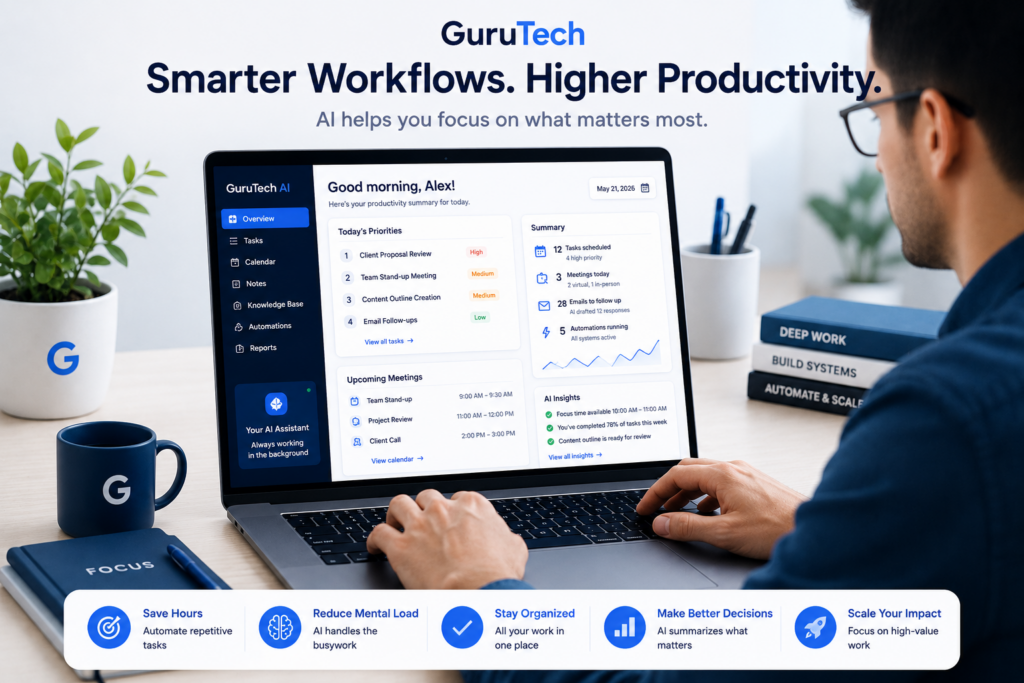
AI productivity workflows aren’t about working faster at all costs — they’re about working smarter with less friction. For professionals, the real advantage comes from consistency, clarity, and reduced cognitive load.
By focusing on workflows rather than tools, AI becomes a long-term productivity asset rather than a short-term experiment. As these workflows mature, they create space for deeper work, better decisions, and more sustainable performance.
The professionals who benefit most from AI are not necessarily the ones using the most tools. They are the ones who build simple, repeatable systems around the work they already do every day.
Start with one workflow. Improve it. Use it consistently. Then build from there.
Related guides: