
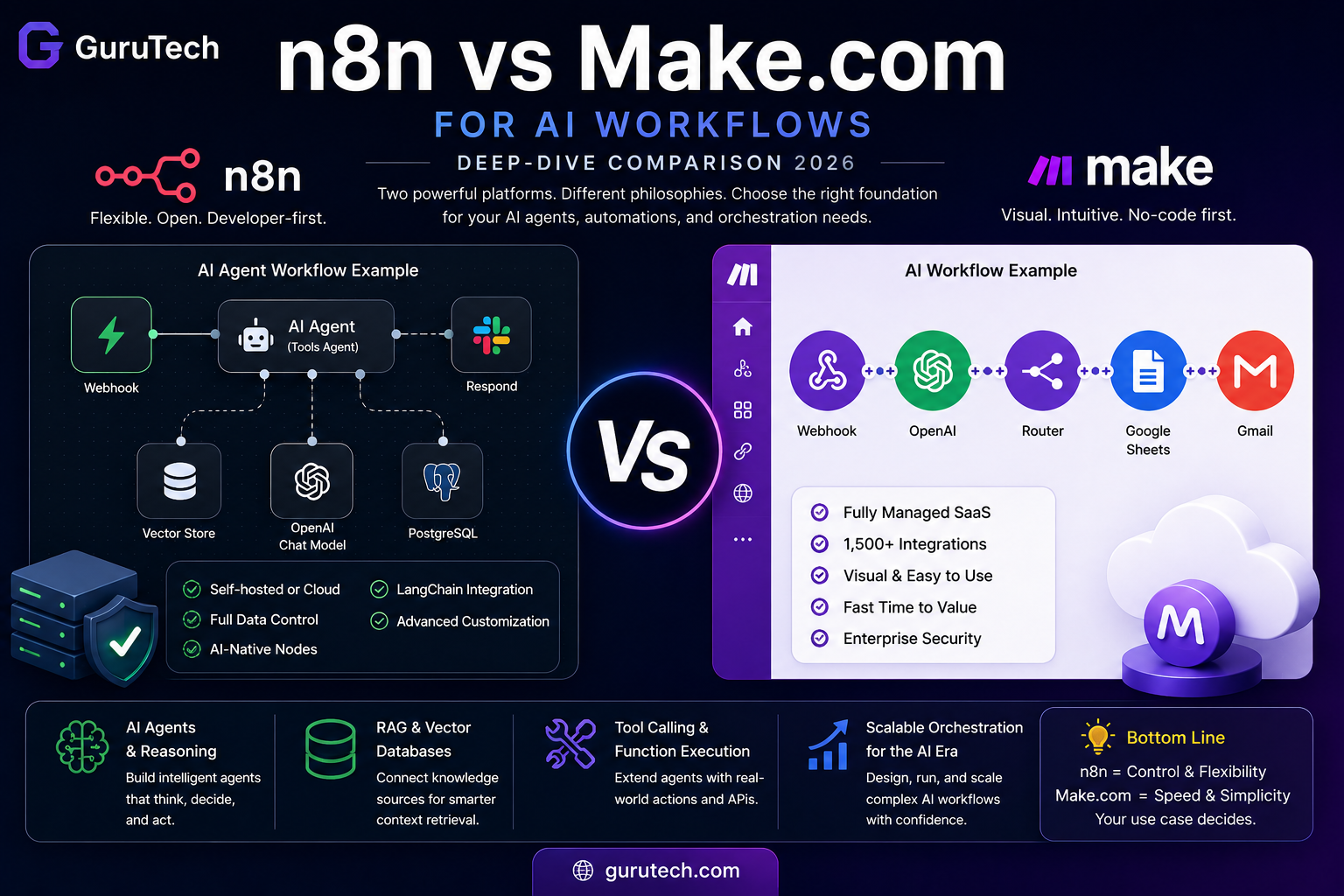
n8n vs Make.com is no longer just a comparison between two automation builders. For modern AI workflows, it is a decision about orchestration architecture, data control, cost predictability, and how much complexity your team can realistically manage in production.
In the early days of workflow automation, the question was simple: which platform can connect Gmail, Slack, Airtable, HubSpot, or Google Sheets with the least friction? In 2026, the question is different. AI workflows now include language model calls, vector database lookups, long-running tasks, conditional routing, human approval steps, memory, retry logic, and sometimes full agent loops that make decisions before the next action is triggered.
That is where the difference between AI workflows and traditional automation becomes important. A basic automation moves data from one app to another. An AI workflow interprets data, transforms it, retrieves context, makes a decision, and then decides which system should act next. The orchestration layer becomes the backbone of the entire AI system.
AI automation stacks therefore need more than attractive visual builders. They need predictable execution, strong error handling, data governance, memory options, observability, and flexibility around model providers. This is why the n8n vs Make.com debate matters for businesses, consultants, developers, and lean teams building serious AI systems.
The simple version is this: Make.com is excellent for fast, visual SaaS automation and approachable AI workflows. n8n is stronger for technical teams building complex, stateful, production-grade AI orchestration.
That does not mean one tool is universally better. It means each platform fits a different operational profile. Make.com is easier for non-technical users who need polished integrations and fast deployment. n8n gives developers and automation builders more control over custom logic, self-hosting, AI agents, vector stores, and advanced workflow patterns.
This guide compares both platforms through the lens that matters most in 2026: not just “which is easier,” but “which one can become the reliable backend for your AI operations?”
Quick Verdict: n8n vs Make.com for AI Workflows
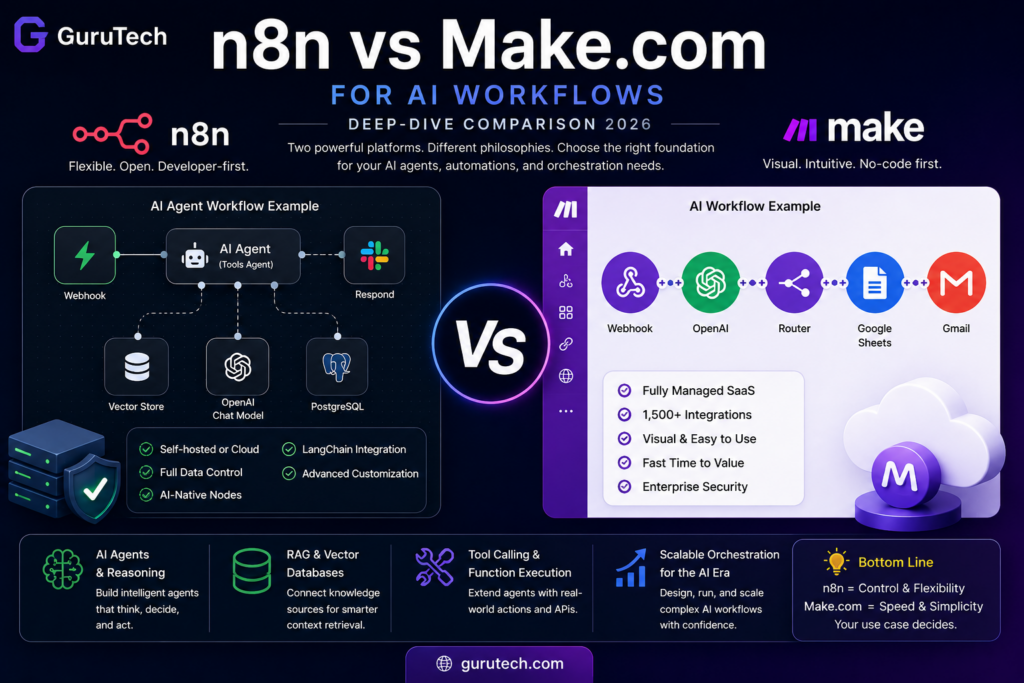
If your team mainly needs fast SaaS automation with occasional AI calls, Make.com is likely the better starting point. It is polished, visual, easy to learn, and has broad app coverage. A marketing team, operations assistant, founder, or consultant can quickly build useful workflows without managing infrastructure.
If your team is building AI agents, retrieval-augmented generation workflows, internal tools, model-routing systems, or production automations with sensitive data, n8n is usually the stronger long-term choice. Its support for self-hosting, code nodes, AI agent nodes, LangChain-style workflows, vector store tools, and custom API handling gives it more room to grow with technical complexity.
| Decision Factor | Choose n8n If… | Choose Make.com If… |
|---|---|---|
| AI complexity | You need agents, RAG, memory, branching logic, or multi-step reasoning. | You need simple AI enrichment, summaries, categorization, or content generation. |
| Team skill level | You have technical users, developers, or automation builders comfortable with JSON and APIs. | You want business users to build and maintain workflows visually. |
| Hosting control | You need self-hosting, private infrastructure, or stricter data control. | You prefer a fully managed SaaS platform with minimal setup. |
| Cost model | You want execution-based pricing or self-hosted control for complex workflows. | You prefer operation-based pricing for simpler scenarios. |
| Best use case | AI agents, internal AI tools, advanced automation systems, RAG pipelines. | SaaS workflows, marketing automation, lead routing, simple AI-powered business processes. |
Why AI Workflow Orchestration Is Different in 2026
Traditional automation platforms were built around deterministic steps. A trigger fires, an action runs, a filter checks a condition, and the workflow ends. That model works well for simple tasks such as sending form submissions to a CRM, posting Slack alerts, or updating a spreadsheet.
AI workflows introduce uncertainty and state. A language model might return a slightly different answer every time. A vector search might produce different context depending on the query. A document extraction workflow might need fallback logic when confidence is low. A customer support agent might need to reference previous interactions before generating the next response.
This creates new requirements for orchestration:
- Context handling: The workflow must pass structured data, retrieved documents, conversation history, and tool outputs between steps.
- Error recovery: The system must handle API failures, rate limits, malformed LLM responses, and timeout issues.
- Human review: Some outputs need approval before they affect customers, finances, or operational records.
- Cost control: Model calls, embeddings, retrieval steps, and loops can quickly increase platform and API costs.
- Security: AI workflows often touch sensitive documents, customer records, invoices, contracts, or internal knowledge bases.
- Observability: Teams need to understand why an AI workflow made a decision, not just whether it technically ran.
This is why the comparison between n8n and Make.com should not be reduced to “which interface looks better.” Interface matters, but architecture matters more when AI systems move from experiments to business-critical infrastructure.
For example, a workflow that summarizes emails is simple. A workflow that reads customer tickets, retrieves policy documents from a vector store, drafts a response, checks tone and compliance, updates a CRM, and escalates risky cases is an orchestration system. That is the category where n8n and Make.com start to diverge.
Architecture: SaaS Convenience vs Self-Hosted Control
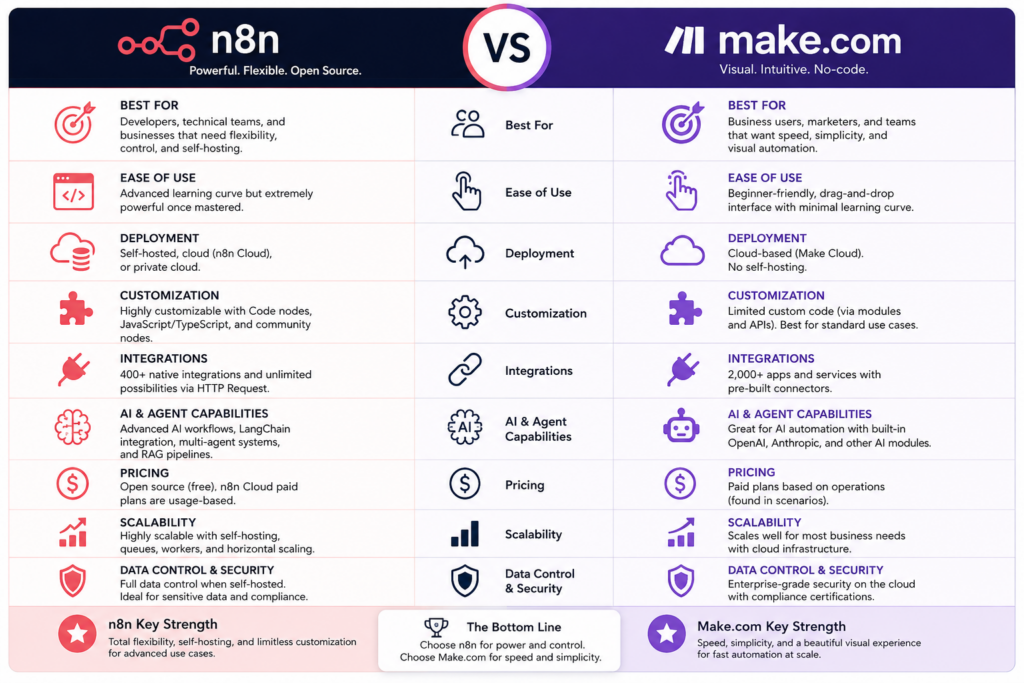
The most important architectural difference is deployment control. Make.com is primarily a managed SaaS automation platform. n8n offers both a managed cloud version and a self-hosted option. That difference affects governance, compliance, customization, performance tuning, and long-term flexibility.
Make.com’s Managed SaaS Model
Make.com is designed for convenience. Users build scenarios in a visual cloud environment, connect apps through pre-built modules, and rely on Make to manage execution infrastructure. That is a major advantage for teams that do not want to think about servers, Docker containers, queues, databases, uptime, or workflow engine maintenance.
Make also has a strong integration ecosystem. Its public site positions the platform around AI and automation across thousands of apps, with Make AI Agents and agentic automation becoming more visible in its product direction. Make’s own site describes support for AI-powered automation, Make AI Agents, Make MCP Server, and a large app ecosystem for orchestrating workflows across business tools.
For business teams, this matters. A workflow can often be built by connecting pre-made modules instead of writing custom code. For example, a sales operations team can connect Typeform, Gmail, HubSpot, Slack, Google Sheets, and OpenAI-style modules without building every API call from scratch.
The tradeoff is that Make.com’s infrastructure is not yours. Your workflow data runs through Make’s cloud. You cannot deeply customize the runtime environment, install arbitrary system libraries, run local model infrastructure, or keep every execution fully inside your private network. For many companies this is acceptable. For others, especially in regulated industries, it becomes a limitation.
n8n’s Cloud and Self-Hosted Model
n8n’s biggest architectural advantage is flexibility. Teams can use n8n Cloud for a managed experience or self-host n8n on their own infrastructure. Self-hosting gives teams control over where workflow data is processed, how logs are stored, how secrets are managed, and which internal systems can be accessed without exposing them publicly.
This is especially relevant for deploying agentic AI systems in production. A production AI workflow may need to connect to private databases, internal APIs, document repositories, local embeddings infrastructure, or models running inside a private environment. A self-hosted orchestration layer can sit closer to those systems.
n8n also supports deeper technical customization. Developers can use code nodes, custom nodes, environment variables, direct HTTP calls, queue-based execution, and external logging/monitoring tools. This makes n8n more attractive when the workflow is not just an automation but a backend process.
The downside is operational responsibility. If you self-host n8n, you need to think about backups, updates, database maintenance, uptime, scaling, access control, and monitoring. That is not a small detail. A self-hosted system can be powerful, but it must be operated properly.
| Architecture Area | n8n | Make.com |
|---|---|---|
| Deployment | Cloud or self-hosted | Managed SaaS |
| Infrastructure control | High, especially self-hosted | Low to moderate |
| Data residency flexibility | Stronger with self-hosting | Depends on Make’s cloud setup and plan |
| Ease of setup | Moderate for cloud, higher effort for self-hosting | Very easy |
| Best fit | Technical teams and controlled environments | Business users and SaaS-first teams |
AI-Native Features: Agents, RAG, Vector Stores, and Model Workflows
Both n8n and Make.com have moved aggressively toward AI automation, but they approach the AI layer differently.
n8n feels more like an AI orchestration toolkit for builders. Make.com feels more like an AI-enabled business automation platform. That difference affects how each platform handles agents, memory, retrieval, and complex model chains.
n8n for AI Agents and RAG Pipelines
n8n includes AI-focused nodes and LangChain-style concepts that are useful for agent workflows. Its documentation includes an AI Agent node, where an agent can use connected tools to make decisions and perform actions. n8n also documents vector store tools and retrievers that can connect directly to AI agent workflows.
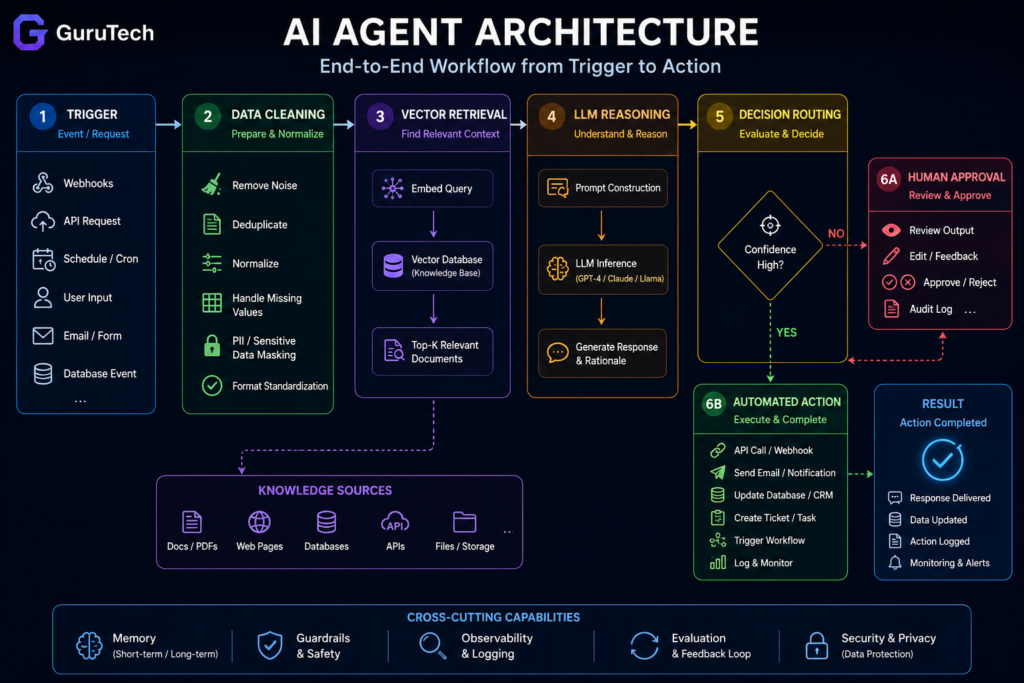
This is important because many business AI systems now rely on retrieval-augmented generation. A RAG workflow usually follows this pattern:
- A user question, document, ticket, or task enters the workflow.
- The system converts the input into a query or embedding.
- A vector store retrieves relevant knowledge base chunks.
- An LLM uses that retrieved context to generate an answer or decision.
- The workflow routes the result to a user, CRM, ticketing system, database, or approval step.
n8n is well suited for this type of workflow because it lets builders combine AI nodes, vector stores, code nodes, HTTP requests, databases, and conditional logic inside one workflow. If the output is malformed, a code node can clean it. If confidence is low, the workflow can trigger human review. If the model fails, the workflow can retry or switch providers.
This makes n8n valuable for use cases like:
- internal knowledge-base assistants,
- AI customer support triage,
- document extraction and routing,
- AI sales research workflows,
- semantic routing systems,
- automated report generation,
- AI operations dashboards,
- and multi-step agentic processes.
n8n also fits well with the type of architecture discussed in GuruTech’s AI-accelerated engineer workflow article because it gives technical users enough control to combine AI output with deterministic software logic.
Make.com for AI-Enabled Business Automation
Make.com has also positioned itself around AI automation and agentic workflows. Its platform messaging highlights AI agents, MCP server support, and automation across thousands of apps. This is a meaningful direction because Make already has one of the most approachable visual automation experiences for non-technical teams.
Make.com works especially well when AI is one step inside a broader SaaS workflow. For example:
- summarize a new customer email and send it to Slack,
- classify a lead and update HubSpot,
- turn a form submission into a project task,
- generate a social post from a blog excerpt,
- rewrite product descriptions before publishing them,
- extract invoice fields and update a spreadsheet,
- or draft follow-up emails after a sales call.
For these use cases, Make.com’s visual scenario builder is a major advantage. It lowers the barrier for business users who want AI-enhanced automation without learning infrastructure, JavaScript, or API debugging.
The limitation appears when AI workflows become deeply stateful or recursive. Make can handle complex scenarios, but its operation-based structure and visual canvas can become harder to maintain when workflows include many loops, repeated model calls, dynamic tool choices, or advanced retrieval logic.
AI Feature Comparison
| AI Capability | n8n | Make.com | Practical Impact |
|---|---|---|---|
| AI agent workflows | Strong technical support through AI Agent nodes and tool connections | Growing focus through Make AI Agents | n8n is stronger for developer-controlled agents; Make is easier for business-facing agents. |
| RAG workflows | Better suited through vector store nodes, retrievers, and custom logic | Possible through integrations and HTTP calls | n8n is usually better when retrieval is central to the workflow. |
| Model flexibility | High; works well with multiple APIs and custom HTTP logic | Good through built-in modules and app integrations | n8n gives more control; Make gives more convenience. |
| Prompt governance | Can be managed through variables, nodes, templates, and custom code | Can be managed visually inside scenarios | Make is simpler; n8n is more scalable for technical prompt operations. |
| Human-in-the-loop steps | Flexible with custom routing and integrations | Easy for common approval flows | Both can work, but n8n is more customizable. |
Handling Complex Logic: Code Execution vs Visual Iteration
Complex AI workflows rarely stay simple. The first version might only summarize a document. The production version might need to validate the summary, extract structured fields, compare them against a database, apply business rules, escalate exceptions, and log the full decision path.
This is where n8n’s code-friendly approach becomes valuable.
Where n8n Has the Edge
n8n includes code nodes that let builders write JavaScript or Python-style logic depending on the available node/runtime options and deployment setup. Even when using JavaScript only, the ability to manipulate arrays, parse JSON, normalize LLM output, and create custom transformations is a major advantage.
For example, an AI workflow might receive an LLM response that looks useful but is not valid JSON. In a visual-only workflow, cleaning that response can become awkward. In n8n, a code node can validate the structure, repair common formatting issues, extract fallback values, and decide whether to continue or send the item to a manual review queue.
This matters for:
- batch processing large sets of documents,
- parsing inconsistent model outputs,
- building custom retry logic,
- joining data from several APIs,
- transforming nested JSON,
- ranking retrieved chunks before an LLM call,
- and implementing cost-aware model routing.
When a workflow becomes a mini-application, n8n usually feels more natural than a purely visual automation platform.
Where Make.com Has the Edge
Make.com is easier for visual iteration. Its scenario builder is one of its strongest features. Users can see modules, routes, filters, iterators, aggregators, and app connections in a clear visual flow. For non-technical users, that is a huge productivity advantage.
A marketing manager can build a workflow that watches a Google Sheet, sends text to an AI model, creates campaign variations, updates a content calendar, and notifies a Slack channel. A sales team can build a lead enrichment workflow without asking a developer to write custom code.
Make’s visual design is also helpful when stakeholders need to understand what the workflow does. A manager can open the scenario and follow the logic. In n8n, the workflow is visual too, but once code nodes and complex JSON transformations are involved, the workflow becomes more developer-oriented.
The Real Difference
Make.com is often better for building the first useful version. n8n is often better for building the durable production version.
That does not mean you must always migrate from Make to n8n. Many workflows should stay in Make permanently because they are simple, stable, and easy for business users to maintain. But when workflows begin to include advanced AI logic, repeated loops, custom transformations, and sensitive data, n8n becomes more attractive.
| Workflow Pattern | Better Fit | Reason |
|---|---|---|
| Simple lead notification | Make.com | Fast to build and easy for non-technical users. |
| AI email summary to Slack | Make.com | Simple linear workflow with common SaaS apps. |
| RAG support assistant | n8n | Needs retrieval, context handling, fallback logic, and logs. |
| AI document extraction pipeline | n8n | Needs parsing, validation, conditional routing, and database writes. |
| Marketing content repurposing | Make.com or n8n | Make is faster; n8n is better if outputs require heavy validation. |
| Multi-agent research workflow | n8n | More control over chaining, memory, APIs, and execution logic. |
Pricing and Scaling: Operation-Based vs Execution-Based Thinking
Cost is one of the most important differences between n8n and Make.com for AI workflows. The issue is not only the monthly subscription. It is how each platform counts work when a workflow becomes complex.
AI workflows tend to use more steps than traditional automations. A single customer support workflow might include:
- one trigger,
- one data cleanup step,
- one embedding or retrieval step,
- one LLM classification call,
- one database lookup,
- one response generation call,
- one compliance check,
- one CRM update,
- one Slack notification,
- and one logging step.
That is already around ten logical steps before accounting for loops, retries, approval branches, or failed outputs. If the platform charges by operation, complex AI workflows can scale differently than expected.
Make.com Cost Pattern
Make.com pricing is usually easier to understand for simple workflows because users can estimate operations. A scenario with a few modules that runs a predictable number of times per month can be budgeted fairly clearly.
The challenge is that AI workflows often multiply operations. If one workflow processes 50 records, runs a model call for each one, and then updates a CRM record for each result, the operation count can climb quickly. Iterators, routers, repeated modules, and error handlers may increase usage further.
This does not make Make.com expensive by default. It means Make.com rewards simple, efficient scenario design. It is a great fit when workflows are relatively linear and the number of operations is predictable.
n8n Cost Pattern
n8n’s pricing and scaling pattern depends on whether you use n8n Cloud or self-hosted n8n. The important conceptual difference is that n8n can be more attractive for complex workflows because internal workflow complexity does not always map the same way to operation-based billing.
With self-hosting, the platform cost can become infrastructure cost instead of per-operation cost. That can be appealing for high-volume automations, but it also means the team must manage hosting, updates, scaling, and monitoring.
For complex AI workflows, n8n can therefore be more predictable when the workflow includes many internal steps, custom data processing, or repeated transformations. You still pay for AI model APIs, embeddings, storage, and infrastructure, but you may avoid a platform model that charges every small step as a separate operation.
Example Cost Logic
| Scenario | Make.com Cost Behavior | n8n Cost Behavior |
|---|---|---|
| Simple daily report with one AI summary | Usually efficient and predictable | Also efficient, but setup may be more than needed |
| Lead enrichment with 5 SaaS steps | Good fit if volume is moderate | Good fit if data transformations are complex |
| RAG workflow with multiple retrieval and LLM steps | Can become operation-heavy | Often more attractive for complex orchestration |
| High-volume document processing | Can scale quickly in operations | Self-hosting may reduce platform cost but adds infrastructure work |
| Internal AI platform backend | Less ideal if workflows are deeply customized | Stronger fit because of control and extensibility |
For a small business, the practical recommendation is simple: do not choose based on the cheapest starting plan alone. Choose based on the workflow shape. A low-volume, simple SaaS workflow may be cheaper and easier in Make.com. A high-complexity AI workflow with many internal steps may be better suited to n8n.
This connects directly with reducing AI API costs. Platform costs and model costs need to be optimized together. A workflow that calls an expensive model too often can be inefficient on either platform.
Debugging, Monitoring, and Reliability
AI workflows fail in different ways than normal automations. A normal API step may fail because of a bad credential, missing field, timeout, or rate limit. An AI step can fail more subtly. It might produce a valid-looking answer that uses the wrong context, returns inconsistent formatting, or makes a decision that needs review.
This makes debugging and observability critical.
Make.com Debugging Experience
Make.com provides a strong visual debugging experience. Users can inspect scenario runs, view module inputs and outputs, identify failed steps, and use built-in error handling paths. This is very useful for business users because errors are shown in the context of the visual workflow.
For many automations, this is enough. If a CRM update fails, the user can inspect the module. If a Slack notification did not send, the execution history makes it easy to identify the failed step. Make’s visual design helps users troubleshoot without digging through raw logs.
n8n Debugging Experience
n8n is more technical. It exposes detailed execution data and JSON payloads at each node. This is powerful when working with AI workflows because developers can inspect exactly what context was passed into the model, what the model returned, how the data was transformed, and where the logic branched.
For advanced AI workflows, this level of detail matters. If a RAG workflow produces a weak answer, the problem may not be the model. It may be the retrieval query, chunk ranking, prompt format, missing metadata, or an earlier transformation step. n8n gives technical users more room to inspect and correct those issues.
Reliability Requirements for AI Workflows
When building production AI workflows, reliability should include:
- Retries: failed API calls should retry safely without duplicate side effects.
- Fallback models: critical workflows should be able to switch providers or use a simpler model.
- Validation: LLM outputs should be checked before entering databases or customer-facing systems.
- Logging: prompts, retrieved context, decisions, and actions should be traceable.
- Human approval: high-risk decisions should pause for review.
- Cost limits: loops and recursive workflows should have guardrails.
Make.com can support many of these patterns for common workflows. n8n gives more flexibility when the reliability logic itself becomes custom software logic.
Security, Compliance, and Data Control
AI workflows often touch sensitive data. That might include customer emails, support tickets, invoices, contracts, HR records, internal documentation, sales notes, or private database entries. When a workflow sends that data to an AI model, the orchestration platform becomes part of your data governance boundary.
Make.com’s managed SaaS approach is simpler operationally, but it means workflow data passes through a third-party cloud platform. For many businesses, this is acceptable if the right security plan, permissions, and vendor review are in place. Make publicly highlights security foundations such as compliance posture, encryption, and SSO-related capabilities.
n8n’s self-hosted option can be more attractive when stricter control is needed. A company can deploy n8n inside its own environment, control network access, connect privately to internal databases, and decide how execution data is stored. This does not automatically make a system compliant, but it gives the technical team more control over the compliance architecture.
For example, a healthcare, legal, financial, or government-related workflow may require more careful handling than a marketing content workflow. If the workflow processes sensitive documents, private customer records, or regulated information, self-hosting and private model infrastructure may become important.
| Security Question | Why It Matters | Platform Implication |
|---|---|---|
| Can workflow data leave your environment? | Some workflows include sensitive or regulated information. | n8n self-hosting gives more control; Make.com requires SaaS vendor trust. |
| Do you need private database access? | Internal tools may not be exposed publicly. | n8n can run closer to private systems. |
| Do non-technical users need access? | Governance must balance usability and control. | Make.com may be easier to govern for business automation teams. |
| Do you need custom audit logs? | AI decisions may need review later. | n8n allows deeper custom logging; Make.com provides managed run history. |
Real-World AI Workflow Examples
The best way to choose between n8n and Make.com is to look at actual workflow patterns. The platform that is best for one workflow may not be best for another.
Example 1: Simple AI Email Triage
A small business receives customer emails and wants AI to summarize each message, classify urgency, and send a Slack notification.
Best fit: Make.com.
This is a classic visual automation workflow. The steps are predictable, the app connectors are common, and the AI task is simple. Make.com can handle this quickly with minimal setup. A non-technical user can maintain the workflow and adjust routing rules when needed.
Example 2: AI Support Assistant with Knowledge Base Retrieval
A company wants an AI workflow that reads support tickets, retrieves relevant policy documents from a vector store, drafts an answer, checks confidence, and escalates uncertain cases to a human agent.
Best fit: n8n.
This workflow needs retrieval, context management, validation, conditional routing, logs, and possibly private data access. n8n’s AI agent and vector-store-oriented workflow patterns make it more suitable. Make.com can still be used, but the workflow may rely more on custom HTTP calls and external services.
Example 3: Marketing Content Repurposing
A content team wants to turn each new blog post into LinkedIn posts, X posts, email snippets, and social captions. The workflow should send drafts to a spreadsheet or project management tool for review.
Best fit: Make.com for most teams; n8n for technical content operations.
Make.com is excellent for this type of SaaS-heavy workflow. It can connect the CMS, spreadsheet, project management tool, and notification channel visually. n8n becomes more attractive if the team wants advanced prompt versioning, custom brand voice validation, or automated internal linking suggestions.
Example 4: Internal AI Operations Backend
A company wants to build internal AI workflows that connect to private APIs, read internal documentation, update databases, generate reports, and run on a schedule with custom logs.
Best fit: n8n.
This is closer to backend orchestration than simple automation. Self-hosting, code nodes, private network access, and detailed execution control become more important than visual simplicity.
Example 5: Consultant Client Automations
An automation consultant builds workflows for several small business clients. Some clients need simple lead routing and content automation. Others need more advanced AI operations.
Best fit: both.
Make.com is excellent for client-facing automations that business users need to understand and maintain. n8n is better for advanced builds where the consultant is effectively delivering a custom AI backend. A smart consultant may use both tools depending on the client’s needs.
This is especially relevant for the audience of AI workflows for consultants. The best platform is not always the one with the most features. It is the one the client can afford, understand, maintain, and trust.
Hidden Operational Costs Most Comparisons Ignore
Most n8n vs Make.com comparisons focus on subscription pricing and feature lists. That misses the bigger question: what will this workflow cost to maintain six months from now?
Hidden Costs in Make.com
Make.com’s hidden cost is usually operational growth. A simple scenario can become large as more modules, routers, iterators, and exceptions are added. If many business users build workflows independently, governance can become difficult. Teams may end up with duplicate scenarios, inconsistent naming, unclear ownership, and operation usage that grows quietly over time.
Make.com also becomes harder to manage when a workflow starts behaving like an application. Visual logic is excellent until the workflow requires complex transformations, custom state management, or advanced testing.
Hidden Costs in n8n
n8n’s hidden cost is technical ownership. Self-hosting is powerful, but someone must own it. That includes updates, security patches, database backups, queue configuration, monitoring, secrets management, and disaster recovery.
Even on n8n Cloud, advanced workflows may require someone comfortable with APIs, JSON, JavaScript, and debugging. If the team does not have that skill set, n8n can become harder to maintain than expected.
The Maintenance Test
Before choosing a platform, ask three questions:
- Who will fix this workflow when it breaks?
- Who will understand it one year from now?
- Who will control cost and security as usage grows?
If the answer is a business operations person, Make.com may be safer. If the answer is a technical automation owner or developer, n8n may provide more long-term leverage.
Migration Strategy: When to Start with Make.com and Move to n8n
Many teams do not need to make a permanent decision immediately. One practical strategy is to start simple and migrate only when complexity justifies it.
Make.com can be a great first platform for validating workflow ideas. You can quickly prove whether an automation saves time, whether users actually use it, and whether the AI output is useful. If the workflow stays simple, keep it in Make.com.
But if the workflow grows into a critical AI system, migration to n8n may make sense. Warning signs include:
- the scenario has become difficult to visually understand,
- operation usage is rising faster than expected,
- you need custom code to clean or validate AI outputs,
- you need deeper logs for model decisions,
- you need private database or internal API access,
- you need vector store retrieval as a core workflow step,
- or you need self-hosting for security and compliance reasons.
A phased approach works well:
- Prototype in Make.com if the workflow is SaaS-heavy and business-led.
- Document the logic once it becomes important.
- Move complex transformation and AI logic into n8n when maintenance becomes difficult.
- Keep simple front-office workflows in Make.com where business users can manage them.
- Use n8n as the backend orchestration layer for advanced AI systems.
This hybrid strategy is often more realistic than treating the decision as all-or-nothing.
FAQ: n8n vs Make.com for AI Workflows
Is n8n better than Make.com for AI workflows?
n8n is usually better for complex AI workflows that involve agents, RAG pipelines, custom code, self-hosting, private data, or advanced branching logic. Make.com is better for fast, visual AI-enhanced business automations that use common SaaS tools and do not require deep technical customization.
Is Make.com easier than n8n?
Yes, Make.com is generally easier for non-technical users. Its visual scenario builder, app modules, and managed SaaS environment make it easier to start quickly. n8n is still visual, but it becomes more powerful when users understand APIs, JSON, code nodes, and workflow architecture.
Can Make.com build AI agents?
Make.com has been moving strongly into AI agents and agentic automation. It can be a good option for business-facing AI agents that need to operate across SaaS tools. However, deeply customized agent systems with retrieval, memory, private infrastructure, or advanced logic may be better suited to n8n.
Can n8n connect to vector databases?
Yes. n8n provides AI and vector-store-related nodes that can support retrieval workflows. This makes n8n attractive for RAG systems where an AI agent needs to retrieve knowledge base content before generating an answer.
Which platform is cheaper for AI automation?
It depends on workflow structure. Make.com can be cost-effective for simple workflows with predictable operation counts. n8n can become more cost-effective for complex workflows with many internal steps, especially when self-hosted. Teams should also calculate AI model API costs, not just platform subscription costs.
Should small businesses use n8n or Make.com?
Small businesses should usually start with Make.com if they want quick SaaS automation and do not have technical support. They should consider n8n if they need custom AI workflows, private data handling, advanced logic, or a more flexible backend automation system.
Can I use both n8n and Make.com?
Yes. A hybrid approach can work well. Make.com can handle simple front-office automations that business users maintain, while n8n can run more advanced backend AI workflows, internal tools, RAG systems, and technical orchestration.
Final Verdict: Which Platform Should You Choose?
The right choice depends on what kind of AI workflows you are building.
Choose Make.com if your priority is speed, visual simplicity, SaaS integration coverage, and business-user accessibility. It is excellent for marketing automation, lead routing, simple AI enrichment, content repurposing, notifications, and standard operational workflows. If the workflow is easy to explain visually and does not require heavy custom logic, Make.com is often the best starting point.
Choose n8n if your priority is control, extensibility, self-hosting, AI agent orchestration, RAG workflows, custom API handling, and long-term production flexibility. It is better suited for teams building AI systems that behave more like internal software than simple automations.
The strongest way to think about the difference is this:
Make.com helps business teams automate faster. n8n helps technical teams orchestrate deeper.
For GuruTech readers building serious AI systems, that distinction matters. The future of automation is not just connecting apps. It is building reliable AI operations that can reason, retrieve, decide, and act safely. Make.com and n8n can both play a role in that future, but they occupy different parts of the automation stack.
If your workflow is simple and business-led, start with Make.com. If your workflow is complex, stateful, sensitive, or central to production AI strategy, build on n8n or plan a migration path toward it.
In 2026, the best automation platform is not the one with the most impressive demo. It is the one your team can scale, debug, govern, and trust when the AI workflow becomes part of the business.