
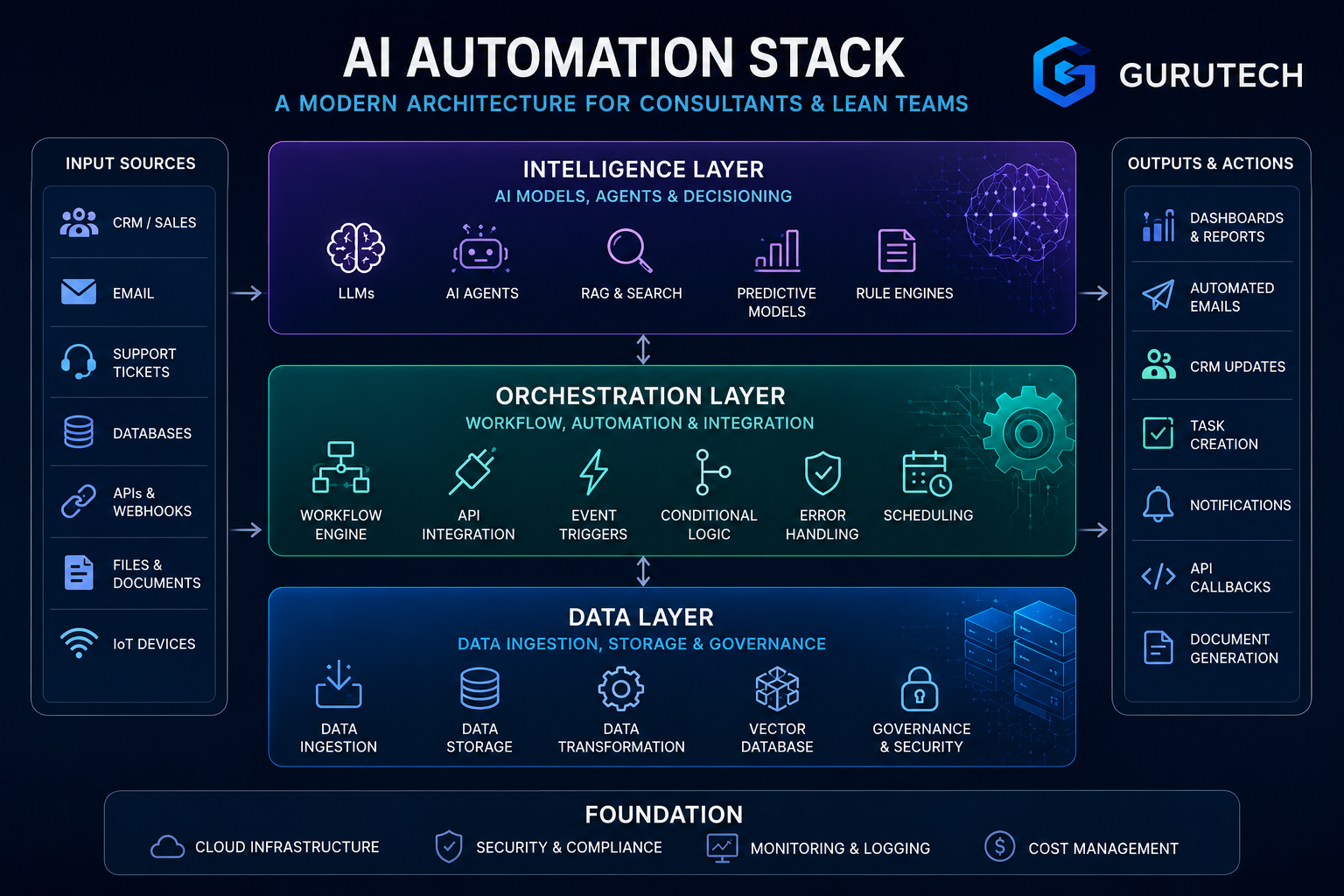
Companies no longer rely on single AI tools to solve isolated tasks. They connect models, data systems, and automation platforms into one structured setup that works together.
This shift helps teams reduce manual work and improve accuracy. Teams can scale operations without adding more staff.
An AI automation stack is a connected set of tools, infrastructure, and workflows that build, deploy, and manage AI systems in one coordinated framework.
Instead of jumping between apps, teams design layered systems that handle data, model logic, orchestration, and real-world actions in a clear flow.
This article explains how modern automation architecture fits together and how to select the right technologies. It also shows how consultants and lean teams can build practical systems.
You’ll see common mistakes, realistic workflow examples, and how to design automation that supports long-term growth.
Quick Summary
- An AI automation stack combines data, orchestration, and intelligence layers into one coordinated system.
- Modern teams use tools like GPT-4o, Claude, Make.com, Zapier, Supabase, Airtable, and Pinecone to automate business workflows.
- Consultants and lean teams can use AI stacks for lead qualification, research pipelines, client dashboards, reporting, and operational automation.
- Successful implementation requires governance, cost monitoring, human review checkpoints, and workflow safeguards.
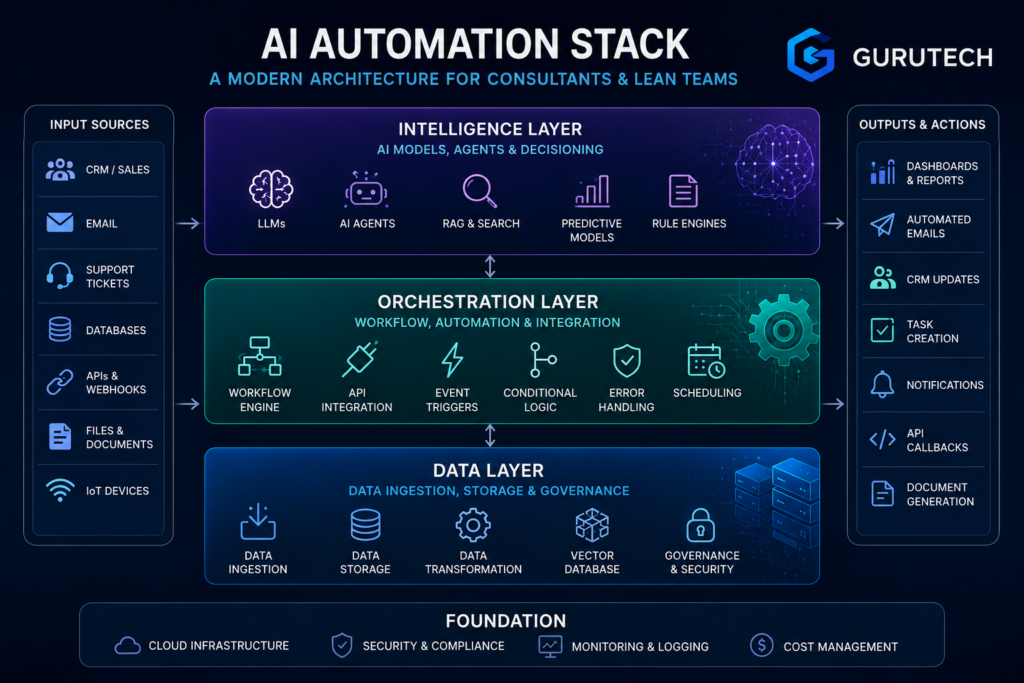
Layers of the 2026 Automation Architecture
Modern automation systems run on connected layers that manage data, coordinate workflows, and apply AI models. Each layer has a clear role.
Weak design in one layer limits the others.
Data Layer
The data layer collects, stores, and prepares information for automation. It handles data ingestion, storage, transformation, and access control.
In 2026, most teams structure this layer around pipelines that pull data from CRM systems, ERP platforms, support tools, and IoT devices.
Many follow patterns described in the AI Tech Stack 2026 frameworks and MLOps guide. These frameworks outline ingestion, storage, retrieval, and governance as core components.
A practical workflow looks like this:
- Pull sales data from Salesforce every hour
- Clean and normalize records
- Store structured data in a warehouse
- Index key fields for retrieval in AI systems
Without clean data, automation fails. Poor tagging, missing fields, and inconsistent formats create errors downstream.
Implementation insight:
Teams should define data ownership early. Assign clear responsibility for schema updates, validation rules, and retention policies.
Governance, including monitoring and cost tracking, must operate at this layer to prevent data drift and security risks.
Orchestration Layer
The orchestration layer controls how tasks move across systems. It connects APIs, triggers workflows, and routes decisions between services.
Enterprise teams often treat this as part of a broader enterprise automation stack architecture. iPaaS tools, workflow engines, and event systems coordinate multiple applications.
A common automation scenario:
- A customer submits a support ticket.
- The system checks account data.
- AI classifies the issue.
- The workflow routes high-risk cases to a human agent.
Orchestration decides when and how each step runs.
Comparison of responsibilities
| Function | Orchestration Layer | Intelligence Layer |
|---|---|---|
| Workflow routing | Yes | No |
| API coordination | Yes | No |
| Model inference | No | Yes |
| Decision scoring | Partial | Yes |
Implementation requires clear event design. Teams must define triggers, retries, and failure handling.
Without strong orchestration, automation becomes a set of disconnected scripts instead of a reliable system.
Intelligence Layer
The intelligence layer applies machine learning models, large language models, and rule engines. It transforms data into decisions.
Many modern systems reflect the shift described in The AI Stack: How Modern AI Systems Are Built (2026). This approach separates infrastructure, data, foundation models, orchestration, and applications.
The intelligence layer sits above data and works closely with orchestration.
Practical examples include:
- Fraud detection scoring transactions in real time
- AI agents drafting customer email replies
- Forecasting demand from historical sales
A realistic automation case:
- The data layer retrieves a customer’s history.
- The intelligence layer generates a response recommendation.
- The orchestration layer sends it for approval or delivery.
Teams must monitor model accuracy and latency. They should track error rates and feedback loops.
Regular evaluation prevents silent failure and keeps automation aligned with business goals.
Core Components: Selecting the Right Technologies
An effective AI automation stack depends on three layers: the reasoning model, the workflow engine, and the data store. Each layer affects cost, speed, control, and how easily a team can maintain the system.
The Brain: Claude 3.5 Sonnet vs GPT-4o
The model handles reasoning, writing, coding, and tool use. It shapes how accurate and consistent the automation feels in real work.
Claude 3.5 Sonnet focuses on strong reasoning, long context handling, and structured outputs.
Teams often use it for contract review, report drafting, and multi-step analysis where accuracy matters more than speed.
GPT-4o supports text, image, and audio in one model. It fits customer support bots, voice assistants, and apps that need multimodal input.
| Feature | Claude 3.5 Sonnet | GPT-4o |
|---|---|---|
| Strength | Deep reasoning, long documents | Multimodal input and output |
| Best for | Legal, research, analysis | Support agents, media workflows |
| Tool use | Strong structured outputs | Broad ecosystem support |
In practice, a company might use Claude to analyze uploaded PDFs. They might use GPT-4o to power a live chat assistant.
The key is to match the model to the task, not to pick one for every workflow.
The Conductor: Make.com vs n8n vs Zapier
The automation platform connects triggers, actions, APIs, and AI calls. It controls how data moves between systems.
Make.com offers visual scenario builders with deep logic control. Teams use it for multi-step automations like: form submission → AI classification → CRM update → Slack alert.
n8n is open-source and supports self-hosting. It works well for companies that need data control, custom nodes, or on-premise deployment.
Zapier focuses on ease of use. Non-technical teams often use it for quick automations such as email parsing or lead routing.
| Platform | Best For | Key Advantage |
|---|---|---|
| Make.com | Complex workflows | Visual logic depth |
| n8n | Technical teams | Self-hosting control |
| Zapier | Fast setup | Large app library |
A SaaS startup might use Make for advanced branching logic. A regulated company may prefer n8n to keep data internal.
The Data & Memory Layer: Pinecone vs Supabase vs Airtable
AI automation needs structured storage and memory. The system must store user data, embeddings, logs, and workflow state.
Pinecone provides vector search for semantic retrieval. Teams use it in retrieval-augmented generation setups where the AI searches company documents before responding.
Supabase offers a hosted Postgres database with authentication and APIs. It supports user accounts, permissions, and structured application data.
Airtable combines spreadsheet simplicity with database features. Marketing and operations teams often use it to manage leads or content pipelines.
| Tool | Use Case | Data Type |
|---|---|---|
| Pinecone | Semantic search | Embeddings |
| Supabase | App backend | Relational data |
| Airtable | Ops tracking | Structured records |
A realistic workflow might store customer profiles in Supabase. It can index knowledge documents in Pinecone and track campaign status in Airtable.
Clear separation between memory types prevents data confusion and keeps automations stable.
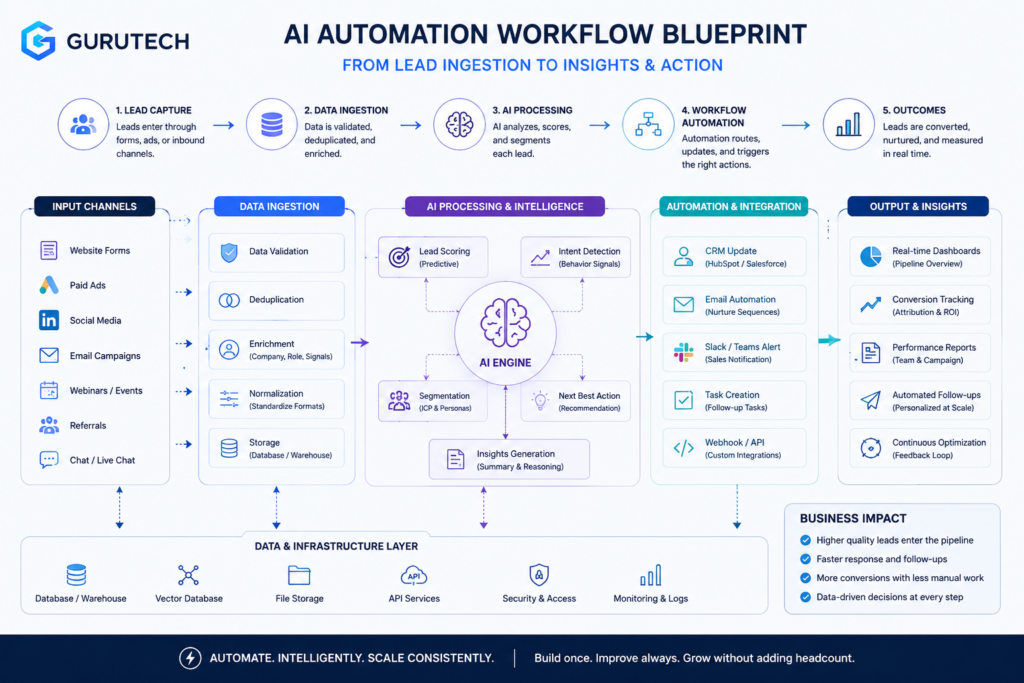
Essential Blueprints for Consultants and Lean Teams
Lean teams scale by connecting intake, research, and reporting into one controlled system. A clear automation design reduces manual review and shortens turnaround time.
This approach keeps client data consistent across tools.
Automated Lead Ingestion and Qualification Engine
Consultants lose time when they copy form data, review unqualified leads, and send manual follow-ups. An automated lead engine fixes this with structured intake and rule-based scoring.
Core workflow example:
- A prospect submits a website form.
- The system pushes data into a CRM.
- An AI model scores the lead based on budget, role, company size, and need.
- The system sends a booking link to qualified leads and a nurture email to others.
Teams often build this using lightweight automation platforms discussed in this AI Workflow Automation Blueprint: Step-by-Step Guide. The key is clear logic, not tool complexity.
| Component | Purpose | Key Setup Detail |
|---|---|---|
| Web form | Structured data capture | Use required fields for budget and timeline |
| CRM | Central record | Standardize tags and stages |
| AI scoring | Qualification | Define clear scoring thresholds |
| Email automation | Follow-up | Use conditional logic |
Implementation insight: start with fixed scoring rules before adding AI classification. This keeps decisions predictable and easy to audit.
Deep-Research and Whitepaper Generation Pipeline
Consultants often spend days gathering data and drafting reports.
A structured research pipeline saves time and keeps quality high.
Practical scenario:
- A client requests a market analysis.
- The system gathers public data, prior project notes, and uploaded documents.
- An AI model extracts themes and builds an outline.
- The consultant reviews, edits, and approves.
Lean teams use structured methods like those in the AI Starter Kit: Lean Teams’ 4-Step Guide. These methods stress defining business goals before automation.
Recommended structure:
- Research agent: Collects and summarizes sources
- Synthesis agent: Groups insights by theme
- Draft generator: Produces structured sections
- Human review layer: Edits and validates claims
Never publish raw AI output. Always assign human review for fact checking and tone control.
Auto-Updating Client Dashboard
Clients expect regular updates. Manual reports slow teams down.
An auto-updating dashboard pulls live metrics and formats them into a clear view.
Typical workflow:
- Connect CRM, ad platforms, or analytics tools.
- Normalize metrics into a single data table.
- Use AI to generate short insight summaries.
- Push updates to a shared dashboard.
Small teams use lean stacks like those in the $50-$300 AI Stack for Consultants. This helps avoid large software costs.
| Layer | Function | Risk to Manage |
|---|---|---|
| Data sync | Pulls metrics | Broken API connections |
| Data model | Standardizes fields | Inconsistent naming |
| AI summary | Explains trends | Overstated conclusions |
| Client view | Displays insights | Access control issues |
Keep summaries short and factual. Focus on changes, causes, and next actions.
Why AI Automation Stacks Matter for Consultants and Lean Teams
AI automation stacks matter because they move teams beyond isolated tools and into repeatable systems. Instead of using AI only for one-off tasks, consultants and lean teams can design connected workflows that capture data, route decisions, generate outputs, and keep humans involved at the right checkpoints.
To ensure your output stays accurate as you scale your team, integrate specialized validation platforms. See our full review of modern AI document generation tools to see how to intercept and audit automated drafts.
This is especially valuable for small teams that need to scale without adding unnecessary complexity. A well-designed stack can reduce repetitive work, improve response speed, and create more consistent client deliverables.
Key benefits of a structured AI automation stack
- Scalability: Teams can handle more leads, reports, and client requests without adding proportional headcount.
- Consistency: Standardized workflows reduce variation in output quality and process execution.
- Speed: Automated routing, summaries, and reporting reduce manual handoffs and delays.
- Visibility: Connected systems make it easier to track workflow status, costs, and performance.
- Control: Human review checkpoints and governance rules reduce the risk of uncontrolled automation.
For consultants, this creates a practical advantage. They can deliver faster insights, build repeatable service models, and support more clients without turning every engagement into a fully manual process.
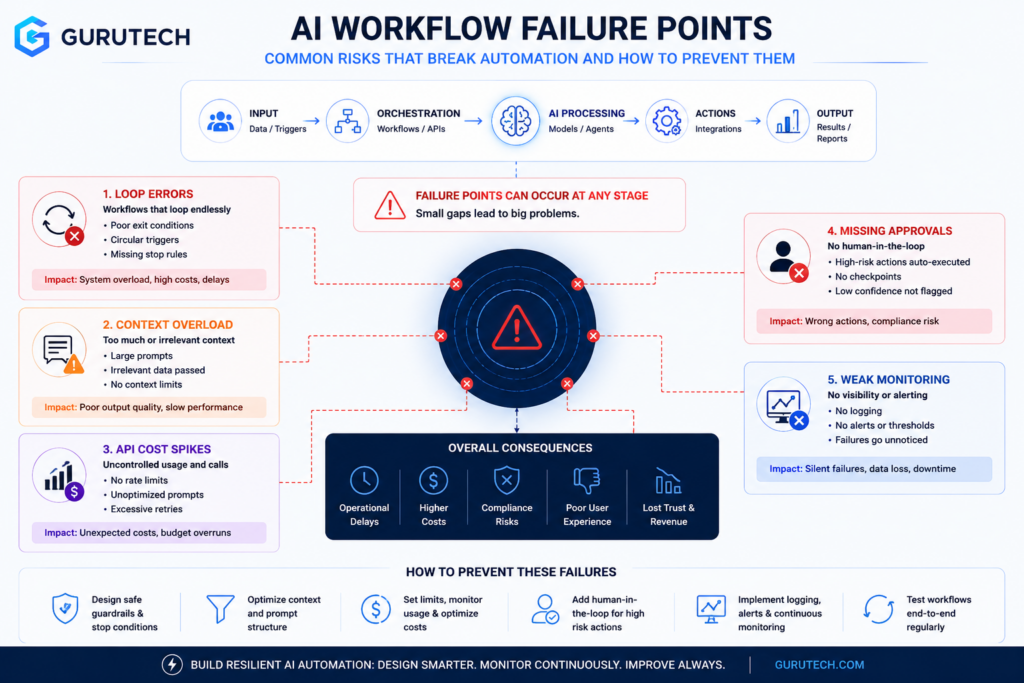
Common Automation Pitfalls to Avoid
Teams lose control of AI automation when they ignore memory limits or underestimate API costs.
Bad workflow design can cause loops without guardrails. These issues waste budget and reduce quality.
Context Window Degradation
Large language models use a fixed context window.
If workflows push too much text into a prompt, the model drops or compresses earlier information.
Output quality drops as the conversation grows.
This issue appears in ticket triage systems or long-running chatbots.
The first few exchanges guide the task well.
After 20 or 30 turns, the model forgets key constraints or repeats earlier steps.
A common mistake is automating without mapping how data flows through the process. This mirrors broader automation implementation pitfalls.
Example scenario
A support bot:
- Pulls the full ticket history
- Adds internal notes
- Appends policy documents
- Sends all text to the model
After several updates, the prompt exceeds token limits. The system trims older text and removes the original issue description.
Better approach
| Risky Design | Improved Design |
|---|---|
| Send full conversation each time | Summarize older turns every 5–10 messages |
| Store raw logs only | Store structured key facts (issue, status, priority) |
| No memory policy | Set token budgets per step |
Engineers should treat context as a limited resource.
They should summarize, structure, and prune data on purpose.
API Cost Traps
API costs rise fast in production. Small tests often hide the real expense of scale.
Each workflow step may call:
- A language model
- An embedding service
- A vector database
- An external API
If a process loops over 1,000 records and makes three model calls per record, costs multiply quickly.
Teams often miss hidden drivers like long prompts, high temperature retries, or verbose output formats. These increase costs and reduce ROI (AI automation mistakes).
Cost example
| Component | Per-Call Cost | Daily Calls | Daily Total |
|---|---|---|---|
| LLM summary | $0.01 | 5,000 | $50 |
| Classification | $0.005 | 5,000 | $25 |
| Retry logic | $0.01 | 1,000 | $10 |
A small workflow can exceed $2,000 per month without clear monitoring.
Controls that work
- Set hard usage caps per workflow
- Log tokens per request
- Cache stable outputs
- Run batch jobs during low-priority windows
Finance and engineering teams should review usage weekly.
Gain cost visibility before scaling.
Workflow Loop Errors
Automation stacks often connect triggers, queues, and model outputs.
If one step feeds back into the trigger without checks, the system loops.
Example:
- Model generates a task update.
- Update posts to a project tool.
- Tool webhook triggers the same automation again.
The loop continues until rate limits stop it.
These failures reflect broader AI workflow automation pitfalls where systems lack guardrails and monitoring.
Common loop causes
- No event ID tracking
- No “processed” flag
- No retry limits
- No human approval step for high-impact actions
Safer design pattern
| Unsafe | Safe |
|---|---|
| Trigger on every update | Trigger only on status change |
| Unlimited retries | Max 3 retries with backoff |
| No state tracking | Store unique execution ID |
Teams should treat workflows like software systems, not scripts.
They should test edge cases, simulate failures, and monitor live runs with alerts.
For a more practical workflow-focused breakdown, see the related GuruTech guide on AI workflows for consultants. For tool selection, see the pillar guide on AI tools for consultants.
Conclusion and Future Directions
AI automation stacks now move from simple task bots to coordinated systems with agents, data layers, and governance tools.
Many firms still scale slowly, even though adoption is rising, as shown in the State of AI in 2025 report.
Leaders focus on integration, control, and measurable results.
A modern stack often includes models, orchestration, data pipelines, monitoring, and user interfaces.
The AI stack definition from IBM outlines these core layers.
Clear separation between layers reduces risk and improves testing.
Practical workflow example: Invoice processing
- Capture invoice with OCR.
- Validate data with rules and an AI model.
- Route exceptions to a human reviewer.
- Sync approved data to ERP.
Comparison of stack maturity
| Level | Capabilities | Limits |
|---|---|---|
| Basic | Single-task bots, manual triggers | Limited scale |
| Integrated | API links, shared data layer | Partial visibility |
| Advanced | AI agents, monitoring, feedback loops | Higher setup cost |
Future stacks will add stronger observability, better agent coordination, and tighter security controls.
Teams already explore agent-driven workflows, as discussed in the Agentic AI architecture guide.
Implementation requires:
- Clear data ownership
- Human review checkpoints
- Ongoing performance tracking
- Cost monitoring per workflow
Teams that treat automation as a managed system will adapt faster as t