
Why Professionals Use AI Differently
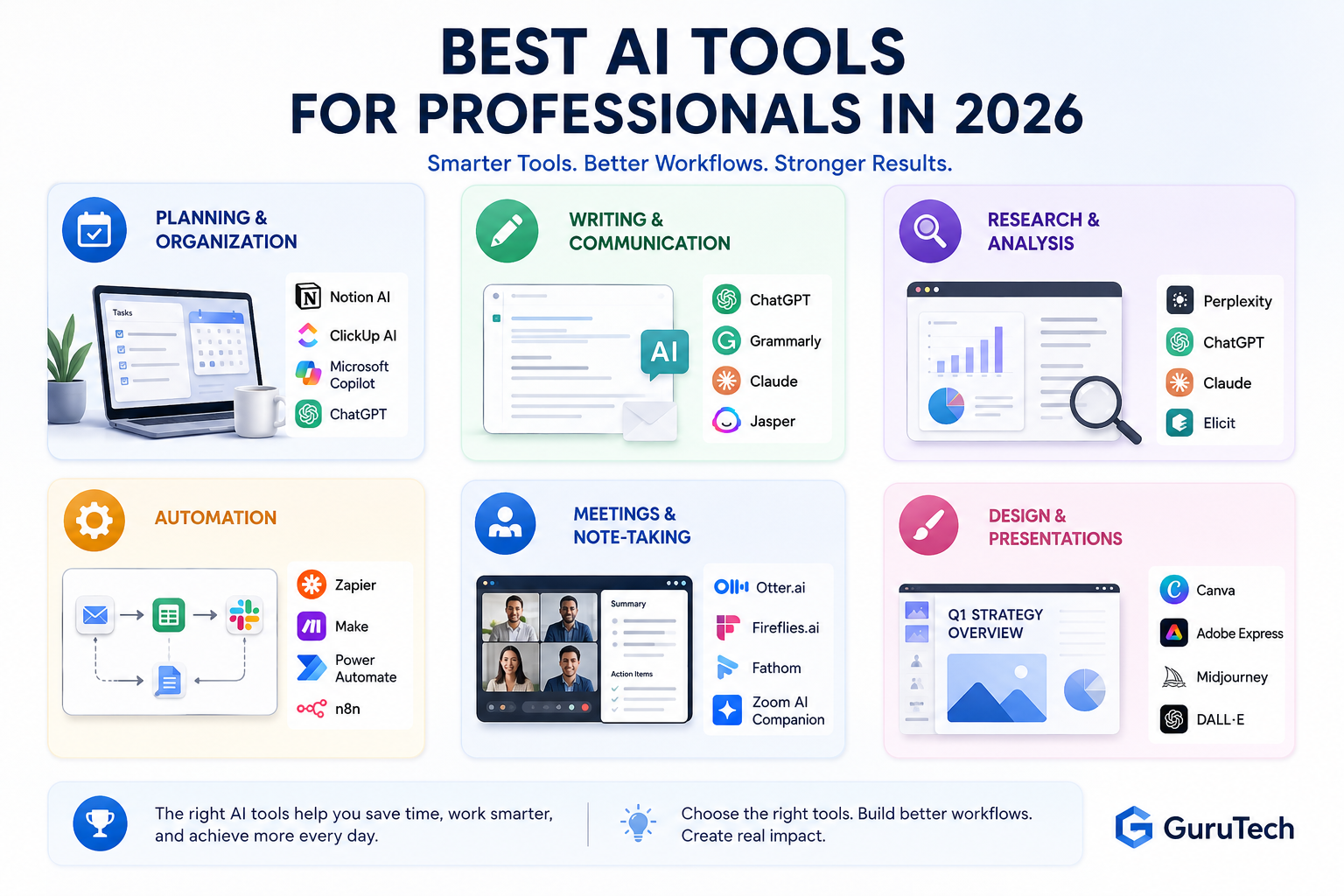
Best AI tools for professionals are no longer experimental add-ons — they are becoming essential components of modern work. From planning and communication to research, automation, analysis, and knowledge management, professionals are using artificial intelligence to reduce friction and improve the quality of their daily output.
The key difference is outcome orientation. Professionals are not using AI simply because it is new. They are using it because it can help them work faster, communicate more clearly, organize information, make better decisions, and reduce repetitive tasks that consume valuable time.
In professional settings, AI is commonly used to:
- Reduce repetitive administrative and documentation work
- Summarize and analyze large volumes of information
- Accelerate drafting, editing, and structured communication
- Support research, competitive analysis, and strategic thinking
- Build repeatable workflows that save time every week
- Improve consistency across reports, proposals, emails, and presentations
Unlike casual experimentation, professional AI adoption is structured. Tools are selected based on reliability, integration capability, security considerations, learning curve, and measurable return on time saved. The goal is not simply to “try AI,” but to embed it into repeatable workflows that consistently improve performance.
As AI tools mature, professionals who approach them strategically gain a meaningful advantage. The difference is not access to tools — it is clarity in how and when to use them. Structured AI productivity workflows help transform tools into repeatable systems that improve execution quality.
Best AI Tools for Planning and Organization
Planning and organization are foundational to professional performance. Before execution begins, priorities must be clear, timelines must be structured, and tasks must be aligned with broader objectives. AI tools in this category help professionals think clearly, structure information, and reduce planning friction.
Rather than replacing task management systems, AI enhances them. It can translate scattered inputs — emails, meeting notes, project briefs, voice notes, and brainstorming sessions — into organized action plans. This is especially useful for consultants, managers, entrepreneurs, project leads, and knowledge workers who handle many moving parts at once.
What to Look for in Planning and Organization Tools
- Context awareness: The ability to interpret raw notes and extract structured tasks.
- Summarization quality: Clear outputs that highlight what actually matters.
- Integration flexibility: Compatibility with calendars, task managers, and project platforms.
- Consistency: Reliable formatting that can be reused daily or weekly.
- Collaboration: The ability to share plans, assign tasks, and maintain visibility across teams.
Professionals typically use AI planning tools in one of three ways:
- Transforming meeting notes into prioritized action lists
- Converting high-level goals into structured weekly execution plans
- Identifying task dependencies, risks, and bottlenecks
| Tool Category | Best For | Professional Use Case | Strength |
|---|---|---|---|
| Notion AI | Knowledge organization | Turning notes, docs, and project pages into organized plans | Strong workspace integration |
| Microsoft Copilot | Office-based planning | Summarizing meetings, emails, Word documents, and Excel information | Useful for Microsoft 365 users |
| ClickUp AI | Project management | Creating tasks, summaries, project updates, and team action lists | Good for execution tracking |
| ChatGPT | Flexible planning | Creating daily plans, project outlines, strategy maps, and checklists | Highly adaptable |
When used consistently, these tools reduce cognitive overload. Instead of manually restructuring information, professionals can focus on evaluating priorities and making strategic decisions. The real benefit is not automation alone — it is clarity. Clear priorities improve execution speed and reduce reactive work patterns, especially in fast-moving environments.
For a broader overview of tool categories, see our guide on best AI tools for productivity to understand how these platforms fit into larger performance systems.
Best AI Tools for Writing and Communication
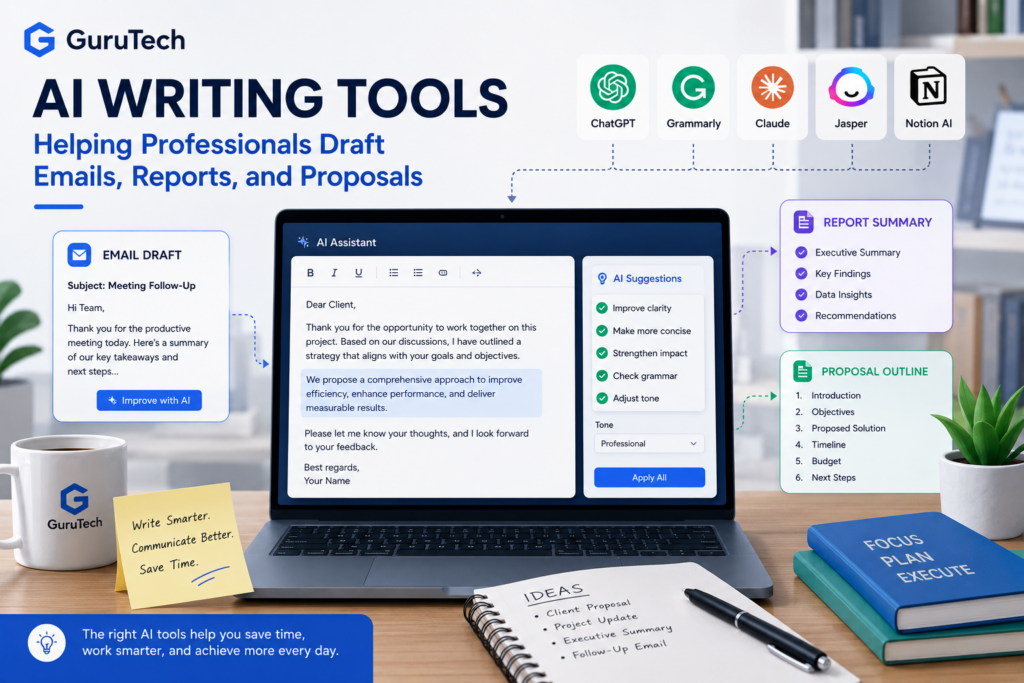
Clear communication is one of the highest-leverage skills in professional environments. Whether drafting reports, responding to clients, writing proposals, preparing internal updates, or creating executive summaries, professionals spend a significant portion of their time translating ideas into structured language.
AI writing tools are not meant to replace expertise or judgment. Instead, they accelerate the drafting process, improve structure, and reduce the time spent rewording ideas. When used correctly, they enhance clarity rather than dilute it.
Key Capabilities to Evaluate
- Drafting speed: How quickly the tool generates coherent first drafts.
- Tone control: Ability to adjust formality, directness, or persuasive style.
- Editing and rewriting: Improving clarity, conciseness, and flow.
- Summarization: Extracting key points from long documents or threads.
- Audience adaptation: Rewriting technical content for non-technical readers.
| Tool | Best Use Case | Best For | Limitation |
|---|---|---|---|
| ChatGPT | Drafting, rewriting, brainstorming, analysis | Professionals who need a flexible all-purpose assistant | Requires review for accuracy and tone |
| Grammarly | Editing, grammar, tone, clarity | Email, business writing, client communication | Less useful for deep research or strategy |
| Claude | Long-document writing and analysis | Reports, policies, proposals, detailed documents | Best results still require human editing |
| Jasper | Marketing copy and brand content | Marketing teams, agencies, content creators | More specialized than general AI assistants |
Professionals commonly apply AI writing tools in structured workflows, such as:
- Generating structured outlines before drafting full documents
- Refining rough drafts into clearer executive summaries
- Rewriting technical explanations for non-technical audiences
- Summarizing long email threads into concise action points
- Creating reusable templates for proposals, updates, and reports
The greatest value comes when AI is used as a structured drafting partner rather than a replacement for professional judgment. Professionals should review, edit, and validate outputs before final delivery. This human-in-the-loop approach preserves credibility while improving efficiency.
When evaluating writing tools, consistency and reliability matter more than creativity. In professional settings, clarity and precision are far more valuable than novelty.
Best AI Tools for Research and Analysis
Research and analysis are high-impact activities in professional environments. Whether evaluating market trends, preparing strategic recommendations, reviewing reports, or synthesizing technical documentation, professionals frequently work with large volumes of information. AI tools in this category are designed to accelerate comprehension and surface meaningful insights.
As research workloads expand, many organizations are exploring how artificial intelligence in professional settings is reshaping analysis and knowledge work, as discussed by MIT Sloan Management Review.
Rather than replacing critical thinking, AI supports it. It reduces the time spent gathering and structuring information so professionals can focus on interpretation, decision-making, and strategic implications.
Core Capabilities to Consider
- Document summarization: Converting lengthy reports into concise executive summaries.
- Data interpretation support: Explaining trends, anomalies, and patterns in structured data.
- Comparative analysis: Identifying differences across competitors, proposals, or scenarios.
- Question-driven exploration: Generating follow-up questions to deepen investigation.
- Source awareness: Helping users trace claims back to reliable references where available.
| Tool | Best For | Professional Strength | Best Workflow |
|---|---|---|---|
| Perplexity | Source-backed research | Useful for quick research with citations | Market research and topic exploration |
| ChatGPT | Analysis and synthesis | Strong for turning raw notes into structured insights | Strategy, summaries, and decision support |
| Claude | Long documents | Useful for reviewing lengthy reports, policies, and transcripts | Document-heavy professional work |
| Elicit | Academic research | Helpful for literature review and research papers | Evidence-based research |
Professionals often integrate AI research tools into workflows such as:
- Uploading briefing documents and extracting key risks and opportunities
- Condensing industry research into strategic bullet points
- Transforming raw findings into presentation-ready summaries
- Comparing vendors, tools, or business options before making decisions
- Creating research briefs for executives or clients
However, reliability is critical in this category. Professionals should validate outputs, verify sources where applicable, and avoid relying on AI-generated insights without review. AI is most effective when used to accelerate synthesis — not to replace domain expertise.
When chosen carefully, research-oriented AI tools can dramatically reduce analysis time while maintaining quality standards expected in professional settings.
Best AI Tools for Automation
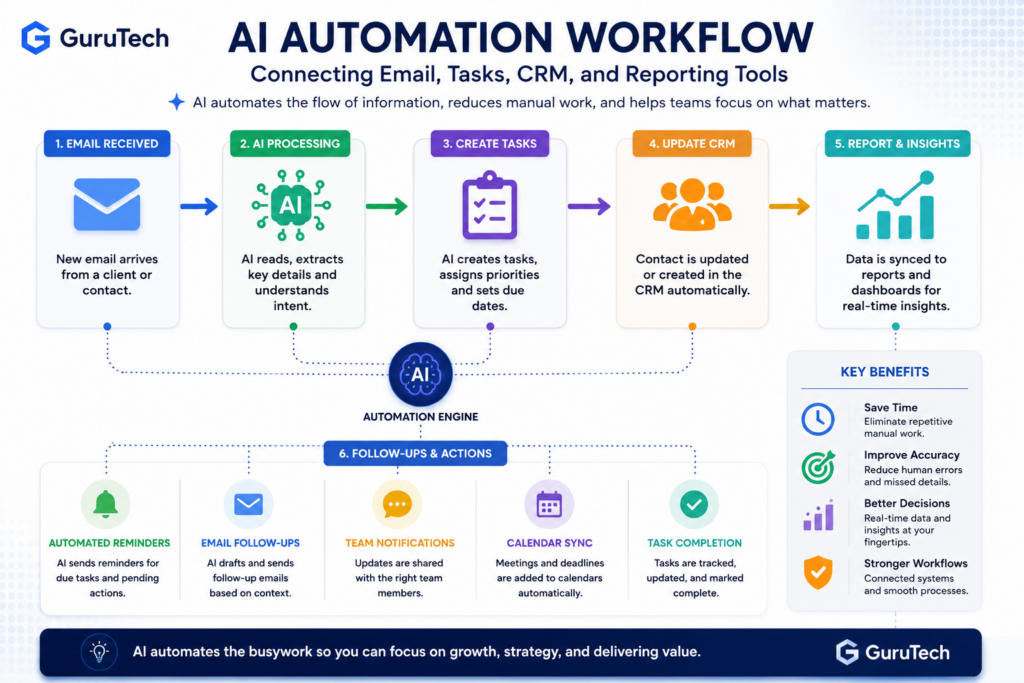
Automation is where AI moves from assistance to leverage. While writing and planning tools improve individual productivity, automation tools create system-level efficiency by reducing manual workflows across tasks, teams, and platforms.
For professionals, automation is less about eliminating work entirely and more about removing repetitive coordination. When implemented carefully, automation reduces friction without sacrificing oversight.
Many of these tools are also used in consulting environments. For a deeper breakdown, explore our guide on AI tools for consultants.
Capabilities That Matter in Automation Tools
- Workflow triggers: Initiating actions based on events such as new emails, form submissions, or calendar updates.
- Cross-platform integration: Connecting task managers, messaging platforms, CRM systems, and documentation tools.
- Conditional logic: Allowing multi-step processes that adapt based on inputs.
- Error visibility: Clear logs and review mechanisms to prevent silent failures.
- Human approval steps: Allowing professionals to review sensitive actions before completion.
| Automation Tool | Best For | Professional Example | Difficulty Level |
|---|---|---|---|
| Zapier | App-to-app automation | Send form submissions to CRM, Slack, and email follow-up | Beginner to intermediate |
| Make | Visual workflow automation | Create multi-step workflows with branching logic | Intermediate |
| Microsoft Power Automate | Microsoft 365 environments | Automate approvals, SharePoint updates, and Teams notifications | Intermediate |
| n8n | Technical automation | Self-hosted or advanced custom workflows | Advanced |
Common professional automation workflows include:
- Automatically converting meeting summaries into task entries
- Routing inbound requests to the appropriate team member
- Generating structured updates from recurring project data
- Triggering follow-ups when deadlines approach
- Saving client information from forms into a CRM or spreadsheet
- Creating weekly reports from multiple data sources
Automation should be implemented incrementally. Professionals often see the greatest return by automating one repetitive process at a time, measuring time saved, and refining workflows before expanding further.
The goal is not maximum automation. The goal is sustainable efficiency — systems that reduce workload while preserving control and accountability.
If you’re beginning with structured systems, start by learning how to automate daily tasks with AI before expanding into multi-step workflows.
Best AI Tools for Meetings and Note-Taking
Meetings are one of the biggest time drains in professional life. Even when meetings are necessary, the follow-up work often creates additional friction. Someone has to summarize the discussion, identify action items, assign responsibilities, and track decisions.
AI meeting assistants help reduce this burden by recording, transcribing, summarizing, and organizing meeting information. For professionals who spend many hours per week in calls, this can create a major productivity improvement.
| Tool | Best For | Useful Feature | Ideal User |
|---|---|---|---|
| Otter.ai | Meeting transcription | Live notes and summaries | Consultants, sales teams, managers |
| Fireflies.ai | Searchable meeting records | Transcript search and action item extraction | Teams with many recurring calls |
| Fathom | Call summaries | Highlights and follow-up notes | Client-facing professionals |
| Zoom AI Companion | Zoom users | Meeting summaries inside Zoom | Organizations already using Zoom |
The best meeting AI tools are not just transcription tools. They help create a clean record of decisions, unresolved questions, next steps, and responsibilities. This makes meetings easier to act on and reduces the risk of important details being forgotten.
Best AI Tools for Design and Presentations
Professionals increasingly need to communicate visually. Whether creating reports, pitch decks, social media graphics, training materials, or internal presentations, design quality affects how information is understood and remembered.
AI design tools help non-designers create polished visuals faster. They can generate layouts, suggest graphics, improve presentations, and create branded assets without requiring advanced design skills.
| Tool | Best For | Professional Use Case | Main Advantage |
|---|---|---|---|
| Canva | Business visuals | Presentations, social posts, reports, and simple graphics | Easy for non-designers |
| Adobe Express | Branded content | Marketing visuals and quick creative assets | Strong creative ecosystem |
| Midjourney | High-quality AI images | Concept visuals and creative direction | Strong visual output |
| DALL·E | Custom image generation | Blog images, diagrams, and unique visual concepts | Flexible prompt-based creation |
For professional use, visuals should support clarity. AI-generated graphics are most valuable when they explain a process, compare options, illustrate a concept, or make a report easier to understand. A simple, clear diagram is often more useful than a flashy image.
Best AI Tools for Coding and Technical Work
For software developers, IT professionals, analysts, and technical teams, AI tools can accelerate coding, debugging, documentation, system design, and technical troubleshooting. These tools are especially useful when they are integrated directly into the development environment.
AI coding assistants can help generate boilerplate code, explain unfamiliar codebases, write tests, create documentation, and suggest fixes. However, professional developers still need to review outputs carefully, especially for security, performance, and maintainability.
| Tool | Best For | Professional Use Case | Risk to Watch |
|---|---|---|---|
| GitHub Copilot | Code completion | Writing functions, tests, and repetitive code faster | Generated code still needs review |
| ChatGPT | Technical explanation and debugging | Explaining errors, architecture, scripts, and troubleshooting steps | May require validation against documentation |
| Cursor | AI-assisted coding environment | Editing and navigating larger projects with AI help | Requires disciplined review |
| Claude | Large codebase/document review | Understanding architecture, docs, and long technical files | Best used with clear context |
For technical professionals, the best approach is to use AI as a productivity layer, not as an unchecked developer. AI can speed up work, but professional judgment is still required for testing, deployment, compliance, and security.
AI Tool Comparison by Professional Use Case
The best AI tool depends on the task. A professional who mostly writes reports may need a different stack than someone who manages projects, analyzes data, or automates operations. The table below summarizes practical tool choices by use case.
| Use Case | Best Tool Options | Best Fit | Why It Matters |
|---|---|---|---|
| Writing and editing | ChatGPT, Grammarly, Claude | Emails, reports, proposals | Improves clarity and saves drafting time |
| Planning and organization | Notion AI, ClickUp AI, Copilot | Projects, tasks, weekly plans | Turns scattered information into structure |
| Research | Perplexity, ChatGPT, Claude, Elicit | Market research, summaries, document review | Accelerates synthesis and comparison |
| Automation | Zapier, Make, Power Automate, n8n | Repeated workflows and app connections | Reduces manual coordination |
| Meetings | Otter.ai, Fireflies.ai, Fathom | Transcripts, summaries, action items | Improves follow-through after meetings |
| Design | Canva, Adobe Express, DALL·E | Presentations, blog visuals, marketing assets | Makes communication more visual |
| Coding | GitHub Copilot, ChatGPT, Cursor | Development, scripts, debugging | Speeds up technical execution |
How to Choose the Right AI Tool for Your Work
With the rapid expansion of AI platforms, professionals are faced with an abundance of choices. Selecting the right tool is less about features and more about alignment with workflow, responsibility level, and risk tolerance.
Instead of evaluating tools based solely on popularity, professionals should assess them using a structured framework.
A Practical Evaluation Framework
- Use Case Fit: Does the tool solve a clearly defined problem in your workflow?
- Output Reliability: Are results consistent enough for professional standards?
- Integration Capability: Can it connect with existing tools you already use?
- Security and Data Handling: Does the tool meet your organization’s privacy expectations?
- Learning Curve: How long does it take to become operationally effective?
- Cost vs. Time Saved: Does the tool save enough time to justify the subscription?
- Scalability: Can the tool support more users, workflows, or projects later?
In professional environments, reliability often outweighs novelty. A tool that performs consistently and integrates smoothly into daily operations may be more valuable than a cutting-edge platform that requires constant adjustment.
It is also important to consider data sensitivity. Professionals handling confidential client information, financial data, legal documents, health information, or proprietary research should carefully review privacy policies and organizational guidelines before adopting any AI system.
The most effective approach is incremental adoption. Start with one defined use case, measure time saved or output quality improvements, and then expand gradually. This method reduces risk while maximizing return on adoption.
Recommended AI Stack for Most Professionals
Most professionals do not need dozens of AI tools. In fact, using too many tools can create more complexity than value. A better approach is to build a simple AI stack that covers the most common work categories.
| Need | Recommended Tool Type | Example Tools | Why It Works |
|---|---|---|---|
| General thinking and writing | AI assistant | ChatGPT, Claude | Flexible for drafting, analysis, and brainstorming |
| Research | Answer engine or research assistant | Perplexity, Elicit | Helps gather and summarize information |
| Task and knowledge management | AI workspace | Notion AI, ClickUp AI | Turns information into organized plans |
| Automation | Workflow automation platform | Zapier, Make, Power Automate | Connects tools and reduces repeated manual work |
| Visual communication | Design assistant | Canva, DALL·E, Adobe Express | Improves presentations and content quality |
A strong starter stack could be simple: one AI assistant, one research tool, one workspace tool, and one automation platform. This combination gives professionals enough power to improve daily work without creating unnecessary complexity.
Common Mistakes Professionals Should Avoid
AI tools can improve productivity, but they can also create problems when used without structure. The most common mistake is adopting tools before defining the workflow. A tool should solve a specific problem, not create another place to manage information.
- Using too many tools at once: This creates confusion and makes it harder to build habits.
- Trusting outputs without review: AI can be useful, but professional judgment remains essential.
- Ignoring privacy and data rules: Sensitive information should not be entered into tools without approval.
- Automating broken processes: A bad workflow becomes worse when automated.
- Measuring features instead of outcomes: Time saved and quality improved matter more than feature lists.
The best results come from disciplined adoption. Choose one workflow, improve it, measure the result, then expand to the next use case.
FAQ: Best AI Tools for Professionals
What are the best AI tools for professionals in 2026?
The best AI tools for professionals depend on the use case. ChatGPT and Claude are strong general assistants, Grammarly is useful for writing clarity, Perplexity is helpful for research, Notion AI and ClickUp AI support organization, and Zapier or Make are useful for automation.
Which AI tool is best for productivity?
For general productivity, ChatGPT is one of the most flexible tools because it can help with planning, writing, summarizing, brainstorming, and analysis. For workflow automation, Zapier, Make, and Power Automate are better choices.
Are AI tools safe for professional work?
AI tools can be safe when used responsibly, but professionals should review privacy policies, avoid sharing sensitive data without approval, and validate important outputs. Security and data handling should be part of the tool selection process.
Should professionals use one AI tool or many?
Most professionals should start with a small stack rather than many tools. One general AI assistant, one research tool, one organization tool, and one automation tool is usually enough for a strong starting workflow.
Can AI replace professional judgment?
No. AI can support drafting, research, analysis, and automation, but professional judgment is still required. The best results come from using AI as an assistant while keeping humans responsible for final decisions and quality control.
Final Thoughts
Artificial intelligence is no longer optional for professionals who want to remain competitive. The advantage does not come from using every available tool, but from selecting the right tools and integrating them thoughtfully into structured workflows.
Planning tools improve clarity. Writing tools accelerate communication. Research tools enhance analytical depth. Automation tools create system-level efficiency. Meeting assistants improve follow-through. Design tools improve visual communication. Coding assistants help technical professionals move faster.
When combined intentionally, these categories form a productivity stack that compounds over time. Professionals who treat AI as a disciplined productivity layer — rather than a novelty — gain sustainable advantages in speed, consistency, and execution quality.
As AI platforms continue to evolve, the key differentiator will not be access to technology. It will be judgment — knowing which tools to adopt, when to use them, and how to integrate them responsibly into professional workflows.
By approaching AI strategically and incrementally, professionals can transform daily operations without sacrificing control, credibility, or standards.