The AI-Accelerated Engineering Workflow Explained
Most engineers using AI today are faster—but not necessarily better.
AI can generate code. It cannot take responsibility for it.
The real divide in modern software development is no longer between those who can code and those who cannot. It’s between engineers who rely on AI to generate output, and those who use it to define, validate, and control entire systems.
This is where the concept of the AI-accelerated engineer emerges. Not as someone who delegates work to AI, but as someone who compresses the distance between problem and production—without sacrificing correctness, reliability, or architectural integrity.
In traditional development, senior engineers spent a significant portion of their time writing and reviewing code line by line. Today, that model is shifting. AI tools can generate entire functions, refactor legacy logic, and propose system designs in seconds. But this speed introduces a new constraint: validation becomes the bottleneck.
The responsibility has not decreased—it has intensified. Engineers are no longer just builders; they are now the final authority on whether AI-generated systems are safe, performant, and production-ready. In high-stakes environments—such as financial systems, APIs, and data pipelines—this distinction is critical.
At GuruTech, we describe this shift as intent-driven development. The engineer defines the intent, constraints, and success criteria. AI accelerates execution—but the human owns the outcome.
In this guide, we’ll break down a real, production-grade workflow used by senior engineers to design, build, and deliver systems using AI—while maintaining full control over quality, performance, and long-term system health.
1. The shift from coder to architect of intent
The term AI-accelerated engineer describes a professional who uses large language models and agentic tools to compress the time between a concept and its implementation. It’s about acceleration, not delegation. You’re still the one in the driver’s seat, but you now have a high-performance engine that handles the repetitive and boilerplate tasks.
The market for AI code tools is projected to grow significantly as autonomous agents begin generating full applications. However, the validation bottleneck remains a human one. Senior engineers are the only ones who can reliably trust and deploy AI-generated code at scale. This’s because they understand the “why” behind the code, not just the “how.”
Intent-driven development’s the core philosophy here. The human engineer defines the intent, the constraints, and the success criteria. The AI then handles the heavy lifting of writing the code, refactoring legacy logic, or generating unit tests. This allows senior professionals to spend more time on high-leverage activities like system design and stakeholder alignment.
We’ve observed a shift from research-heavy model training to system-level Applied AI Engineering. The goal’s no longer just to build a model that works in a notebook, but to build a system that delivers reliable outcomes in a complex production environment. For those looking to level up, using the best AI tools for professionals is the first step in mastering this new workflow.
2. Phase-by-phase workflow: From discovery to hardening
A production-grade AI-accelerated workflow isn’t a single prompt. It’s a structured, multi-phase process that ensures code isn’t just functional, but resilient and maintainable. Let’s break down the five key phases.
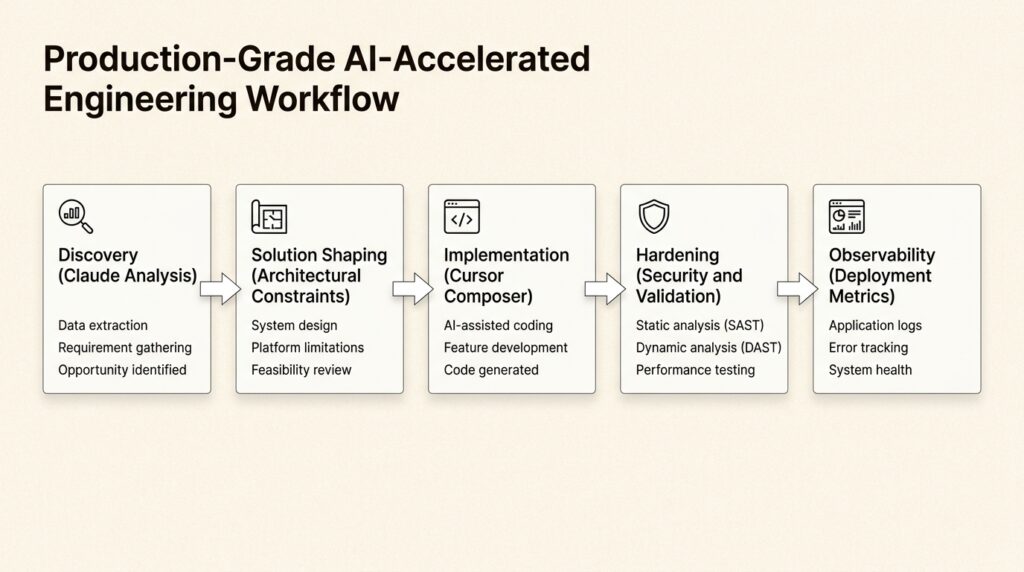
Phase 1: AI-assisted discovery
The workflow begins before any code’s written. Senior engineers use tools like Claude to summarize complex stakeholder requirements and extract “hidden” business logic from messy documentation. By feeding Claude project briefs or meeting transcripts, you can quickly identify edge cases and potential architectural conflicts that might take hours to find manually.
Phase 2: Solution shaping
Once requirements are clear, the engineer defines the “box” that the AI must work within. This includes choosing the tech stack, defining security guardrails, and mapping out the data flow. You’re setting the constraints that prevent the AI from generating “creative” but technically debt-heavy solutions.
Phase 3: Implementation acceleration
This’s where the speed gains happen. Using an AI-native IDE like Cursor, you can use the Composer feature to execute multi-file changes simultaneously. Instead of writing one function at a time, you describe a feature, and the AI plans and writes the necessary changes across your entire codebase.
Phase 4: Hardening and validation
This’s the most critical phase. AI-generated code’s a draft, not a finished product. Senior engineers perform rigorous “hardening” by:
- Conducting security audits on generated logic.
- Verifying data integrity for complex transactions.
- Running AI-assisted unit and integration tests.
- Refactoring for performance and readability.
Phase 5: Deployment and observability
The final phase involves moving code to production using modern patterns like blue-green deployments and circuit breakers. These strategies ensure that if a system degrades, it does so gracefully. Our research into AI workflows that save 10+ hours per week shows that senior engineers who automate their observability stacks are far more successful in ensuring high-uptime systems.
3. Case study: Modernizing a mortgage ecosystem
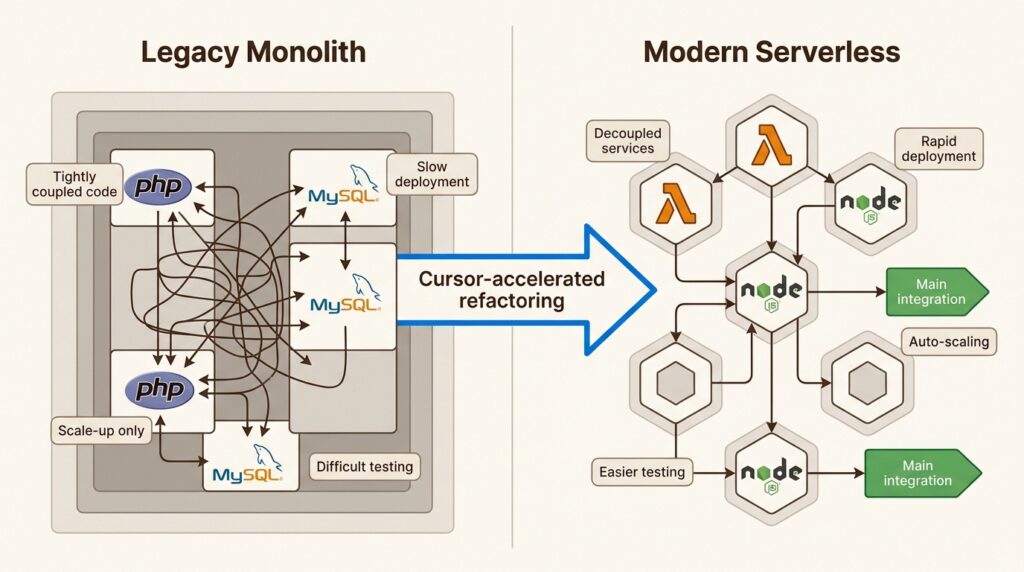
To see this workflow in action, let’s look at a real-world scenario inspired by the CMI Financial Group model. Imagine a senior engineer tasked with refactoring a legacy mortgage management system built on a CakePHP and MySQL monolith.
Analyzing the legacy monolith
The first challenge’s understanding a decade of accumulated business rules. The engineer uses Claude to analyze the legacy PHP files. By providing sections of the codebase to Claude, the engineer can generate high-level logic maps and identify undocumented rules for interest calculations or borrower eligibility. This “AI-assisted archaeology” compresses weeks of manual code review into days.
Transitioning to AWS microservices
With the logic mapped out, the engineer uses Cursor to refactor the monolithic PHP logic into modern, serverless AWS Lambda functions using Node.js and TypeScript. The AI handles the syntax conversion and generates boilerplate for AWS SDK integrations, while the senior engineer ensures that the new microservices architecture maintains strict data isolation and follows the “one-responsibility” principle.
Maintaining data integrity
In a financial ecosystem, there’s zero room for error. During the migration, the engineer owns the data integrity strategy. They design a “shadow writing” phase where the new microservices process data in parallel with the legacy system to verify consistency before a full cutover. AI accelerates the creation of these validation scripts, but the senior engineer makes the final call on the correctness of the results.
This approach allows teams to move fast without breaking things. For more practical examples, check out our 10 powerful AI workflow examples for business.
4. Integration integrity: Bridging core systems and Salesforce
In many mortgage and financial ecosystems, the core system must stay in sync with a CRM like Salesforce. Maintaining API reliability and data integrity between these systems’s a major engineering challenge.
Generating robust Apex boilerplate
Senior engineers use AI to generate Salesforce Apex triggers and classes that handle the “plumbing” of the integration. This includes mapping fields between systems and setting up basic error handling. However, the human engineer defines the transaction logic and handles complex state management that AI often struggles with.
Ensuring API reliability
API integrations are prone to failure due to rate limits or network issues. The AI-accelerated workflow includes generating robust retry logic and circuit breakers. Here’s how this might be structured:
graph LR
    A[AWS Lambda] --> B{Circuit Breaker}
    B -- Open --> C[Fallback: Queue for later]
    B -- Closed --> D[Salesforce API]
    D -- Success --> E[Update Sync Log]
    D -- Failure --> F[Retry / Open Circuit]
Engineering guardrails
Every line of AI-generated integration code must undergo a security audit. Senior engineers look for “hidden” vulnerabilities such as improper handling of sensitive financial data or missing permission checks in Salesforce Apex. We recommend using our guide on the best AI automation tools for business in 2026 to find tools that can assist with these specialized audits.
5. Benefits vs. trade-offs of the AI-accelerated workflow
While the speed gains are undeniable, the AI-accelerated workflow introduces new challenges that require a senior-level perspective.
| Benefit | Trade-off |
|---|---|
| 10x faster implementation | Increased validation cognitive load |
| Massive reduction in boilerplate | Potential for “black box” code bloat |
| Rapid architectural pivots | High risk of technical debt if unmanaged |
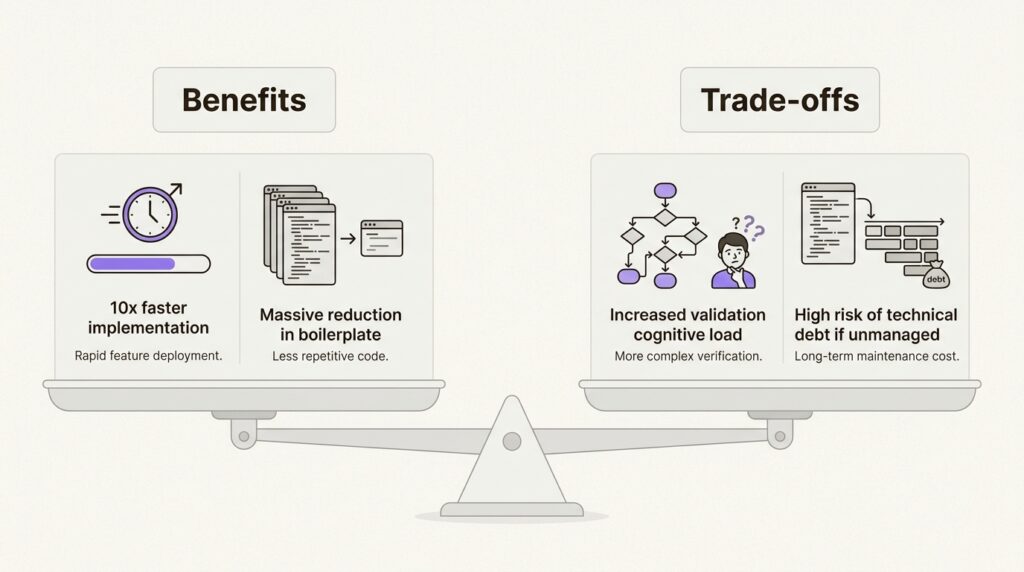
The core tension’s that tools are lowering the barrier to writing code, but they’re not lowering the barrier to writing production-ready code. As mentioned earlier, trust remains low among developers, with only 29 percent fully trusting AI output.
Senior engineers bridge this trust gap through a “guardrail first” mindset. This involves:
- Treating AI output as a “highly confident but fallible” junior developer.
- Implementing automated linting and static analysis on all generated code.
- Prioritizing simple, readable code over clever but opaque AI-generated abstractions.
When you’re deciding on a primary model, comparing ChatGPT vs Gemini vs Claude is useful, but the choice should ultimately depend on which tool fits your specific validation workflow best.
6. Mastering the senior AI engineering workflow
To thrive in this new environment, you must shift your focus from being a “code generator” to being a “code validator.” Your value’s no longer measured by lines of code, but by the reliability and architectural integrity of the systems you oversee.
Mastering this workflow means building a portfolio of outcomes. Instead of just pointing to a repository of code, you should be able to demonstrate how you used AI to solve complex business problems, refactor legacy systems, and maintain high production standards. The future of the role involves becoming an architect of an AI agent consortium, where you orchestrate multiple specialized agents to build and maintain sophisticated systems.
Bottom line? AI’s an amplifier for those who already know what they’re doing. It won’t make a bad engineer good, but it’ll make a great engineer extraordinary.
If you’re ready to start accelerating your own process, explore our list of the 50 best AI tools in 2026 to see which ones can enhance your technical stack today.
Frequently Asked Questions
How can I start using an AI-accelerated engineer workflow in my daily tasks?
Begin by using an AI-native IDE like Cursor for your implementation phase. Focus on using the AI to handle boilerplate and repetitive logic, while you spend more time on architectural planning and code validation.
What is the most important skill for an AI-accelerated engineer workflow at the senior level?
The most important skill is code validation and architectural oversight. You must be able to critically audit AI-generated code for security vulnerabilities, performance issues, and technical debt.
Does the AI-accelerated engineer workflow reduce the need for senior developers?
No, it actually increases the demand for senior developers. While AI can generate code, it cannot own the intent or guarantee the correctness of complex production systems. Senior engineers are the essential validation layer.
How does an AI-accelerated engineer workflow handle legacy refactoring like PHP to Node.js?
The workflow uses models like Claude to analyze and map out legacy logic first. Once the business rules are understood, the AI helps refactor the code into modern microservices, while the human engineer ensures data integrity and architectural consistency.
Are there specific security risks in an AI-accelerated engineer workflow?
Yes, the primary risk is ‘hallucinated’ security vulnerabilities or the inclusion of insecure patterns in generated code. A senior workflow must include mandatory security audits and human-in-the-loop validation for all production code.