
AI workflows are transforming how professionals approach daily work. Tasks that once required long hours of manual effort can now be completed much more efficiently using structured systems powered by artificial intelligence.
Instead of treating AI as a tool used occasionally for writing or brainstorming, many professionals are now integrating it into repeatable processes known as AI workflows. These workflows connect tools and automate steps to reduce effort and improve consistency.
An AI workflow is a sequence of steps where artificial intelligence tools assist with or automate parts of a task. When designed properly, these workflows reduce repetitive work, improve consistency, and save meaningful time every week. Entrepreneurs, consultants, marketers, freelancers, and small business owners are increasingly using AI workflows to manage content, communication, planning, research, and reporting.
Many professionals combine these systems with modern AI productivity tools. For a complete overview, explore our guides to the best AI tools in 2026 and AI automation tools for business.
The real productivity gain does not come from using AI once in a while. It comes from connecting tools into repeatable systems that handle routine tasks efficiently. When professionals design workflows that combine AI tools with human oversight, they create a powerful productivity advantage.
In this guide, we explore ten practical AI workflows that can help professionals save more than ten hours every week. These workflows focus on real activities that most professionals perform regularly, including content creation, email management, meetings, research, marketing, and task planning.
What Is an AI Workflow?
An AI workflow is a structured process where artificial intelligence tools assist or automate different steps in a task. Instead of completing work manually from start to finish, professionals create a system where AI handles repetitive or time-consuming parts of the work. Many modern workflows rely on advanced AI language models such as those developed by OpenAI to generate summaries, drafts, and insights.
For example, a content creation workflow might include researching a topic, generating an outline, drafting an article, and editing the final result. AI can support each of these stages, helping professionals move faster while still maintaining human oversight.
Another example is a meeting workflow. Instead of manually writing notes during a call, a professional can record the meeting, generate a transcript using AI, create a summary, and extract action items automatically. This workflow ensures that important information is captured while reducing the effort required.
The main advantage of AI workflows is not just automation. It is the ability to create repeatable systems that produce consistent results. Once a workflow is designed, it can be reused again and again.
Why AI Workflows Improve Productivity
Many professionals spend a large portion of their week on repetitive tasks. Writing emails, preparing documents, organizing research, and summarizing meetings can consume hours of valuable time. Individually these tasks seem small, but together they can significantly reduce productivity.
AI workflows help solve this problem by turning these tasks into structured systems. Instead of performing every step manually, professionals can rely on AI tools to accelerate the process.
- Automating repetitive tasks
- Reducing manual writing and data entry
- Summarizing large amounts of information quickly
- Improving organization and task planning
- Generating first drafts of documents or messages
- Helping professionals focus on strategic work
The result is a more efficient work environment where professionals can concentrate on creative thinking, decision making, and problem solving rather than routine administrative work.
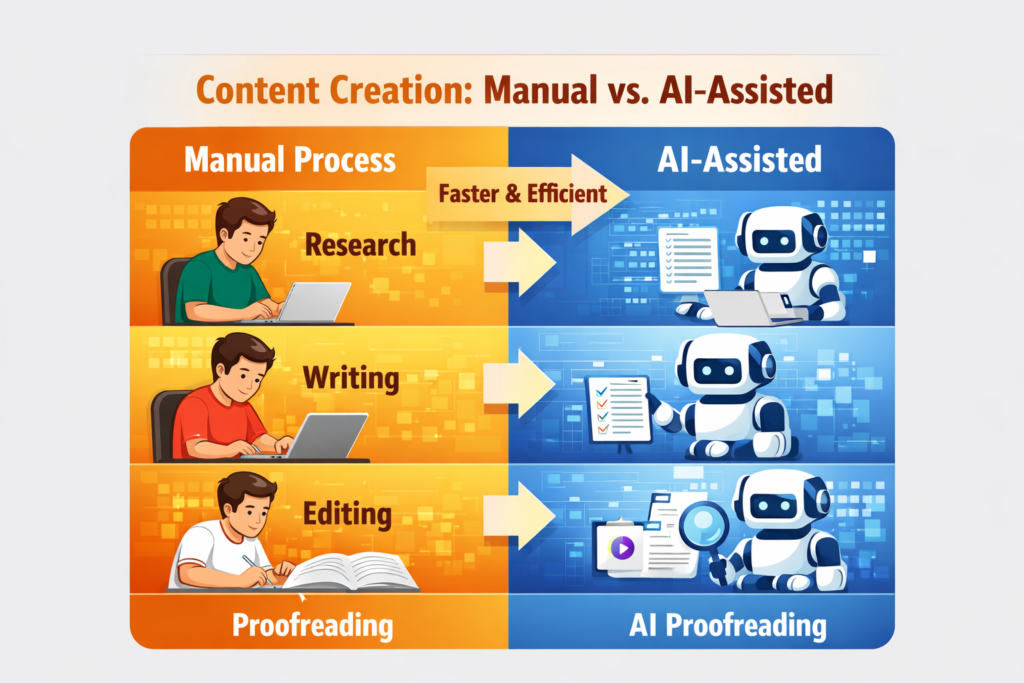
This side-by-side comparison shows how AI workflows streamline each step compared to traditional manual processes.
10 AI Workflows That Save Professionals 10+ Hours Per Week
The following workflows represent practical ways professionals are already using AI to improve productivity.
1. AI Content Creation Workflow
Content creation is one of the most time-consuming activities for marketers, entrepreneurs, consultants, and business owners who publish articles or newsletters. Writing high-quality content usually involves multiple stages including research, outlining, drafting, editing, and optimization.
An AI content workflow speeds up this process by assisting at each stage rather than attempting to produce the entire article in one step.
A typical workflow might look like this: topic research, AI outline generation, AI draft creation, editing, and final publishing.
Professionals can begin by identifying the topic and the key ideas they want to address. An AI writing assistant can then generate an outline with suggested headings and structure. Once the outline is approved, AI can help draft sections of the article. The human editor then reviews and refines the content before publishing.
This workflow reduces writer’s block and allows professionals to publish content more consistently.
These workflows often rely on structured ChatGPT prompts for productivity.
2. AI Email Response Workflow
Email management is one of the most common productivity challenges professionals face. Many people spend hours each week reading, organizing, and responding to messages.
An AI email workflow helps by summarizing email threads and generating draft responses. Instead of writing each message from scratch, professionals review and edit AI-generated drafts.
A typical email workflow includes receiving a message, generating an AI summary of the thread, creating a draft response, reviewing the message, and sending the final email.
This workflow is especially helpful for responding to recurring questions, writing follow-up messages, and summarizing long conversations.
3. Meeting Notes Automation Workflow
Meetings often produce important information, but capturing that information manually can be difficult. Professionals frequently try to listen, participate, and take notes at the same time.
An AI meeting workflow simplifies this process. The meeting is recorded, AI generates a transcript, and a summary of key points is produced automatically. Many tools can also identify action items or decisions made during the meeting.
This approach improves documentation while allowing participants to focus on the conversation instead of note-taking.
4. AI Marketing Workflow
Marketing teams often need to produce a large amount of content across multiple platforms. Blog posts, social media updates, email campaigns, and advertisements all require planning and writing.
An AI marketing workflow helps accelerate this process by generating campaign ideas, drafting copy, and organizing messaging. Check helpful AI tools for small business.
Professionals can begin by defining the marketing objective. AI can then help brainstorm ideas, generate content drafts, and support the creation of campaign materials.
This workflow helps marketing teams move faster while maintaining consistent messaging.
5. Customer Support Workflow
Customer support teams frequently answer similar questions from customers. AI chat assistants can handle many of these interactions automatically.
In a support workflow, customers submit questions through chat or email. AI provides an initial response based on predefined knowledge. If the issue is complex, it can be escalated to a human support agent.
This workflow improves response times and reduces the workload on support teams.
6. Social Media Content Workflow
Maintaining an active social media presence requires consistent content production. AI tools can help generate post ideas, write captions, and suggest visual concepts.
A typical workflow includes selecting a topic, generating captions, creating visuals, and scheduling posts.
This system allows professionals to batch-create content instead of writing posts individually throughout the week.
7. AI Research Workflow
Research tasks often involve reading long articles, reports, or documents. AI tools can summarize this information quickly and highlight the most important insights.
In a research workflow, the professional defines a question, AI gathers relevant sources, summaries are generated, and insights are compiled into notes or reports.
This workflow helps professionals synthesize information faster and identify key patterns across multiple sources.
8. Blog Publishing Workflow
Blog publishing is closely related to content creation but focuses specifically on the steps required to publish an optimized article.
A typical workflow includes keyword research, outline creation, draft writing, editing, SEO optimization, and publishing.
AI tools help accelerate research and drafting while professionals focus on quality and accuracy.
9. AI Task Planning Workflow
Professionals often struggle to prioritize tasks effectively. AI productivity assistants can help organize priorities and create structured schedules.
A task planning workflow begins with listing tasks for the day or week. AI tools can suggest priorities, estimate time requirements, and organize tasks into a schedule.
This approach reduces decision fatigue and improves focus.
10. AI Data Summary Workflow
Professionals frequently work with reports, spreadsheets, and dashboards. AI tools can analyze this data and produce summaries that highlight important trends.
A typical workflow includes uploading data, generating an AI analysis, producing a summary report, and reviewing the insights.
This process speeds up decision making and reduces the time required to interpret complex information.
How to Build Your Own AI Workflow
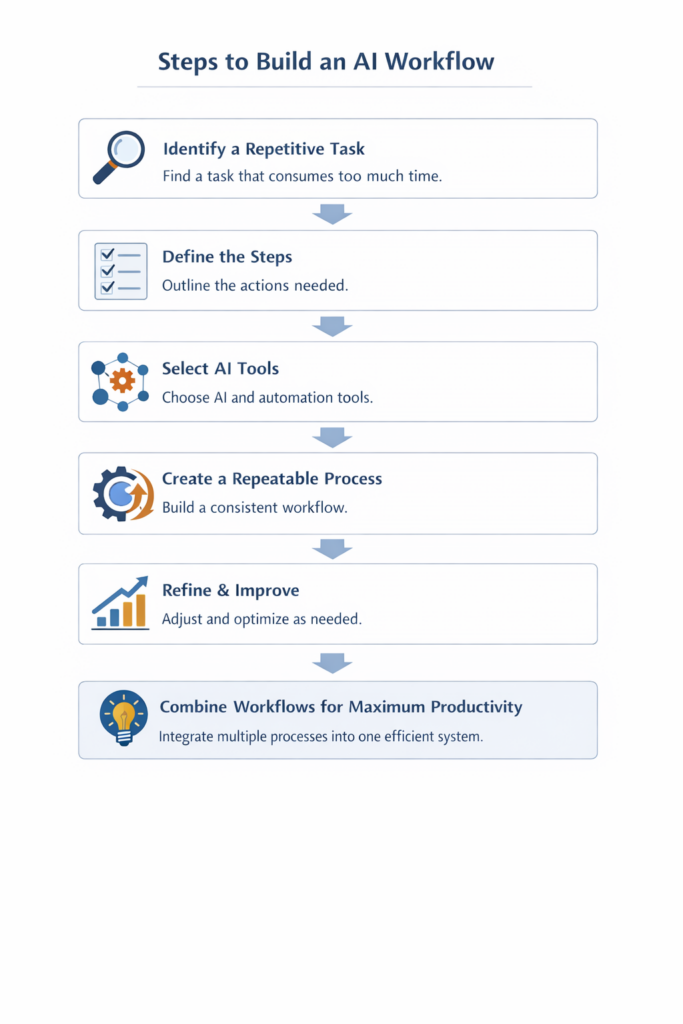
Building an AI workflow does not require advanced technical knowledge. The best approach is to start with a task that already consumes too much time. Many professionals also use automation platforms like Zapier to connect multiple tools and automate repetitive steps.
The flowchart below illustrates the steps to build an AI workflow.
The table below highlights the key differences between traditional workflows and AI-powered workflows:
AI Workflow vs Traditional Workflow Comparison
| Step | Manual Approach | AI Workflow Approach |
|---|---|---|
| Research | Search multiple sources manually | Use AI to summarize and gather insights quickly |
| Writing | Write content from scratch | Generate drafts using AI tools |
| Editing | Manually review and revise | Use AI for suggestions and improvements |
| Proofreading | Check grammar and spelling manually | AI-powered grammar and style corrections |
| Optimization | Basic formatting and SEO | AI-assisted SEO optimization and enhancements |
| Publishing | Manual upload and formatting | Automated publishing or streamlined workflow |
Final Thoughts
AI workflows represent a major shift in how professionals organize their work. Instead of relying on manual effort for every step, structured systems allow artificial intelligence to assist with routine tasks.
By combining AI tools with thoughtful human oversight, professionals can dramatically increase productivity while maintaining quality. The key is to focus on building repeatable workflows that solve real problems.
As artificial intelligence continues to evolve, professionals who learn how to design effective workflows will gain a significant advantage in efficiency, focus, and output.