Artificial intelligence is no longer a niche advantage for tech companies. In 2026, AI tools are helping professionals, creators, entrepreneurs, and small businesses save time, automate repetitive work, create content faster, and make better decisions with less effort. The challenge is no longer finding an AI tool. The challenge is choosing the right one.
According to research from MIT Sloan Management Review, AI adoption is significantly improving productivity across industries, making it a critical advantage for businesses and professionals.
That is exactly why this guide exists. Instead of listing random tools with no structure, this article breaks down the 50 best AI tools in 2026 by category so you can quickly find what fits your workflow. Whether you want to improve productivity, automate daily tasks, write faster, create images, manage projects, or grow a business, there is now an AI tool built for that purpose.
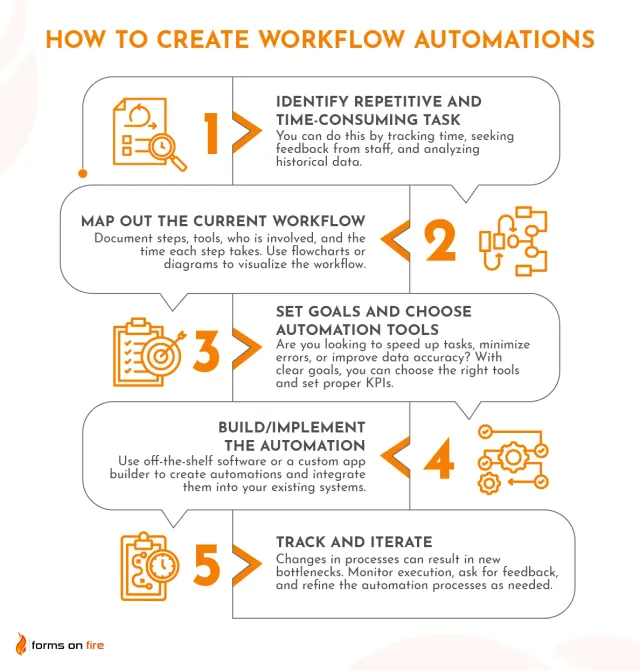
If you are building a smarter workflow, you may also want to read our guides on AI productivity workflows, how to automate daily tasks with AI, and AI tools for small business.
50 Best AI Tools in 2026
Why AI Tools Matter More Than Ever in 2026
AI tools are no longer just helpful add-ons. They are becoming part of the core workflow for modern work. Instead of spending hours drafting emails, summarizing research, creating social media posts, organizing notes, or moving data between apps, you can now hand much of that work to intelligent software.
The biggest advantage of AI is not replacing human thinking. It is reducing low-value friction so you can focus on strategy, creativity, and execution. The best AI tools do not just save a few minutes. Used properly, they can save hours every week.
To make this guide easier to use, the tools below are grouped into practical categories: productivity, automation, writing, image generation, video, research, meetings, coding, customer support, and small business operations.
How We Chose the Best AI Tools
This list focuses on tools that are useful in real workflows, not just impressive demos. Each tool was selected based on a mix of usability, versatility, popularity, business value, and practical day-to-day impact. Some are excellent all-purpose platforms, while others are specialized tools that solve one problem extremely well.
As you read, remember that the best AI tool is not always the most powerful one. It is the one you will actually use consistently.
Best AI Tools for Productivity
Top 5 AI Productivity Tools Comparison
| Tool | Best For | Pricing Model | Price Range | Pros | Cons |
|---|---|---|---|---|---|
| ChatGPT | All-in-one AI assistant | Free + Monthly subscription | Free / ~$20/month | Extremely versatile, wide use cases | Requires prompting skills |
| Notion AI | Knowledge & note management | Monthly add-on | ~$10/month | Seamless within Notion workspace | Limited outside Notion ecosystem |
| Motion | AI scheduling & planning | Monthly subscription | ~$19–$34/month | Automates daily planning completely | Learning curve for new users |
| Reclaim AI | Calendar optimization | Free + Monthly subscription | Free / ~$10/month | Smart time blocking & habit tracking | Less powerful than Motion |
| ClickUp AI | Project & task management | Monthly add-on | ~$5/month | Affordable and integrated with tasks | Requires using ClickUp platform |
1. ChatGPT
ChatGPT remains one of the most versatile AI tools available. It can help with writing, brainstorming, summarizing, research assistance, coding help, planning, and workflow design. For many users, it is the starting point of an AI-powered productivity system.
2. Notion AI
Notion AI is ideal for people who already use Notion as their workspace. It can summarize notes, generate drafts, rewrite text, extract action items, and help organize scattered information into something usable.
3. Motion
Motion combines calendar management, task planning, and AI scheduling. It is especially useful for busy professionals who want their day automatically structured around priorities and deadlines.
4. Reclaim AI
Reclaim AI helps users protect time on their calendar for deep work, routines, and tasks. It is a strong tool for people who struggle with fragmented schedules and constant meeting overload.
5. ClickUp AI
ClickUp AI brings writing and task intelligence into project management. Teams can use it to generate summaries, draft updates, and turn messy notes into clearer action items.
6. Todoist with AI assistance
Todoist continues to be a favorite for personal task management, and AI enhancements make it easier to prioritize and describe tasks faster.
7. Mem AI
Mem AI is designed around capturing knowledge quickly and resurfacing it when needed. It works well for people who collect many ideas, notes, and fragments throughout the day.
8. Taskade
Taskade combines outlines, project management, mind maps, and AI generation. It is especially attractive for users who want a flexible productivity environment without a steep learning curve.
Best AI Tools for Automation
If your goal is to save time at scale, automation is where AI becomes truly powerful. These tools help connect apps, trigger actions, and reduce repetitive work.
Top 5 AI Automation Tools Comparison
| Tool | Best For | Pricing Model | Price Range | Pros | Cons |
|---|---|---|---|---|---|
| Zapier | No-code automation | Monthly + usage tiers | Free / ~$20–$100+/month | Very easy to use, huge app ecosystem | Can get expensive at scale |
| Make (Integromat) | Advanced automation workflows | Monthly (operations-based) | Free / ~$10–$30+/month | Highly flexible, visual builder | Slight learning curve |
| n8n | Developers & custom workflows | Free (self-hosted) + monthly cloud | Free / ~$20+/month | Open-source, very powerful | Requires technical setup |
| Pabbly Connect | Budget automation | One-time / lifetime + limited tiers | ~$99–$249 one-time | No monthly fees, cost-effective | Smaller app ecosystem |
| Bardeen | Browser-based automation | Free + Monthly subscription | Free / ~$10–$30/month | Great for web tasks & scraping | Limited outside browser workflows |
9. Zapier
Zapier remains one of the most accessible automation platforms. It connects thousands of apps and allows non-technical users to create workflows with minimal setup.
10. Make
Make is excellent for more visual and complex workflows. It gives users more control over branching logic and data handling than many beginner-focused automation tools.
11. n8n
n8n is a favorite among more technical users who want open-source flexibility and deeper customization. It is powerful for advanced automation and API-driven workflows.
12. Pabbly Connect
Pabbly Connect is often chosen as a budget-friendly alternative to Zapier. It can be a strong option for users who want core automation features without premium pricing.
13. Bardeen
Bardeen specializes in browser-based automation. It is useful for scraping, web workflows, repetitive browser actions, and lightweight productivity automations.
14. IFTTT
IFTTT still has value for personal and smart-device workflows. It is simpler than enterprise-grade automation tools but useful for everyday triggers and actions.
15. Relay.app
Relay.app focuses on human-in-the-loop workflows, making it useful when automation still requires occasional approval or manual review.
Best AI Writing Tools
Writing tools remain one of the most popular AI categories because they produce immediate value. They can help with blog posts, emails, product descriptions, ad copy, and more.
Top 5 AI Writing Tools Comparison
Here are the top 5 AI writing tools based on content quality, ease of use, and overall value for different writing needs.
| Tool | Best For | Pricing Model | Price Range | Pros | Cons |
|---|---|---|---|---|---|
| Jasper | Marketing & long-form content | Monthly subscription | ~$39–$99/month | High-quality output, brand voice control | More expensive than alternatives |
| Copy.ai | Marketing copy & quick content | Free + Monthly subscription | Free / ~$36/month | Fast, easy to use | Less depth for long-form content |
| Writesonic | SEO content & blog writing | Monthly + usage-based | Free / ~$20+/month | SEO-focused features | Output quality varies |
| Grammarly | Editing & rewriting | Free + Monthly subscription | Free / ~$12/month | Excellent grammar & clarity improvements | Not a full content generator |
| Rytr | Budget-friendly writing | Free + Monthly subscription | Free / ~$9/month | Affordable and simple | Limited advanced features |
Below is a detailed breakdown of each tool and how to use it effectively.
16. Jasper
Jasper is built with marketers and businesses in mind. It is known for brand-oriented content generation, campaign support, and structured copy creation.
17. Copy.ai
Copy.ai is strong for fast marketing copy, sales messaging, and short-form content. It is often used by startups and small teams that need content quickly.
18. Writesonic
Writesonic is useful for articles, landing page copy, and SEO-focused writing. It aims to combine speed with content structure.
19. Rytr
Rytr is a more affordable writing assistant that works well for users who want simple content generation without a complex interface.
20. Sudowrite
Sudowrite is tailored more toward fiction, storytelling, and creative writing. It is a niche tool, but a strong one for writers who want idea expansion and scene development support.
21. Grammarly
Grammarly is still one of the most widely used tools for refining grammar, clarity, and tone. Its AI features now go beyond correction and help with rewriting and drafting.
22. QuillBot
QuillBot is especially popular for rewriting, paraphrasing, and tightening wording. It can be helpful for editing and improving sentence flow.
For more practical prompting ideas, see our article on the best ChatGPT prompts.
Best AI Tools for Research and Knowledge Work
23. Perplexity
Perplexity is one of the most useful AI research tools because it combines answers with source-based exploration. It works well for quick research, comparisons, and topic discovery.
24. Elicit
Elicit is designed for research workflows and can help users find papers, summarize findings, and extract information more efficiently.
25. Consensus
Consensus is particularly useful when you want answers based on academic literature rather than general web results.
26. Scite
Scite helps researchers and knowledge workers evaluate citations and understand how papers are being referenced in the broader literature.
27. NotebookLM
NotebookLM is useful for working with your own source materials. It helps summarize, question, and organize uploaded documents in a focused environment.
28. Humata
Humata is useful for interacting with long documents and extracting answers quickly, especially when dealing with reports or PDFs.
Best AI Tools for Meetings and Communication
29. Otter
Otter is widely used for meeting transcription and note generation. It can save time after meetings by turning spoken discussion into usable summaries.
30. Fireflies.ai
Fireflies.ai records, transcribes, and organizes meetings. Teams often use it to track key points, action items, and searchable conversations.
31. Fathom
Fathom is another strong meeting assistant that focuses on note capture and follow-up convenience, especially for teams that live in video calls.
32. Superhuman
Superhuman adds AI features to email workflows and is designed for speed. It is particularly appealing to users who process high volumes of email every day.
33. Microsoft Copilot for Microsoft 365
For users deeply inside Word, Excel, Teams, and Outlook, Microsoft Copilot can streamline writing, summarization, presentation work, and meeting follow-up.
Best AI Tools for Design and Image Creation
AI design and image tools are transforming how visuals are created. From social media graphics to high-quality AI-generated art, these tools allow anyone to produce professional visuals quickly and efficiently.

AI design tools can generate high-quality visuals, marketing assets, and creative content in seconds. The table below compares the top options.
Top 5 AI Design and Image Tools Comparison
Here are the top 5 AI design and image generation tools based on ease of use, output quality, and versatility for creators and businesses.
| Tool | Best For | Pricing Model | Price Range | Pros | Cons |
|---|---|---|---|---|---|
| Canva | Easy graphic design & social media | Free + Monthly subscription | Free / ~$12/month | Very easy to use, all-in-one design tool | Limited advanced customization |
| Midjourney | High-quality AI art generation | Monthly subscription | ~$10–$60/month | Stunning visual quality | Requires Discord interface |
| DALL·E | AI image generation | Usage-based (pay per image) | Pay per use | Easy to use, integrated with ChatGPT | Costs can add up with heavy use |
| Adobe Firefly | Professional design workflows | Monthly subscription | ~$10–$20/month | Integrated with Adobe tools | Requires Adobe ecosystem |
| Leonardo AI | Creative assets & game design | Free + Monthly subscription | Free / ~$10+/month | Great control over image styles | Learning curve for beginners |
Below is a detailed breakdown of each tool and how to use them effectively.
34. Canva
Canva has become one of the most practical AI design tools for non-designers. It can help create presentations, social graphics, marketing visuals, and quick branded assets.
35. Midjourney
Midjourney is known for producing striking artistic images and concept visuals. It is often used for creative ideation, branding experiments, and visual inspiration.
36. Adobe Firefly
Adobe Firefly is useful for creators who already work in the Adobe ecosystem. It supports image generation and editing with closer ties to professional design workflows.
37. DALL·E
DALL·E is useful for generating images from prompts and can support blog visuals, concept art, simple illustrations, and creative exploration.
38. Leonardo AI
Leonardo AI is popular for design assets, concept generation, and game-oriented visuals. It is often chosen by users who want more control over style outputs.
39. Remove.bg
Remove.bg solves one specific task extremely well: removing image backgrounds quickly. It remains a practical tool for ecommerce and graphic preparation.
Best AI Video Tools
40. Runway
Runway is one of the leading AI video creation and editing platforms. It is used for visual effects, background editing, and generative video experiments.
41. Synthesia
Synthesia specializes in avatar-based video creation. It is especially useful for training videos, internal communication, and simple business presentations.
42. Pictory
Pictory helps turn written content into video, which can be useful for repurposing blog posts into social or YouTube-friendly formats.
43. Descript
Descript remains one of the most practical tools for podcast and video editing. Its text-based editing approach makes it easier for non-editors to clean up content fast.
44. Opus Clip
Opus Clip is focused on turning long videos into short, shareable clips. It is especially useful for creators and marketers working with short-form platforms.
Best AI Tools for Coding and Technical Work
45. GitHub Copilot
GitHub Copilot remains one of the best-known coding assistants. It helps with code suggestions, boilerplate generation, and speeding up development work.
46. Cursor
Cursor is gaining traction as an AI-native coding environment. It is designed to make code generation, editing, and understanding more fluid inside the IDE itself.
47. Replit AI
Replit AI is useful for rapid prototyping and lightweight coding projects, especially for solo builders and learners.
48. Tabnine
Tabnine focuses on AI-assisted code completion and can be appealing for teams that want productivity help across development workflows.
Best AI Tools for Customer Support and Sales
49. Tidio
Tidio combines chat, automation, and AI support features. It is especially useful for small businesses that want to improve customer response speed without building a large support team.
50. Intercom
Intercom continues to be an important customer communication platform, and its AI capabilities help automate support, answer common questions, and improve response handling at scale.
Best AI Tools for Small Business Growth
For small businesses, the best stack is usually not the biggest one. It is the one that covers content, communication, support, and automation without becoming too expensive or complicated. A practical small business AI stack could include ChatGPT for general work, Canva for marketing visuals, Zapier for automation, Tidio for support, and Jasper or Copy.ai for marketing copy.
If your focus is business growth, read our full guide on AI tools for small business for more targeted recommendations.
How to Choose the Right AI Tool for Your Workflow
Do not choose tools based only on hype. Start by asking what problem you want to solve. Are you trying to write faster, automate admin work, manage meetings better, improve design output, or reduce customer service load? Once you know the bottleneck, the right tool becomes much easier to identify.
It is also smart to start small. One of the most common mistakes is adopting too many AI tools at once. That usually creates clutter rather than productivity. A better approach is to start with one general-purpose tool and one specialized tool. Use them consistently, build a routine around them, and expand only when the added complexity is worth it.
Recommended Starter AI Stack for Most Users
- ChatGPT for writing, planning, and general assistance
- Canva for quick graphics and presentation design
- Zapier for automation
- Perplexity for research
- Otter or Fireflies.ai for meeting notes
This kind of setup covers most everyday needs without overwhelming your workflow.
Common Mistakes to Avoid When Using AI Tools
The first mistake is using AI without a clear goal. The second is trusting output without reviewing it. The third is adding too many tools before building a real process. AI works best when it supports a defined system. It performs worst when it is used randomly.
That is why workflow matters more than novelty. The users who gain the most from AI are not the ones trying every new app. They are the ones who consistently apply a few useful tools in repeatable ways.
Frequently Asked Questions
What is the best AI tool in 2026?
For overall versatility, ChatGPT remains one of the strongest options because it covers writing, ideation, planning, summarization, and many workflow tasks in one place.
What is the best AI tool for productivity?
That depends on your workflow, but ChatGPT, Notion AI, Motion, and Reclaim AI are among the most useful productivity-focused tools.
Are free AI tools worth using?
Yes. Many free AI tools are powerful enough for everyday use. Canva, ChatGPT, Gemini, and Perplexity all offer useful entry points depending on what you need.
What is the best AI tool for small businesses?
Small businesses often get strong value from combining ChatGPT, Canva, Zapier, Jasper, and Tidio. Together they can support content, design, automation, and customer communication.
Can AI tools really save time?
Yes, especially when they are used for repetitive and structured tasks. Writing first drafts, summarizing notes, generating visuals, and automating data movement are common examples.
Final Thoughts
The best AI tools in 2026 are not just about automation for the sake of automation. They are about creating a smoother, faster, more focused way to work. Whether you are a solo creator, a professional, or a growing business, the right AI stack can free up time and help you operate at a higher level.
If you are just getting started, begin with a small stack and build from there. A strong combination of one writing assistant, one automation tool, one research tool, and one design platform can already transform your workflow. The goal is not to use every AI tool on the market. The goal is to use a few of the right ones exceptionally well.
To continue building your AI workflow, explore our related articles on AI productivity workflows, automating daily tasks with AI, ChatGPT vs Gemini vs Claude, and the best ChatGPT prompts.