
Enterprise AI adoption is moving quickly from experimentation to production. Customer support bots, internal copilots, document assistants, sales enablement agents, compliance chatbots, and workflow automation systems are no longer small proof-of-concept tools. They are becoming always-on infrastructure.
That shift creates a new financial problem: every repeated user question can trigger a fresh large language model call, even when the system has already answered a nearly identical request hundreds or thousands of times before.
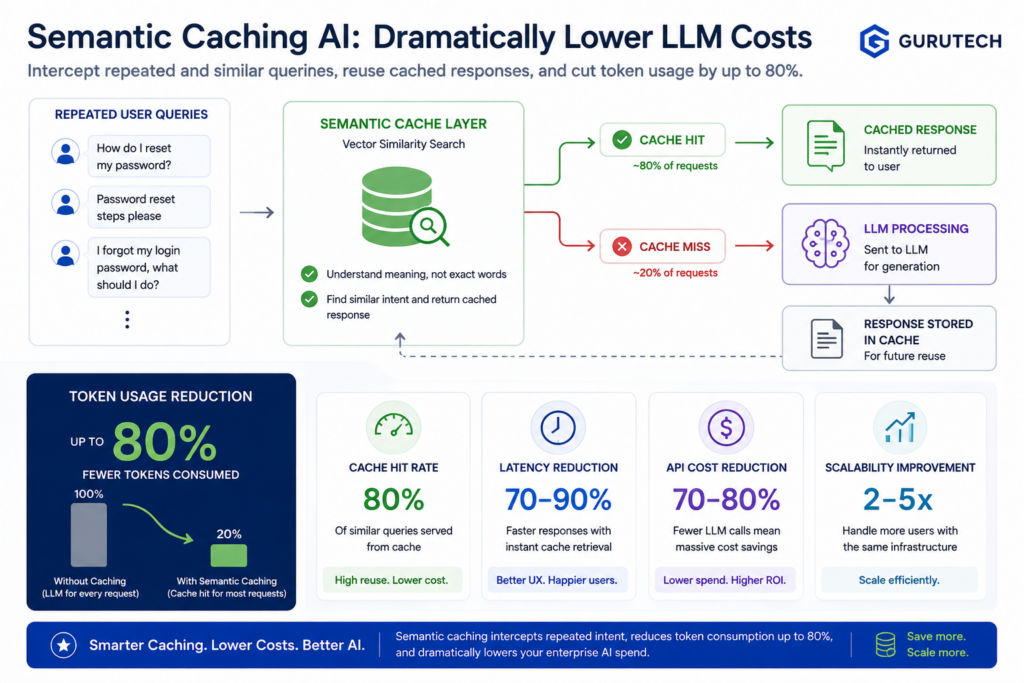
This is where enterprise semantic caching AI becomes one of the highest-impact cost optimization patterns in modern AI architecture. Instead of treating every prompt as a new request, semantic caching allows an AI system to recognize when two questions mean the same thing, even if the wording is different.
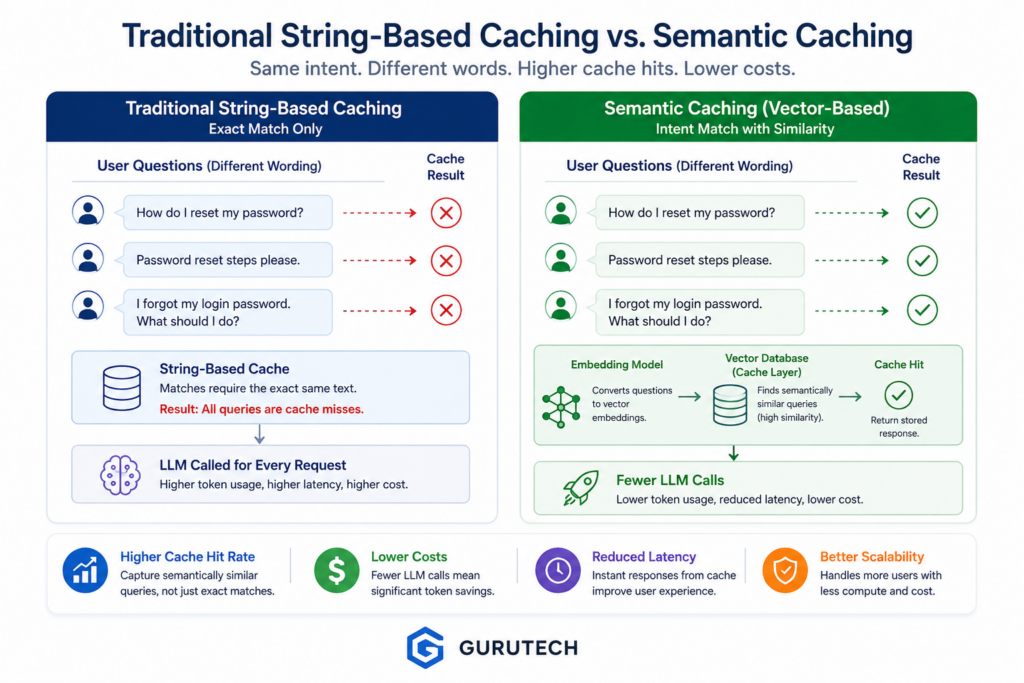
Traditional caching relies on exact matches. Semantic caching relies on intent similarity. That difference is what makes it powerful for enterprise LLM systems.
For example, these three user prompts are different strings:
- How do I reset my password?
- Password reset steps please.
- I forgot my login password. What should I do?
A traditional cache sees three different inputs. A semantic cache sees one reusable intent.
At scale, that distinction can reduce token usage, lower latency, smooth API traffic spikes, and prevent enterprise AI systems from paying repeatedly for the same reasoning work.
The Hidden Financial Drain of Repetitive LLM Queries
Most enterprise AI cost problems do not begin with exotic failures. They begin with ordinary repetition.
A customer support agent may answer the same billing question thousands of times. An HR assistant may explain the same vacation policy every week. A technical support bot may troubleshoot the same login issue across hundreds of employees. A sales enablement assistant may summarize the same product capability in slightly different language for every account executive.
From a user experience perspective, these are normal requests. From a token economics perspective, they are expensive duplicates.
When every repeated prompt is sent to a foundation model, the organization pays for:
- Prompt tokens
- Retrieved context tokens
- Completion tokens
- Tool call overhead
- Agent routing overhead
- Latency from repeated model execution
This becomes especially costly in retrieval-augmented generation systems. A simple user question may trigger document retrieval, reranking, prompt construction, model reasoning, citation formatting, and response generation. If the same question appears 10,000 times per month in slightly different language, the organization may be paying for the same workflow 10,000 times.
An AI token observability dashboard can reveal this pattern. It may show that specific categories of prompts create recurring token spikes. It may expose repeated completions, duplicated support paths, or high-cost workflows that differ only by phrasing.
However, observability alone does not reduce spend. It tells the team where money is being consumed. Semantic caching changes the architecture so the system stops spending that money unnecessarily.
What Is Enterprise Semantic Caching AI?
Enterprise semantic caching AI is an architectural pattern where user prompts, intermediate AI outputs, or final LLM responses are stored and reused based on meaning rather than exact text equality.
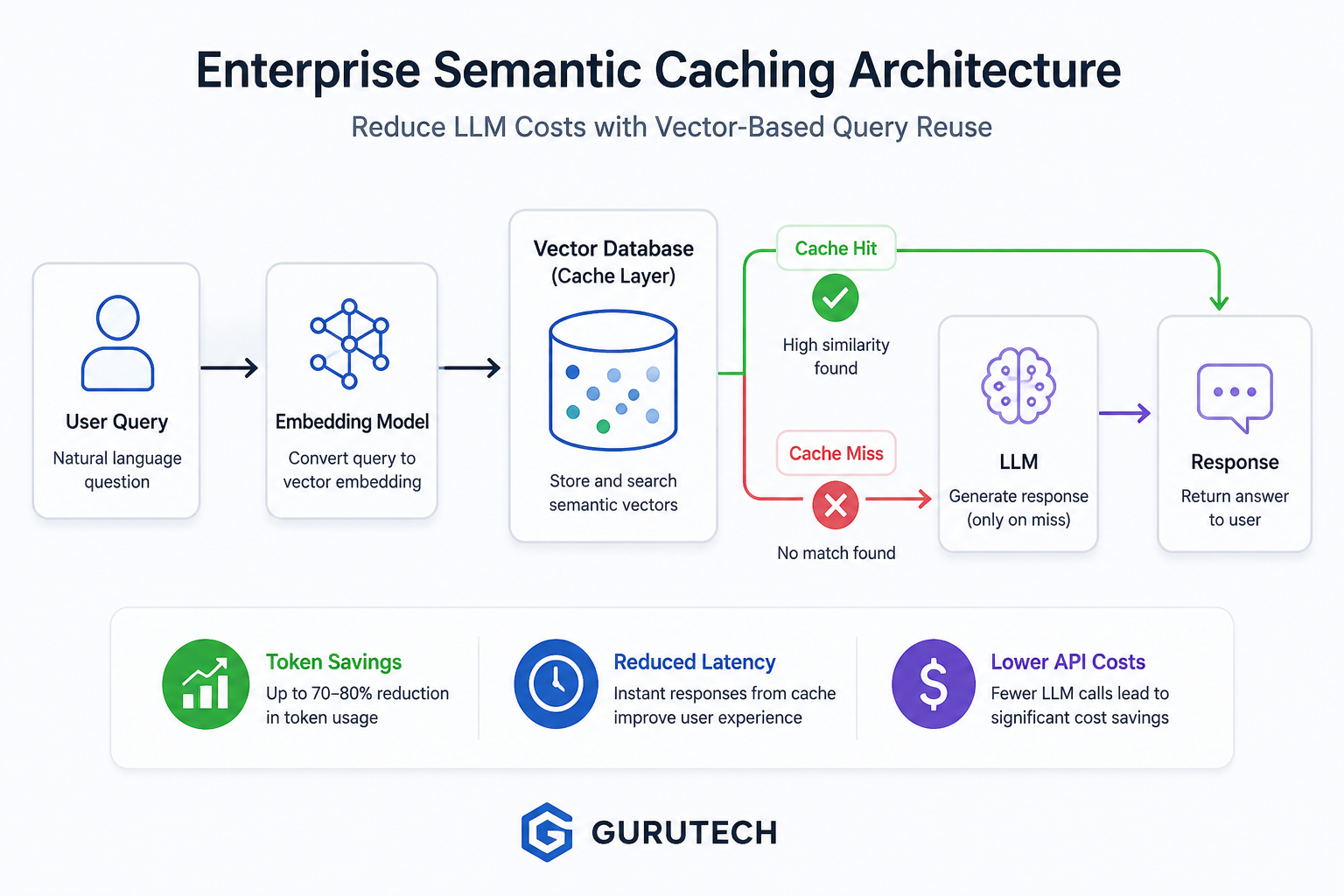
Instead of using the raw prompt as a cache key, the system converts the prompt into a vector embedding. That embedding represents the semantic meaning of the request as a numeric coordinate in a high-dimensional space. When a new query arrives, the system embeds it, compares it against previously cached embeddings, and determines whether a close enough match already exists.
If the similarity score exceeds a predefined threshold, the system returns the cached response. If no reliable match exists, the request is forwarded to the LLM, and the new result is saved back into the semantic cache.
This creates a gateway between the application and the model provider. The gateway makes an architectural decision before spending tokens.
The simplified flow looks like this:
User Query
   ↓
Embedding Model
   ↓
Vector Similarity Search
   ↓
Cache Hit?
   ├── Yes → Return Cached Response
   └── No  → Call LLM → Store Response → Return Response
This is not only a performance optimization. It is a cost-control layer, a latency reduction layer, and an operational scaling layer.
Why Semantic Caching Matters More in Enterprise AI Than Consumer Chatbots
Consumer chatbot usage is unpredictable. One user may ask about travel, another about cooking, another about history, and another about code. Enterprise usage is different. It often has a narrower domain and repeated intent patterns.
That makes enterprise AI a strong fit for semantic caching.
In a company environment, many users ask variations of the same operational questions:
- How do I reset my VPN access?
- Where is the expense reimbursement policy?
- What is the onboarding process for new hires?
- How do I connect Salesforce to the reporting dashboard?
- What is the approval process for a vendor contract?
- How do I troubleshoot a failed data sync?
The wording changes, but the answer often does not.
This is why semantic caching is especially valuable for:
- Customer support automation
- Internal IT help desks
- HR policy assistants
- Legal and compliance knowledge bots
- Sales enablement copilots
- RAG-based document assistants
- AI workflow orchestration systems
- multi-agent enterprise applications
In these environments, many requests are not truly new. They are semantically repetitive. A well-engineered semantic cache converts that repetition into savings.
Advanced Retrieval Architectures: As systems transition from basic vector chunks to deeply interconnected entity networks, managing compute costs becomes even more critical. Read our deep dive into engineering a robust graphrag architecture enterprise cluster to see how knowledge graphs reshape data retrieval.
String Matching vs Semantic Proximity: Why Traditional IT Caching Fails
Traditional enterprise caching works well when the input is predictable. Web applications often cache database queries, API responses, rendered pages, session data, and product catalog results using exact keys.
For example, a standard Redis cache may store a response under a key like:
user:12345:billing_summary
product:sku-8842:inventory
api:weather:ottawa:today
This works because the application can generate deterministic keys. The same request maps to the same cache key.
LLM prompts do not behave that way. Natural language is flexible. Users rarely ask questions with identical wording. Even when the intent is identical, small phrasing changes break exact-match caching.
Consider these two prompts:
How do I reset my password?

Password reset steps please.
A traditional cache sees two different strings. Unless the application normalizes the query perfectly, the second request becomes a cache miss.
Now consider:
What is our policy for remote work in the United States?

Can US employees work remotely full time?
These are not identical. They may not even share many of the same words. But in a corporate HR assistant, they may point to the same policy answer.
This is the core weakness of string-based caching for AI systems: it optimizes for character equality, not meaning.
The Fragility of Exact Matches
Exact-match caching fails because human language is variable by design. Users may express the same intent with different verbs, synonyms, sentence structures, abbreviations, or levels of detail.
A support chatbot might receive all of these requests:
- I cannot log in.
- Login is not working.
- My account access failed.
- I forgot my password.
- It says my credentials are invalid.
- Can you help me get back into my account?
Some of these may require different answers. Others may belong to the same troubleshooting flow. A traditional cache cannot make that distinction. It can only compare the raw text.
Engineering teams sometimes try to solve this with normalization. They lowercase the text, remove punctuation, strip whitespace, or apply simple keyword rules. That can help for deterministic API traffic, but it is not enough for natural language.
For enterprise AI systems, exact-match caching usually produces low hit rates because the cache is too rigid. It saves money only when users repeat the same wording. Semantic caching saves money when users repeat the same intent.
The Vector Embedding Space
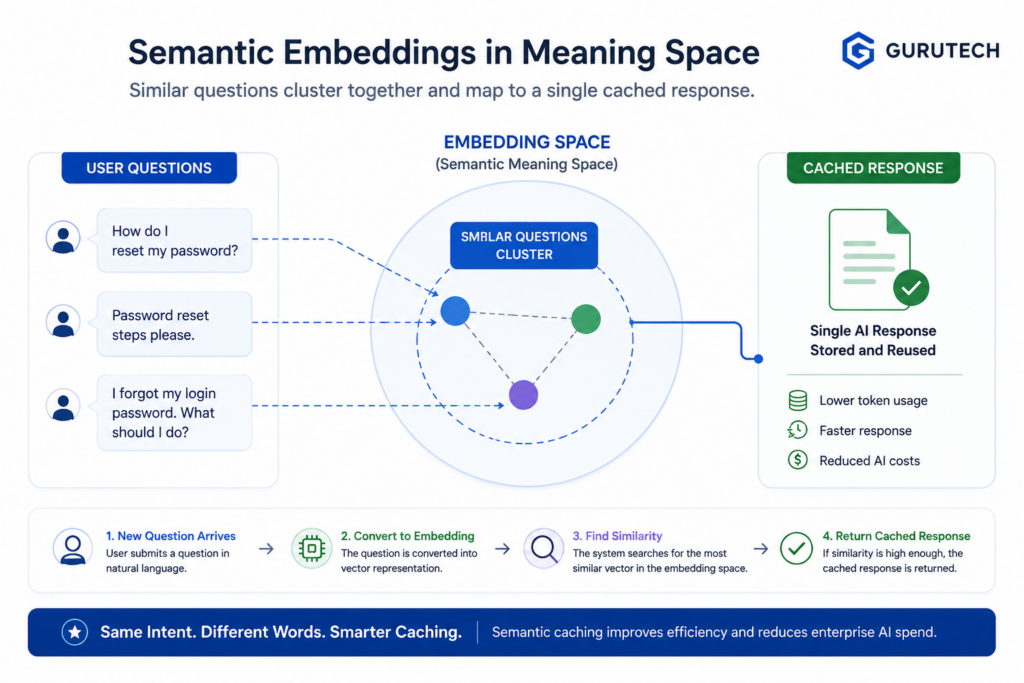
Semantic caching works because modern embedding models can convert text into numeric vectors that represent meaning.
An embedding is a list of numbers. The exact values are not designed for humans to read. They are designed for mathematical comparison. When two pieces of text have similar meaning, their vectors are close together in embedding space. When the meanings differ, the vectors are farther apart.
For example:
"How do I reset my password?"
"Password reset steps please."
These prompts would likely produce embeddings that are close together.
But this prompt:
"How do I export last quarter's sales data?"
would be farther away because the intent is different.
The semantic cache uses a distance or similarity metric to decide whether a previous response is close enough to reuse.
Common metrics include:
- Cosine similarity: Measures the angle between two vectors. Frequently used for text embeddings.
- Euclidean distance: Measures straight-line distance between vector coordinates.
- Dot product: Measures vector alignment and magnitude, often used in optimized vector search systems.
In many semantic caching systems, cosine similarity is the easiest concept to reason about. A higher score means the new query is closer in meaning to a previously cached query.
For production systems, the key design question becomes: how similar is similar enough?
A threshold of 0.70 may return too many risky matches. A threshold of 0.98 may be so strict that the cache rarely hits. Many enterprise teams begin testing around 0.90 to 0.94 for low-risk support and knowledge retrieval use cases, then adjust based on observed accuracy, domain complexity, and user tolerance.
Core Blueprint: Engineering a Semantic Cache Gateway
A semantic cache should not be treated as a small utility function hidden inside the application. In enterprise architecture, it is better designed as a gateway layer that sits between AI-enabled applications and expensive model calls.
The gateway is responsible for deciding whether a request should be answered from cache or forwarded to the LLM pipeline.
A clean semantic cache gateway typically includes:
- An embedding generation step
- A vector database lookup
- A similarity threshold rule
- A cache metadata policy
- A TTL and invalidation strategy
- A fallback path to the foundation model
- Logging for observability and auditability
This design separates cost-control logic from the rest of the AI application. The chatbot, agent, or workflow engine does not need to know every detail of vector similarity. It sends the query to the cache gateway and receives either a cached response or a fresh model response.
That separation becomes important as AI systems grow. A company may eventually have multiple applications sharing the same semantic cache infrastructure:
- One cache namespace for customer support
- One cache namespace for internal IT
- One cache namespace for sales enablement
- One cache namespace for HR policy
- One cache namespace for developer documentation
Each namespace can have its own threshold, TTL, security rules, and invalidation policy.
Step A: The Embedding Intercept
The first step in semantic caching is intercepting the raw user prompt before it reaches the LLM.
Instead of immediately sending the prompt to a large model, the application sends it to a smaller, faster embedding model. The embedding model converts the user query into a vector representation.
This step is usually much cheaper and faster than a full LLM completion. That cost difference is what makes semantic caching economically attractive. The system pays a small amount to check whether it can avoid a much larger model call.
A simplified example:
Raw query:
"Password reset steps please."

Embedding output:
[0.014, -0.229, 0.771, ...]
The application does not need to interpret the vector manually. It only needs to store and compare it.
For enterprise systems, the embedding intercept should also attach metadata before the lookup occurs. This metadata may include:
- Tenant ID
- Application name
- User role
- Department
- Language
- Region
- Knowledge base version
- Content sensitivity level
- Timestamp
This prevents the semantic cache from becoming a dangerous global memory layer. A cached answer from one tenant, department, or policy version should not automatically be reused for another context.
In other words, semantic similarity is necessary, but not sufficient. Enterprise cache hits must also pass metadata filters.
Step B: The Similarity Lookup
After the query is embedded, the system performs a vector similarity lookup against the cache store.
The vector database searches for previously stored prompts that are close to the new prompt in embedding space. The result is a ranked list of candidate matches, usually with similarity scores.
A simplified lookup result may look like this:
Candidate 1:
Cached prompt: "How do I reset my password?"
Similarity: 0.947
Response ID: support-password-reset-001

Candidate 2:
Cached prompt: "I cannot log into my account."
Similarity: 0.884
Response ID: support-login-troubleshooting-003

Candidate 3:
Cached prompt: "How do I update my profile email?"
Similarity: 0.751
Response ID: account-profile-email-002
If the configured threshold is 0.92, Candidate 1 would qualify as a cache hit. Candidate 2 and Candidate 3 would not.
This threshold is one of the most important controls in the entire architecture. A low threshold increases cache hit rate but raises the risk of returning the wrong answer. A high threshold improves precision but reduces savings.
In enterprise AI, the right threshold depends on the use case.
| Use Case | Suggested Threshold Approach | Reason |
|---|---|---|
| FAQ chatbot | Moderate to high | Many repeated questions, lower risk |
| Internal IT help desk | High | Operational accuracy matters |
| Legal or compliance assistant | Very high or no final-answer caching | Wrong cached answers can create risk |
| Marketing content assistant | Moderate | Reused guidance may be acceptable |
| Financial analysis assistant | Very high with strict metadata | Data freshness and precision are critical |
The best practice is not to pick a universal threshold and forget it. The best practice is to monitor cache hit quality, false positives, user feedback, and token savings over time.
Step C: The Cache Hit/Miss Fork
Once the similarity lookup is complete, the semantic cache gateway must choose one of two paths.
On a cache hit, the system returns the stored response immediately. This avoids the expensive LLM call and reduces latency dramatically.
On a cache miss, the request continues through the normal AI pipeline. The LLM generates a fresh answer, and the system stores the prompt embedding, response, metadata, and expiration policy for future reuse.
A production cache hit should not simply return the raw previous completion without context. It should usually return a response wrapper that includes internal metadata such as:
- Cache hit status
- Similarity score
- Cached response ID
- Created timestamp
- Expiration timestamp
- Source knowledge base version
- Model used to generate the original response
- Safety or approval status
This metadata does not need to be shown to the end user. But it should be logged for observability, debugging, compliance, and cost attribution.
For example, an internal response wrapper might look like this:
{
  "cache_status": "hit",
  "similarity_score": 0.947,
  "response_id": "support-password-reset-001",
  "ttl_remaining_seconds": 604800,
  "knowledge_base_version": "kb-2026-06",
  "model_origin": "gpt-4.1",
  "response": "To reset your password, go to the login page and select Forgot Password..."
}
This makes the cache auditable. If a user later reports an incorrect answer, the engineering team can inspect whether the issue came from a stale response, an overly loose threshold, outdated source content, or a bad original generation.
Why the Cache Gateway Should Be Independent from the LLM Application
Many early AI applications add caching directly inside the chatbot backend. That may work for a prototype, but it becomes limiting in enterprise environments.
A better design is to make the semantic cache a reusable gateway service.
This allows multiple applications to share the same caching infrastructure while applying different policies. The customer support chatbot may use a lower-risk FAQ cache. The legal assistant may use only retrieval-level caching, not final-answer caching. The internal IT bot may use a short TTL for service outage questions but a longer TTL for password reset instructions.
A dedicated gateway also makes it easier to enforce:
- Tenant isolation
- Role-based access controls
- Cache expiration rules
- PII filtering
- Audit logging
- Model attribution
- Cost reporting
- Centralized threshold tuning
In a mature enterprise architecture, semantic caching should be part of the AI platform layer, not an afterthought buried in one application.
Where Semantic Caching Fits in the Enterprise AI Stack
Semantic caching is not a replacement for observability, retrieval, guardrails, or prompt engineering. It sits alongside them as an efficiency layer.
A typical enterprise AI request may pass through several layers:
User Interface
   ↓
Authentication and Tenant Context
   ↓
Prompt Normalization
   ↓
Semantic Cache Gateway
   ↓
Retrieval Layer
   ↓
Prompt Assembly
   ↓
LLM or Agent Runtime
   ↓
Validation and Guardrails
   ↓
Response Formatting
   ↓
Observability and Audit Logs
In this stack, the semantic cache acts before the most expensive stage. It gives the system an opportunity to avoid retrieval, prompt assembly, and LLM completion when a trusted cached response already exists.
For high-volume enterprise AI systems, this can produce meaningful savings because the cache is positioned before token-heavy work begins.
The greatest value comes when semantic caching is combined with token observability. Observability identifies repeated expensive patterns. Semantic caching eliminates or reduces them.
That is the shift from passive monitoring to active architecture optimization.
Technical Implementation Options: Redis vs. Qdrant
Once an organization decides to implement semantic caching, the next major architectural decision is selecting the underlying vector storage platform.
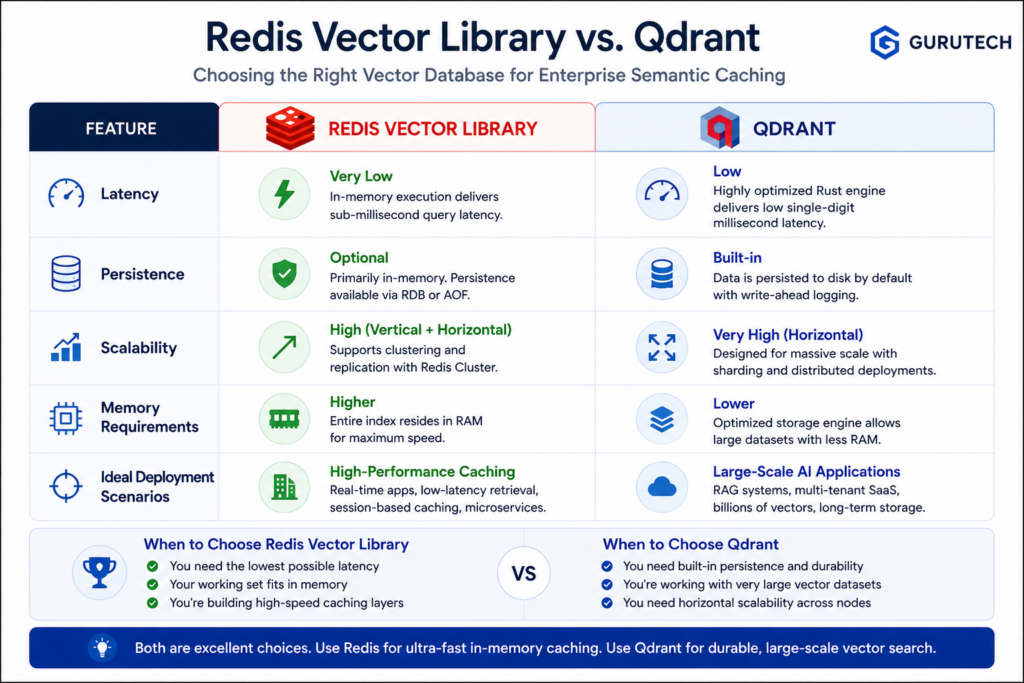
At a high level, both Redis and Qdrant can support semantic caching. Both can store vector embeddings. Both can perform similarity searches. Both can scale to support enterprise workloads.
The difference lies in how they approach performance, persistence, infrastructure management, and large-scale operational requirements.
For many organizations, the decision is not about which platform is universally better. It is about selecting the right platform for the workload.
Some teams prioritize microsecond-level response times. Others prioritize persistence, storage efficiency, or multi-terabyte vector collections. Understanding those tradeoffs is essential before deploying a production semantic cache.
Redis Semantic Cache Architecture
Redis has been a cornerstone of enterprise caching for years. Its reputation was built on speed. Long before AI became mainstream, Redis powered session storage, API caching, leaderboards, rate limiting, and high-performance application acceleration.
That heritage makes Redis a natural candidate for semantic caching.
Modern Redis deployments can support Redis Vector Search and vector similarity search through vector indexing capabilities and libraries such as RedisVL. Instead of storing only key-value pairs, Redis can store embeddings and perform nearest-neighbor searches against those vectors.
The resulting architecture looks similar to traditional Redis caching but adds a semantic search layer.
User Query
    ↓
Embedding Model
    ↓
Redis Vector Index
    ↓
Similarity Search
    ↓
Cache Hit or Miss
    ↓
LLM Fallback
The primary advantage of Redis is speed. Because Redis is designed around in-memory operations, semantic lookups can be extremely fast.
This is particularly valuable for:
- Customer support assistants
- Real-time chat applications
- Agent orchestration systems
- Low-latency API gateways
- Interactive AI copilots
In these scenarios, every millisecond matters. A semantic cache should reduce latency, not introduce additional overhead.
Redis also provides mature operational tooling. Many enterprise infrastructure teams already know how to deploy, monitor, secure, and scale Redis clusters.
This familiarity lowers adoption friction. Engineering teams can often extend existing Redis infrastructure rather than introducing a completely new platform.
Strengths of Redis Semantic Caching
- Extremely low latency
- Well-established enterprise ecosystem
- Mature clustering capabilities
- Simple cache expiration management
- Excellent for frequently accessed responses
- Strong operational familiarity
Limitations of Redis Semantic Caching
- Memory costs increase as vector collections grow
- Very large embedding collections can become expensive
- Long-term historical cache storage may not be cost-effective
- Storage efficiency is often lower than specialized vector databases
For many organizations, Redis works best when the semantic cache is focused on recent, high-value, frequently reused responses rather than becoming an unlimited long-term archive.
Qdrant and Persistent Vector Engines
While Redis evolved from traditional caching into vector search, Qdrant was designed specifically around vector workloads.
Qdrant belongs to the broader category of vector databases that support similarity search, metadata filtering, embedding storage, and semantic retrieval at scale.
Unlike purely memory-focused architectures, Qdrant is designed to manage large persistent collections efficiently.
This distinction becomes important when semantic caching expands beyond a few thousand entries.
Many enterprise AI deployments eventually accumulate:
- Millions of cached prompts
- Multiple departments
- Multiple languages
- Multiple tenants
- Years of historical interactions
- Large metadata payloads
At that scale, storage efficiency becomes a first-class architectural concern.
A Qdrant-based semantic cache typically looks like this:
User Query
    ↓
Embedding Model
    ↓
Qdrant Collection
    ↓
Similarity Search
    ↓
Metadata Filtering
    ↓
Cache Hit or Miss
    ↓
LLM Fallback
Qdrant’s metadata filtering capabilities are particularly valuable for enterprise AI systems.
Rather than searching across all cached responses, the system can limit searches to:
- Specific departments
- Specific tenants
- Specific regions
- Specific knowledge base versions
- Specific user roles
- Specific document collections
This improves both security and relevance.
For organizations already using vector databases for retrieval-augmented generation, adding semantic caching to the same platform can also simplify architecture.
Rather than maintaining separate infrastructure stacks, the organization can leverage existing vector search capabilities for both retrieval and caching.
If your team is already evaluating vector infrastructure, our guide on vector databases for AI memory explores these architectural considerations in greater detail.
Strengths of Qdrant Semantic Caching
- Designed specifically for vector workloads
- Persistent storage
- Efficient handling of large collections
- Advanced metadata filtering
- Strong fit for RAG ecosystems
- Excellent scalability characteristics
Limitations of Qdrant Semantic Caching
- May introduce slightly higher latency than pure memory approaches
- Additional operational complexity for teams unfamiliar with vector databases
- Potentially unnecessary for smaller cache deployments
Redis vs. Qdrant: Which Platform Should You Choose?
The answer depends on workload characteristics rather than vendor preference.
| Category | Redis | Qdrant |
|---|---|---|
| Latency | Excellent | Very Good |
| Storage Scale | Moderate | Excellent |
| Persistence | Available | Native Strength |
| Metadata Filtering | Good | Excellent |
| Operational Familiarity | Excellent | Moderate |
| Large Semantic Archives | Less Ideal | Excellent |
| Real-Time Chat Applications | Excellent | Very Good |
| Massive Enterprise Knowledge Systems | Good | Excellent |
Many mature organizations ultimately deploy both.
A common pattern is:
- Redis for hot semantic cache entries
- Qdrant for long-term semantic storage
- Automatic promotion and demotion policies
This mirrors traditional infrastructure architectures where hot data resides in memory and colder data resides in persistent storage.
Cache Expiration and Invalidation Strategies
One of the biggest mistakes in semantic caching is assuming that all responses remain valid forever.
Enterprise knowledge changes constantly.
- HR policies evolve
- Pricing changes
- Compliance requirements update
- Documentation revisions occur
- Support procedures change
- Products receive new features
If semantic caches are not managed properly, organizations risk serving stale information.
This is why every semantic cache requires a cache invalidation strategy.
Time-Based TTL
The simplest approach is time-to-live expiration.
Examples:
- Password reset instructions: 30 days
- Product feature explanations: 7 days
- Legal guidance: 24 hours
- Pricing information: 12 hours
- Outage communications: 1 hour
The goal is to align cache lifetime with information volatility.
Knowledge Base Versioning
Many enterprise systems attach a knowledge base version identifier to every cached response.
When documentation is updated, all cache entries associated with the old version become invalid automatically.
This prevents stale content from surviving long after source documents have changed.
Event-Driven Invalidation
More advanced systems trigger cache invalidation directly from business events.
- Policy updated
- Product launched
- Compliance document revised
- Knowledge article retired
- Security bulletin released
Whenever one of these events occurs, associated semantic cache entries are removed or regenerated.
Designing Metadata for Enterprise Semantic Caching
The vector itself is only part of the cache record.
A production semantic cache entry typically includes:
{
  "embedding": [...],
  "prompt": "...",
  "response": "...",
  "tenant_id": "enterprise-01",
  "department": "support",
  "language": "en",
  "knowledge_version": "2026.06",
  "created_at": "...",
  "expires_at": "...",
  "model": "gpt-4.1",
  "approval_status": "approved"
}
This metadata becomes critical for governance, filtering, security, and cache accuracy.
Without metadata constraints, two semantically similar questions from different business contexts could accidentally share responses.
That is acceptable in a public FAQ bot. It is unacceptable in regulated enterprise environments.
Code-Level Design: Building a Semantic Cache Node
The following simplified Python pseudo-code demonstrates a common semantic cache pattern.
SIMILARITY_THRESHOLD = 0.92

def process_query(user_query):

    embedding = create_embedding(user_query)

    match = vector_db.search(
        embedding=embedding,
        top_k=1
    )

    if match:
        similarity = match.score

        if similarity >= SIMILARITY_THRESHOLD:

            if current_time() < match.expires_at:

                return {
                    "cache_status": "hit",
                    "similarity": similarity,
                    "response": match.response
                }

    llm_response = generate_llm_response(user_query)

    vector_db.store(
        embedding=embedding,
        response=llm_response,
        expires_at=calculate_ttl(user_query)
    )

    return {
        "cache_status": "miss",
        "response": llm_response
    }
This example is intentionally simplified, but it demonstrates the core decision flow that drives most semantic cache implementations.
Advanced Multi-Level Semantic Cache Design
As enterprise AI deployments mature, organizations often introduce multiple cache layers.
Layer 1: Exact Match Cache
      ↓
Layer 2: Semantic Cache
      ↓
Layer 3: Retrieval Cache
      ↓
Layer 4: LLM Generation
      ↓
Layer 5: Human Escalation
This layered approach maximizes efficiency while maintaining accuracy.
Simple repeated requests are resolved immediately. Similar requests leverage semantic reuse. Retrieval results can be reused when appropriate. Only truly novel requests consume full model resources.
As AI usage grows, these layered architectures often become the difference between sustainable scaling and runaway token costs.
Semantic Caching for RAG Systems
Semantic caching becomes even more valuable when combined with retrieval-augmented generation. In a RAG system, the LLM call is only one part of the cost. Organizations often build these systems on top of vector database infrastructure that powers retrieval and semantic search. The system may also perform document retrieval, embedding search, reranking, context assembly, citation formatting, and final response generation.
That means repeated questions do not only waste completion tokens. They also repeat the entire retrieval workflow.
A semantic cache can reduce this overhead in several ways:
- Cache the final generated answer
- Cache retrieved document chunks
- Cache reranked context sets
- Cache common prompt assemblies
- Cache approved responses for high-volume questions
For example, if employees frequently ask about the same travel reimbursement policy, the system should not repeatedly retrieve the same policy document, assemble the same prompt, and regenerate the same explanation. A semantic cache can intercept that pattern and return a trusted answer faster.
However, RAG caching requires careful invalidation. If the underlying source document changes, cached answers must be refreshed or removed. That is why knowledge base versioning is essential for production systems.
Semantic Caching for Multi-Agent AI Systems
Multi-agent AI systems introduce another layer of repeated computation. A user request may pass through a router agent, research agent, retrieval agent, summarization agent, validation agent, and final response agent.
Without caching, each agent may repeat work that has already been performed in previous sessions.
Semantic caching can be applied at multiple points inside a multi-agent system:
Shared semantic memory becomes even more valuable when combined with human-in-the-loop AI workflows where human approvals, governance checkpoints, and reusable reasoning paths can be cached and reused safely.
- Router decisions
- Research summaries
- Retrieved context bundles
- Tool call outputs
- Validated final responses
- Human-approved response templates
This is especially useful when agents perform expensive reasoning steps. If a research agent has already summarized a vendor policy, product document, or compliance rule, the system may be able to reuse that intermediate result when another user asks a semantically similar question.
The key is to avoid caching blindly. Not every agent output should be reused. Some outputs depend heavily on the user, time, permissions, or current data. A mature system treats semantic caching as a controlled reuse layer, not as a shortcut around governance.
Observability Metrics for Semantic Cache Performance
A semantic cache should be measured continuously. Without observability, teams may know that caching exists, but they will not know whether it is improving cost, latency, or user experience.
The most important metrics include:
- Cache hit rate: Percentage of requests served from cache.
- Token savings: Estimated prompt and completion tokens avoided.
- Latency reduction: Difference between cached and uncached response time.
- False positive rate: Cases where the cache returned a response that was too loosely matched.
- False negative rate: Cases where the system missed a valid reusable answer.
- Threshold performance: How similarity thresholds affect accuracy and savings.
- TTL expiry patterns: How often cache entries expire before reuse.
- Top repeated intents: Which questions generate the most savings.
These metrics connect semantic caching back to broader AI token observability. The dashboard identifies repetitive cost patterns. The semantic cache reduces them. The next dashboard cycle then confirms whether the architecture is working.Many organizations only discover these optimization opportunities after implementing a comprehensive AI token observability strategy that exposes duplicate prompts, repeated completions, and high-cost workflows.
Security and Compliance Considerations
Semantic caching introduces a powerful reuse mechanism. That also means it must be secured carefully.
The most important enterprise concern is context leakage. A cached response generated for one user, department, tenant, or permission level should not be served to another user who lacks the same access rights.
To prevent this, semantic cache lookups should include metadata filters. The system should not only ask, “Is this query similar?” It should also ask, “Is this cached response allowed for this user and this context?”
Important safeguards include:
- Tenant isolation
- Role-based filtering
- Department-level namespaces
- PII redaction before storage
- Encryption at rest
- Audit logging
- Short TTLs for sensitive answers
- Approval workflows for reusable responses
Semantic caching should also be protected against cache poisoning. If malicious or low-quality responses are stored, future users may receive those answers repeatedly. This is why high-risk systems should apply validation before saving responses into the cache.
For regulated industries, final-answer caching may not always be appropriate. A safer pattern is to cache retrieval results, approved snippets, or human-reviewed answer templates instead of full generated completions.
Common Failure Modes in Semantic Caching
Semantic caching is powerful, but it is not magic. Poor implementation can create accuracy, governance, and user trust problems.
1. Similarity Threshold Too Low
If the threshold is too loose, the system may treat related but different questions as identical. This can produce confident but incorrect cached answers.
For example, “How do I reset my password?” and “How do I reset another employee’s password?” are similar, but they may require very different permission checks and security instructions.
2. Similarity Threshold Too High
If the threshold is too strict, the cache rarely hits. The architecture remains technically correct but fails to produce meaningful cost savings.
3. Stale Cached Responses
A cached answer that was correct last month may be wrong today. This is especially dangerous for pricing, compliance, legal, policy, tax, and security-related content.
4. Missing Metadata Filters
Without metadata filtering, semantic caching can accidentally cross boundaries between tenants, departments, languages, regions, or permission levels.
5. Caching Unapproved AI Outputs
If every generated response is automatically cached, the system may preserve hallucinations, formatting errors, or incomplete answers. A production system should apply validation rules before caching high-impact responses.
ROI Modeling: How Semantic Caching Reduces Token Spend
The business case for semantic caching is straightforward: repeated intent should not produce repeated full-price model calls.
Consider a customer support AI system with the following monthly usage:
- 500,000 user queries per month
- Average uncached request cost: $0.01
- Total monthly LLM cost: $5,000
- Semantic cache hit rate: 35%
If 35% of requests are served from cache, the system avoids 175,000 full LLM calls per month. Even after accounting for embedding and vector database costs, the monthly savings may be significant.
In larger enterprise environments, the numbers become more dramatic. A system processing millions of AI requests per month may save tens of thousands of dollars annually by avoiding repeated prompts, repeated retrieval, and repeated completion generation.
The ROI is not limited to API spend. Semantic caching also improves:
- Response speed
- User satisfaction
- System throughput
- Rate-limit resilience
- Model provider dependency
- Infrastructure predictability
That combination makes semantic caching one of the most practical AI cost optimization patterns for production systems.
Best Practices for Enterprise Semantic Caching AI
- Start with low-risk, high-volume use cases.
- Use strict metadata filters for tenant, role, region, and knowledge version.
- Begin with a conservative similarity threshold and tune from real data.
- Apply TTL based on content volatility.
- Do not cache sensitive or highly personalized answers without safeguards.
- Track cache hit rate, false positives, token savings, and latency reduction.
- Use human approval for reusable answers in high-risk domains.
- Separate hot cache storage from long-term vector storage when scale increases.
- Combine semantic caching with token observability dashboards.
- Review cache performance regularly as prompts, users, and content evolve.
FAQ: Enterprise Semantic Caching AI
What is enterprise semantic caching AI?
Enterprise semantic caching AI is an architecture pattern that stores and reuses AI responses based on meaning rather than exact text. It uses embeddings and vector similarity search to identify when a new user query is close enough to a previous query to reuse a cached response.
How does semantic caching reduce token usage?
Semantic caching reduces token usage by avoiding unnecessary LLM calls. When a similar query has already been answered, the system can return the cached response instead of sending the full prompt, retrieved context, and completion request to the model again.
Is semantic caching the same as traditional Redis caching?
No. Traditional caching usually depends on exact keys or exact string matches. Semantic caching compares vector embeddings to determine whether two differently worded prompts have similar meaning.
Should I use Redis or Qdrant for semantic caching?
Redis is a strong choice for ultra-low-latency hot cache entries. Qdrant is a strong choice for larger persistent vector collections with advanced metadata filtering. Some enterprise systems use both: Redis for hot cache lookups and Qdrant for long-term semantic storage.
What similarity threshold should I use?
There is no universal threshold. Many teams begin testing around 0.90 to 0.94 for low-risk knowledge assistant use cases, then adjust based on accuracy, false positives, and cache hit rate. High-risk domains may require stricter thresholds or human-approved cache entries.
Can semantic caching cause wrong answers?
Yes. If the similarity threshold is too low, the cache may return an answer for a related but different question. This is why production systems need metadata filters, TTL policies, validation, and observability.
Is semantic caching safe for regulated industries?
It can be, but the design must be more careful. Regulated environments should use strict tenant isolation, access controls, audit logs, short TTLs, and approval workflows. In some cases, caching retrieved context or approved snippets is safer than caching full LLM responses.
Does semantic caching work with RAG?
Yes. Semantic caching can improve RAG systems by caching final answers, retrieved document chunks, reranked context sets, or approved response templates. The main requirement is reliable invalidation when source documents change.
What should not be cached?
Highly personalized, sensitive, time-dependent, legally risky, or user-specific responses should not be cached without strong safeguards. Examples include financial recommendations, medical guidance, legal interpretations, account-specific data, and security-sensitive instructions.
Conclusion: Observability Shows the Waste, Semantic Caching Removes It
Enterprise AI teams often begin cost optimization by building dashboards. That is the correct first step. You cannot control token spend without visibility into prompts, completions, model usage, latency, and repeated workflows.
But observability is only half the battle.Strong token observability helps teams identify repetitive workflows that are ideal candidates for semantic caching.
System Scaling: While optimizing vector database queries stabilizes your infrastructure costs, the true challenge lies in managing the compute loops that generate them. Discover how to build and control these complex systems in our complete guide to multi agent orchestration frameworks.
If a dashboard shows that thousands of users are asking variations of the same question, the architecture should not continue paying full price for every variation. The system should recognize repeated intent and reuse trusted answers when it is safe to do so.
That is the value of enterprise semantic caching AI. It gives organizations a practical way to reduce token usage, accelerate response times, and scale AI systems without letting costs grow linearly with traffic.
The strongest implementations are not reckless shortcuts. They combine embeddings, vector similarity, Redis or Qdrant storage, metadata filtering, TTL policies, approval workflows, and observability. They treat semantic caching as part of the enterprise AI platform layer.