
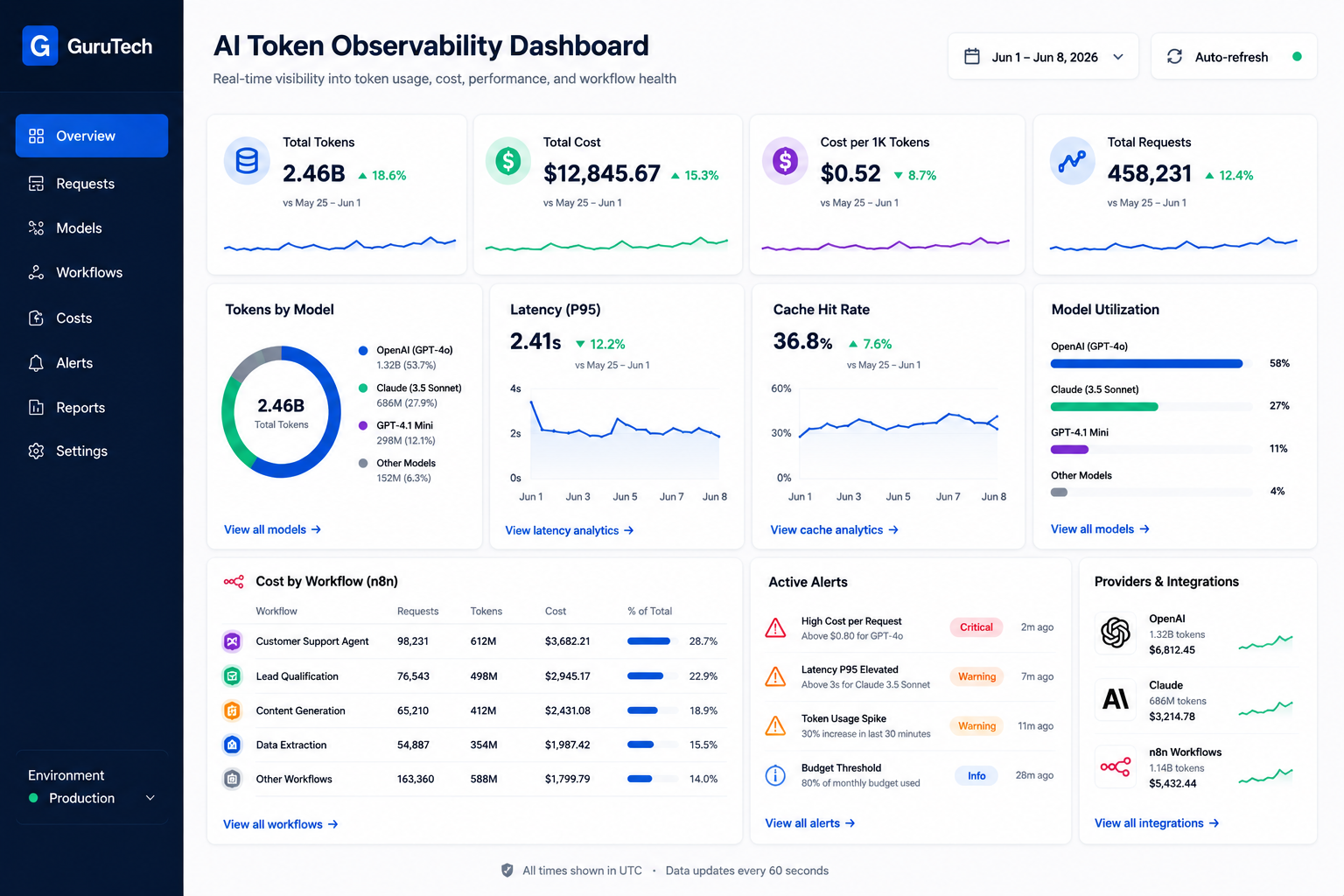
Production AI systems burn through thousands of dollars in token costs each month. Most engineering teams have no visibility into where that spend goes or why certain requests cost 10x more than others.
An AI token observability dashboard gives platform teams real-time telemetry on token consumption, model performance, latency percentiles, and cost attribution across every agent, workflow, and user session in your infrastructure. Without this layer of instrumentation, you’re deploying blind.
The challenge goes beyond cost tracking. Multi-agent systems make dozens of LLM calls per user request, each with different context windows, tool invocations, and reasoning chains.
When a workflow fails or produces poor output, you need trace-level visibility to understand which model made which decision and why.
Enterprise AI observability platforms now provide token usage tracking, latency monitoring, and tool-use success metrics that help teams debug agent behavior and optimize model routing.
This guide walks through building production-grade observability for AI systems. You’ll learn how to instrument telemetry pipelines, compare leading observability platforms, implement cost governance controls, and design tracing architectures for complex multi-agent workflows running in n8n or custom orchestration layers.
Key Takeaways
- AI token observability dashboards provide real-time telemetry on token costs, latency, and model performance across production systems
- Enterprise teams need trace-level visibility into multi-agent workflows to debug failures and attribute costs accurately
- Modern observability stacks combine token tracking, cost governance, and compliance tooling to manage AI systems at scale
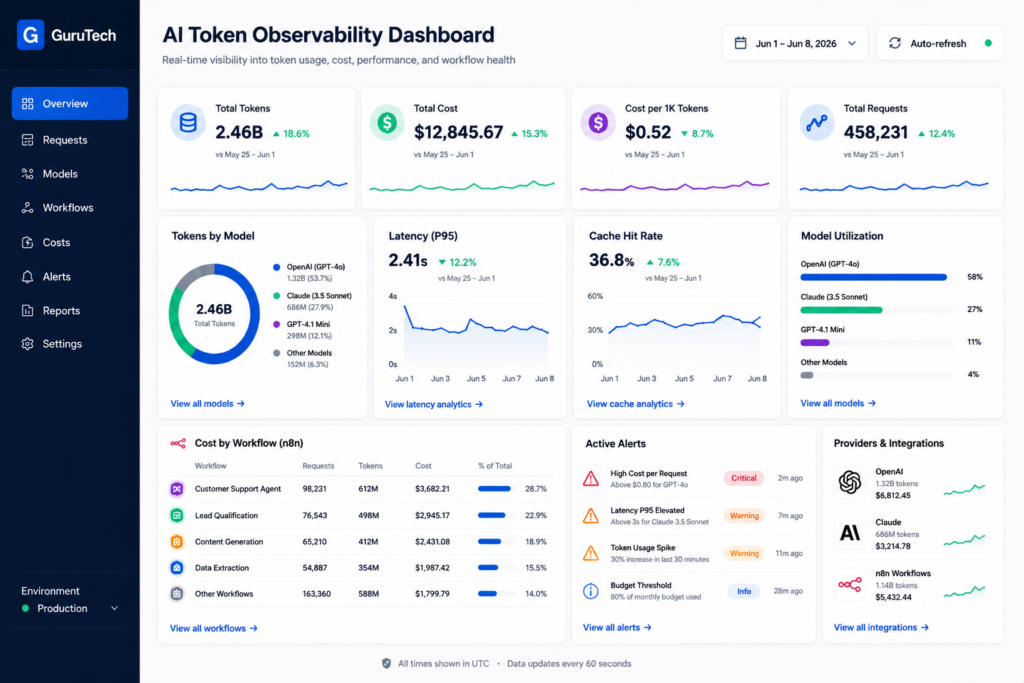
Defining AI Token Observability
AI token observability tracks how language models consume tokens across requests, sessions, and workflows to measure cost, performance, and system behavior in production environments.
Unlike traditional application monitoring, it captures token-level telemetry that reveals model efficiency, prompt engineering effectiveness, and real-time resource allocation across OpenAI, Anthropic Claude, and other LLM providers.
Understanding Tokens as an Operational Metric
Tokens represent the fundamental unit of computation in large language models. Every API call to GPT-4, Claude, or other LLMs consumes input tokens for prompts and output tokens for responses.
Your production costs, latency, and throughput directly correlate to token consumption patterns.
Token telemetry differs from standard application metrics. A single user request might trigger multiple LLM calls through RAG pipelines, agent chains, or workflow orchestration platforms like n8n.
Each step consumes tokens at different rates depending on context window size, retrieval chunks, and tool-calling overhead.
Consider a customer support agent powered by Claude. A simple question might consume 500 input tokens for context plus vector database results, then generate 300 output tokens for the response.
If your RAG system retrieves 10 document chunks at 200 tokens each, you’ve consumed 2,800 tokens before the model even responds.
Production systems require granular tracking across these dimensions:
- Per-request attribution: Which API endpoint or workflow triggered token usage
- Model-specific consumption: GPT-4 Turbo vs Claude Opus cost structures
- Agent orchestration overhead: Tokens spent on planning, tool calls, and reflection
- Context window utilization: How much of the available token limit each request uses
Why Traditional Monitoring Tools Fall Short
Prometheus, Grafana, and APM platforms track HTTP requests, latency, and error rates. They cannot parse LLM request payloads to extract token counts, prompt templates, or model responses.
Your existing observability stack shows an API call succeeded in 2.3 seconds but provides no visibility into whether it consumed 1,000 or 10,000 tokens.
Real-time observability for AI systems requires purpose-built instrumentation. OpenTelemetry traces capture request flows but don’t automatically log token usage, completion quality, or cost attribution.
You need middleware that intercepts LLM API calls, extracts telemetry, and correlates it with business context.
Traditional monitoring also misses AI-specific failure modes. A Claude API call might return HTTP 200 with a response that’s factually incorrect, off-topic, or truncated due to context limits.
Standard health checks pass while your AI feature degrades silently.
Enterprise AI platforms demand specialized observability tools. Langfuse provides prompt versioning and token tracking.
Helicone offers LLM gateway capabilities with cost dashboards. Arize Phoenix focuses on embedding drift and retrieval quality.
LangSmith combines tracing with evaluation workflows for agent debugging.
These platforms implement observability for AI by capturing:
- Full prompt and completion pairs for debugging
- Token breakdowns by input, output, and cached tokens
- Model parameters like temperature and max tokens
- Latency distribution across model providers
- Cost per request, user, or workflow execution
The Evolution from Cloud Observability to AI Observability
Cloud observability matured around infrastructure metrics, distributed tracing, and log aggregation. You monitor CPU, memory, network throughput, and service dependencies.
AI observability adds a semantic layer that tracks what models are doing, not just how infrastructure performs.
The shift parallels earlier transitions from server monitoring to APM to distributed tracing. Each abstraction layer required new tooling because existing metrics couldn’t answer emerging questions.
AI systems introduce non-determinism, token economics, and quality evaluation that infrastructure metrics cannot capture.
Your Kubernetes cluster might show healthy pods with normal CPU usage while your RAG pipeline silently degrades. Vector search returns less relevant chunks due to embedding drift.
Your LLM produces lower-quality responses because prompt templates don’t account for new document formats. Traditional monitoring remains green while user satisfaction drops.
LLM observability platforms address this gap by correlating infrastructure health with model behavior. A complete observability strategy includes:
| Layer | Traditional Metrics | AI-Specific Metrics |
|---|---|---|
| Infrastructure | CPU, memory, disk I/O | GPU utilization, vector DB query latency |
| Application | Request rate, error rate, p95 latency | Token throughput, cost per request, context window usage |
| Model Behavior | N/A | Response quality scores, embedding similarity, tool-call success rate |
| Business Impact | Conversion rate, revenue | Cost per conversation, tokens per active user, agent resolution rate |
Modern AI architectures require end-to-end visibility across model providers, vector databases like Pinecone or Weaviate, orchestration platforms, and human-in-the-loop approval systems.
Your real-time observability dashboard must surface token consumption alongside retrieval accuracy, agent decision traces, and cost attribution by team or project.
Factors Driving Production AI Costs
Production AI costs spiral when architectural decisions compound token consumption across multiple system layers.
Teams often underestimate how context management, agent behavior, and error handling patterns multiply LLM costs beyond initial projections.
Context Window Bloat
Your context window expands rapidly when you include entire document histories, conversation threads, and system prompts in every API call.
OpenAI’s GPT-4 Turbo charges $0.01 per 1,000 input tokens and $0.03 per 1,000 output tokens, meaning a single request with 100,000 tokens costs $1.00 before generating any response.
Context bloat accelerates when engineers append debugging information, metadata, and formatting instructions directly into prompts rather than using structured tool parameters.
A typical RAG implementation might retrieve 10 document chunks at 500 tokens each, adding 5,000 tokens per query even before your actual user question.
Common bloat patterns:
- Full conversation history in stateless API calls
- Redundant system instructions repeated across requests
- Uncompressed document retrievals from vector databases for AI memory
- Multiple few-shot examples that don’t improve accuracy
You can reduce context costs by implementing sliding window approaches that retain only recent messages. Compress retrieved documents through extractive summarization, and cache system prompts using provider-native features like Anthropic’s prompt caching.
Recursive Agent Loops
Agent frameworks like LangChain and LlamaIndex enable autonomous decision-making but create recursive patterns where agents call themselves or other agents iteratively.
Each iteration consumes tokens for the full context plus tool descriptions, function schemas, and execution results.
A single user request might trigger 15-20 agent iterations when planning, executing, and validating tasks. If each iteration uses 8,000 tokens at $0.01 per 1,000 tokens, your $1.20 in token costs far exceeds the value of simple queries that could execute in one call.
Recursive loop triggers:
- Ambiguous stopping criteria in agent configurations
- Tool selection logic that oscillates between options
- Validation steps that re-invoke planning agents
- Error recovery mechanisms that restart full workflows
LangSmith tracing reveals these patterns by showing iteration counts and token consumption per agent step. You should implement hard limits on recursion depth, use simpler models for routing decisions, and cache tool descriptions to reduce redundant token usage.
Retrieval-Augmented Generation Overhead
RAG architectures query vector databases before each LLM call, but the retrieved context often contains irrelevant chunks that inflate token counts without improving response quality.
A query returning 20 chunks at 400 tokens each adds 8,000 tokens even when only 3 chunks contain useful information.
Your embedding costs compound the problem. OpenAI’s text-embedding-3-large charges $0.13 per million tokens, and re-embedding documents during updates or experimenting with chunk sizes multiplies these costs across your entire knowledge base.
RAG overhead sources:
- High similarity threshold returning too many chunks
- Large chunk sizes that exceed optimal context density
- Metadata and formatting preserved in retrieved text
- Multiple retrieval passes for hybrid search strategies
Arize Phoenix observability shows which retrieved chunks contribute to final responses.
You should tune your retrieval top-k parameter based on actual relevance metrics, implement semantic chunking that respects document structure, and compress retrieved context through extractive summarization before LLM calls.
| RAG Parameter | Conservative | Standard | Aggressive | Token Impact |
|---|---|---|---|---|
| Chunks Retrieved | 3 | 8 | 15 | 1,200 → 3,200 → 6,000 |
| Chunk Size | 200 | 400 | 800 | Base cost multiplier |
| Reranking Passes | 0 | 1 | 2 | +15% per pass |
| Metadata Included | Minimal | Standard | Full | +20-40% per chunk |
Excessive Prompt Engineering
Your prompts grow as teams add instructions for edge cases, formatting requirements, and behavioral constraints discovered during testing.
Production prompts often exceed 2,000 tokens before including any user input or retrieved context.
Prompt engineering iterations multiply costs during development.
Testing 50 prompt variations against 100 test cases generates 5,000 API calls.
At 3,000 tokens per call with Claude 3.5 Sonnet ($3 per million input tokens), you spend $45 just on experimentation.
Prompt bloat indicators:
- System instructions exceeding 1,500 tokens
- Redundant constraints phrased multiple ways
- Detailed examples for rare edge cases
- JSON schema definitions duplicated in text
Helicone’s prompt version tracking shows which instructions actually influence model behavior.
You should extract static content into system message caching, remove redundant phrasing identified through ablation testing, and use structured outputs instead of text-based formatting instructions.
Retry Storms and Failed Executions
Your retry logic triggers token consumption even when requests fail.
Rate limits, timeouts, and validation errors cause automatic retries that double or triple token usage without producing usable outputs.
N8n workflows configured with aggressive retry policies can spiral costs during provider outages.
A workflow processing 1,000 documents might retry each failed request 5 times, turning a 3,000-token operation into 15,000 tokens across attempts before finally succeeding or exhausting retry limits.
Retry cost amplifiers:
- Exponential backoff starting too low
- No jitter causing synchronized retry storms
- Retrying non-transient errors like invalid schemas
- Circuit breakers not implemented across agent tools
| Failure Type | Should Retry | Token Waste | OpenTelemetry Signal |
|---|---|---|---|
| Rate Limit | Yes | Low | http.status_code=429 |
| Invalid JSON | No | High | llm.response.validation_error |
| Timeout | Yes | Medium | http.timeout=true |
| Content Filter | No | High | llm.content_filtered=true |
Grafana dashboards with OpenTelemetry traces show retry patterns and failure distributions.
Essential Metrics for AI Teams
Tracking AI token usage and operational metrics allows platform teams to control costs, detect performance issues, and maintain service quality across production AI systems.
Key metrics include token consumption patterns, per-api-call latency, error rates, and cost per call attribution that enable granular visibility into LLM behavior.
Input Tokens
Input tokens represent the number of tokens your application sends to the LLM provider with each request.
This includes your system prompts, user messages, retrieved context from vector databases, and any few-shot examples.
Tracking input token volume helps you identify expensive queries before they impact your budget.
A RAG system retrieving 10 documents at 500 tokens each generates 5,000 input tokens per request, which significantly increases cost per call compared to simple chat completions.
You should monitor input token distribution across different request types.
OpenAI’s GPT-4 charges approximately $0.03 per 1,000 input tokens, while Claude 3 Opus costs $0.015 per 1,000 tokens.
Breaking down input tokens by workflow type reveals which operations consume the most resources.
Set alerts when input tokens exceed expected thresholds.
If your typical request uses 2,000 tokens but suddenly jumps to 15,000, you’re likely pulling too much context or experiencing a prompt injection issue.
Output Tokens
Output tokens measure the length of responses generated by your LLM.
These tokens typically cost 2-3 times more than input tokens across most providers.
A verbose model response generating 1,500 tokens costs significantly more than a concise 300-token answer.
OpenAI charges $0.06 per 1,000 output tokens for GPT-4, making output optimization critical for cost management.
Monitor average output length by endpoint and use case.
Code generation workflows naturally produce longer outputs than classification tasks.
Establishing baselines helps you detect when models generate excessive or repetitive content.
Implement max_tokens parameters to cap response length for predictable workflows.
Setting appropriate limits prevents runaway generation while maintaining response quality.
Tools like LangSmith provide output token tracking across production traces.
Cached Tokens
Cached tokens represent portions of your prompts stored by the LLM provider for reuse across requests.
Anthropic’s Claude and OpenAI’s recent models support prompt caching, reducing costs by up to 90% for repeated context.
When you send the same system prompt or retrieved documents multiple times, caching stores these tokens server-side.
Subsequent requests reference the cached content instead of retransmitting and reprocessing it.
Track your cache hit rate to measure caching effectiveness.
A RAG system with stable document embeddings should achieve 70-85% cache hits for recurring queries.
Low hit rates indicate prompt variation that prevents cache reuse.
Calculate cached token savings by multiplying cache hits by the cost difference between cached and standard tokens.
Anthropic charges $0.30 per million cached write tokens but only $0.03 per million cached read tokens.
For a system processing 100 million tokens monthly with 80% cache hits, you save approximately $2,160 monthly compared to uncached requests.
Cost Per Request
Cost per request aggregates input tokens, output tokens, and cached token charges into a single metric per API call.
This metric provides immediate visibility into your most expensive operations.
Calculate cost per request by summing (input_tokens × input_price) + (output_tokens × output_price) + (cached_writes × cache_write_price) – (cached_reads × cache_savings).
Breaking this down by request type reveals which workflows drive spending.
Your customer support agent might average $0.03 per request while your code review agent costs $0.18 per request due to longer context windows and detailed outputs.
Understanding this distribution helps you optimize high-cost workflows first.
Platforms like Helicone automatically track cost per call across different models and providers.
Set budget alerts when daily spending exceeds thresholds or when individual requests cost more than expected maximums.
Cost Per Workflow
Cost per workflow tracks total spending for multi-step AI operations that involve multiple LLM calls, retrievals, and agent iterations.
This metric captures the true cost of complex processes.
A document analysis workflow might include embedding generation, similarity search, summarization, and fact-checking steps.
Each step consumes tokens, but only workflow-level tracking reveals the total cost.
In n8n workflows with multiple AI nodes, you need to aggregate costs across all LLM calls within a single execution.
A typical RAG workflow might cost $0.05 for embedding, $0.12 for generation, and $0.03 for validation, totaling $0.20 per workflow completion.
Monitor cost per workflow alongside success rates.
A workflow that costs $0.30 but fails 40% of the time actually costs $0.50 per successful execution when accounting for retries.
Time to First Token (TTFT)
Time to first token measures the latency between sending a request and receiving the first response token.
This metric directly impacts perceived responsiveness in streaming applications.
Users notice delays beyond 500ms, making TTFT critical for interactive experiences.
Claude 3.5 Sonnet typically delivers first tokens in 200-400ms, while GPT-4 Turbo averages 300-600ms depending on prompt complexity.
Monitor TTFT separately from total latency because it affects user experience differently.
A chat application with 300ms TTFT feels responsive even if the complete response takes 3 seconds.
Track TTFT percentiles rather than averages.
Your p95 TTFT reveals the experience for your slowest 5% of requests.
If p50 TTFT is 350ms but p95 is 2,100ms, some users experience significant delays that averages hide.
Latency
Per-api-call latency measures total time from request initiation to complete response delivery.
This includes network overhead, model processing time, and data transfer.
Production AI systems should maintain p95 latency under 5 seconds for most interactive use cases.
Latencies above 10 seconds often indicate oversized prompts, model throttling, or infrastructure issues.
Break down latency by component: embedding generation, vector search, LLM inference, and post-processing.
AI FinOps and Cost Governance
Token-level cost attribution connects infrastructure spend to business value by mapping every API call to users, workflows, and departments.
Enterprise teams need real-time token attribution combined with forecasting models and chargeback systems to prevent budget overruns.
Cost Attribution by User
You need to track which individual users or service accounts generate token consumption across your AI systems.
This requires instrumenting your authentication layer to pass user identifiers through to your observability pipeline alongside token counts and model selection data.
Implement user-level tracking by capturing identity metadata at the API gateway level.
When a request hits your OpenAI or Anthropic endpoint, your middleware should log the authenticated user ID, timestamp, model name, input tokens, output tokens, and total cost.
Tools like Langfuse and LangSmith automatically extract this data when you wrap your LLM calls with their SDKs.
For production systems running multiple models, you should maintain a cost mapping table that updates daily with current pricing:
| Model | Input Cost per 1M | Output Cost per 1M | Cached Input per 1M |
|---|---|---|---|
| GPT-4o | $2.50 | $10.00 | $1.25 |
| Claude 3.5 Sonnet | $3.00 | $15.00 | $0.30 |
| GPT-3.5-turbo | $0.50 | $1.50 | N/A |
Your observability dashboard should surface per-user spend over configurable time windows.
Set tiered budget alerts at 50%, 75%, and 90% thresholds to catch anomalous usage before monthly limits expire.
Cost Attribution by Workflow
Workflow-level attribution maps token spend to specific business processes like document summarization, customer support automation, or code generation pipelines.
You tag each inference request with a workflow identifier to understand which use cases drive the highest costs.
In n8n or similar orchestration platforms, you inject workflow metadata into your LLM node configurations.
When your RAG pipeline executes, it passes a workflow_id parameter through the entire chain—from vector database retrieval through LLM inference to response formatting.
Your AI cost observability tools aggregate spend by this identifier.
Track cost per session by grouping related requests within a single user interaction.
A customer support conversation might span five Claude API calls totaling 12,000 tokens at $0.36 per session.
Compare this against automation value to calculate ROI per workflow type.
Platform teams should implement semantic deduplication at the workflow level.
If your document processing pipeline sends identical chunks to the embedding model repeatedly, you waste compute budget on redundant operations.
Cost Attribution by Department
Department-level chargeback requires mapping user accounts or API keys to organizational units in your identity provider.
Your FinOps system queries this mapping to roll up individual user costs into department totals for monthly billing cycles.
Configure your observability stack to join user identity data with HR system exports containing department codes and cost centers.
Helicone and similar gateways support tagging requests with custom metadata fields that flow through to your data warehouse.
You can then aggregate spend using SQL queries grouped by department_id.
Implement cost tracking dashboards that show each team’s month-to-date burn rate against allocated budgets.
Engineering might receive $15,000 monthly for AI services while Marketing gets $5,000 based on projected usage patterns.
| Department | Monthly Budget | Current Spend | Projected EOMonth | Status |
|---|---|---|---|---|
| Engineering | $15,000 | $8,200 | $13,100 | On Track |
| Marketing | $5,000 | $4,600 | $6,300 | Over Budget |
| Product | $8,000 | $2,100 | $3,800 | Under Budget |
Your FinOps governance layer should enforce hard limits at the API gateway when departments exceed their allocations.
This prevents runaway agent systems from consuming the entire corporate AI budget.
Forecasting AI Spend
Forecasting models predict future token consumption based on historical usage patterns, seasonality factors, and planned feature releases.
You need at least 60 days of baseline data to build reliable projections with confidence intervals.
Apply time series analysis to your token consumption logs.
Extract daily aggregates for total tokens, unique users, and average tokens per request.
Use exponential smoothing or ARIMA models to project the next 30-90 days of spend assuming current growth rates continue.
Account for known inflection points like product launches or marketing campaigns that will drive increased API traffic.
If you plan to roll out an AI assistant to 5,000 additional users next quarter, multiply your per-user average by the expansion cohort to estimate incremental costs.
Your forecasting dashboard should display three scenarios: conservative (10th percentile), expected (50th percentile), and high (90th percentile) spend projections.
This helps finance teams understand budget risk exposure.
Monitor forecast accuracy by calculating mean absolute percentage error (MAPE) between predictions and actual spend.
Retrain your models monthly as usage patterns evolve with new features and model releases.
Chargeback Models for Enterprise Teams
Enterprise chargeback models allocate AI costs back to departments using actual token telemetry rather than estimates. Most organizations start with direct attribution for model usage and then distribute shared infrastructure costs such as vector databases, observability platforms, and caching layers proportionally.
The goal is not accounting complexity but visibility. Teams should be able to see spending by workflow, model, and business function, while finance can compare AI costs against delivered value. Monthly reports should include model usage, workflow costs, and trends rather than only raw token counts.
| Cost Component | Engineering | Marketing | Product | Total |
|---|---|---|---|---|
| LLM API Calls | $8,200 | $4,600 | $2,100 | $14,900 |
| Embedding and RAG Operations | $1,100 | $600 | $350 | $2,050 |
| Shared Observability Platform | $750 | $420 | $330 | $1,500 |
| Total Monthly Allocation | $10,050 | $5,620 | $2,780 | $18,450 |
A simple chargeback model like this gives finance teams a practical view of which groups are consuming AI infrastructure and whether that consumption is aligned with business value. It also helps engineering teams justify optimization work because savings can be tied directly to departments, workflows, or products.
The Modern AI Observability Stack
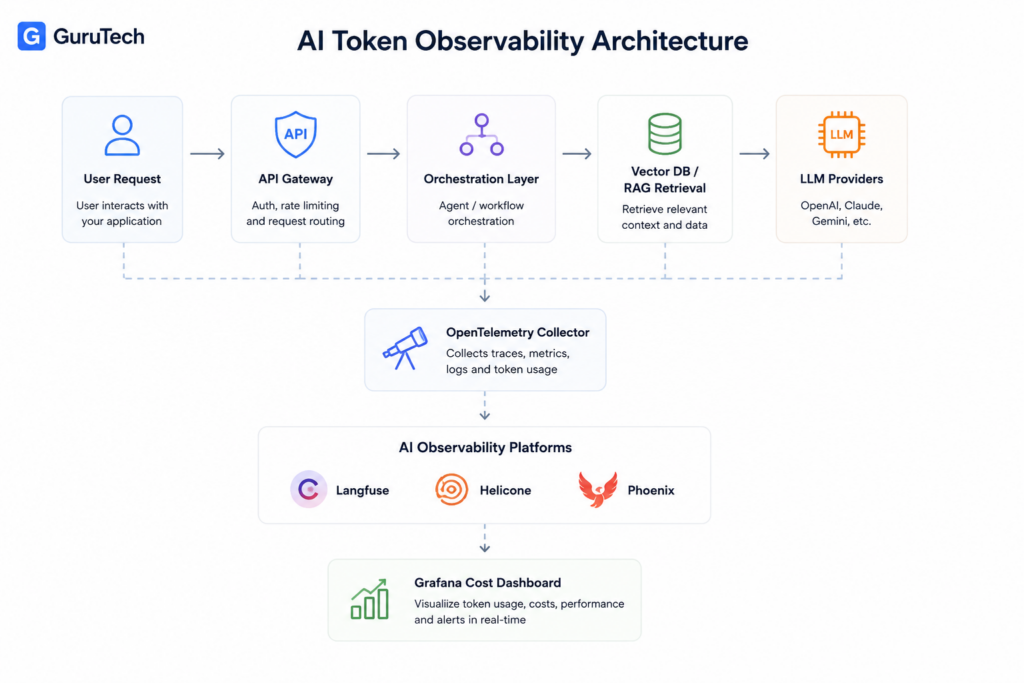
Modern production AI systems require specialized tooling to track token consumption, model performance, and cost attribution across distributed workflows.
The observability stack combines open standards like OpenTelemetry with specialized AI platforms that capture LLM-specific telemetry including prompt versioning, latency benchmarks, and per-request token costs.
OpenTelemetry
OpenTelemetry provides the foundational instrumentation layer for AI observability through its standardized approach to collecting traces, metrics, and logs.
You can instrument your LLM applications using OpenTelemetry SDKs to capture request lifecycles across model calls, vector database queries, and agent orchestration steps.
The framework supports semantic conventions for AI workloads that let you tag spans with model names, token counts, and prompt templates.
When you deploy AI agents on Kubernetes clusters, OpenTelemetry collectors aggregate telemetry from multiple pods and export data to your chosen backend.
Your instrumentation captures hierarchical trace structures where parent spans represent complete agent workflows and child spans track individual model invocations.
Each span includes attributes for model provider, temperature settings, max tokens, and actual consumption.
This granular data feeds into cost attribution systems that calculate expenses per user session or business unit.
OpenTelemetry integrations exist for major LLM frameworks including LangChain and LlamaIndex.
You configure exporters to send telemetry to platforms like Grafana, Prometheus, or commercial observability vendors without vendor lock-in.
Langfuse
This platform provides observability, tracing, cost visibility, and debugging capabilities for production AI systems. Use it to monitor token consumption, evaluate model performance, and investigate workflow behavior. The detailed comparison later in this article covers deployment, tracing, cost monitoring, and RAG-specific capabilities.
Helicone
This platform provides observability, tracing, cost visibility, and debugging capabilities for production AI systems. Use it to monitor token consumption, evaluate model performance, and investigate workflow behavior. The detailed comparison later in this article covers deployment, tracing, cost monitoring, and RAG-specific capabilities.
LangSmith
LangSmith from LangChain delivers end-to-end observability specifically designed for complex agent workflows and production LLM applications.
You integrate LangSmith through the LangChain framework or standalone SDKs that capture detailed execution traces.
The platform visualizes agent reasoning steps including tool selections, memory retrievals, and decision branches.
When your agents fail or produce unexpected outputs, you replay exact execution conditions in the debugging interface to identify root causes.
LangSmith preserves complete context including vector database queries, tool invocations, and intermediate reasoning chains.
Your evaluation framework runs automated tests against production traces using both rule-based validators and LLM-as-judge patterns.
You define test cases that check for specific behaviors, output formats, or compliance requirements.
The platform tracks evaluation metrics over time to detect quality regressions after model updates or prompt changes.
LangSmith’s dataset management features let you curate production examples into training sets for fine-tuning or few-shot prompting.
You export traces with human annotations to build supervised learning datasets.
The platform integrates with CI/CD pipelines to run evaluation suites before deploying new agent versions.
Arize Phoenix
This platform provides observability, tracing, cost visibility, and debugging capabilities for production AI systems. Use it to monitor token consumption, evaluate model performance, and investigate workflow behavior. The detailed comparison later in this article covers deployment, tracing, cost monitoring, and RAG-specific capabilities.
Grafana
Grafana provides visualization and alerting infrastructure for AI observability when combined with backends like Prometheus, Loki, or Tempo.
You build dashboards that display token consumption trends, request latencies, error rates, and cost metrics from your LLM infrastructure.
The platform supports custom panels for AI-specific metrics including tokens per second, cache hit rates, and model routing decisions.
You create dashboards that show real-time performance across multiple models and providers.
Your operations team monitors these views to detect anomalies or capacity issues.
Grafana’s alerting system evaluates metric thresholds and sends notifications through Slack, PagerDuty, or email.
You configure alerts for conditions like error rate spikes, latency degradation, or budget overruns.
The platform supports multi-dimensional alerting that triggers based on combinations of metrics and labels.
When you deploy on Kubernetes, Grafana integrates with cluster metrics to correlate AI performance with infrastructure health.
Comparative Analysis of Langfuse, Helicone, and Phoenix
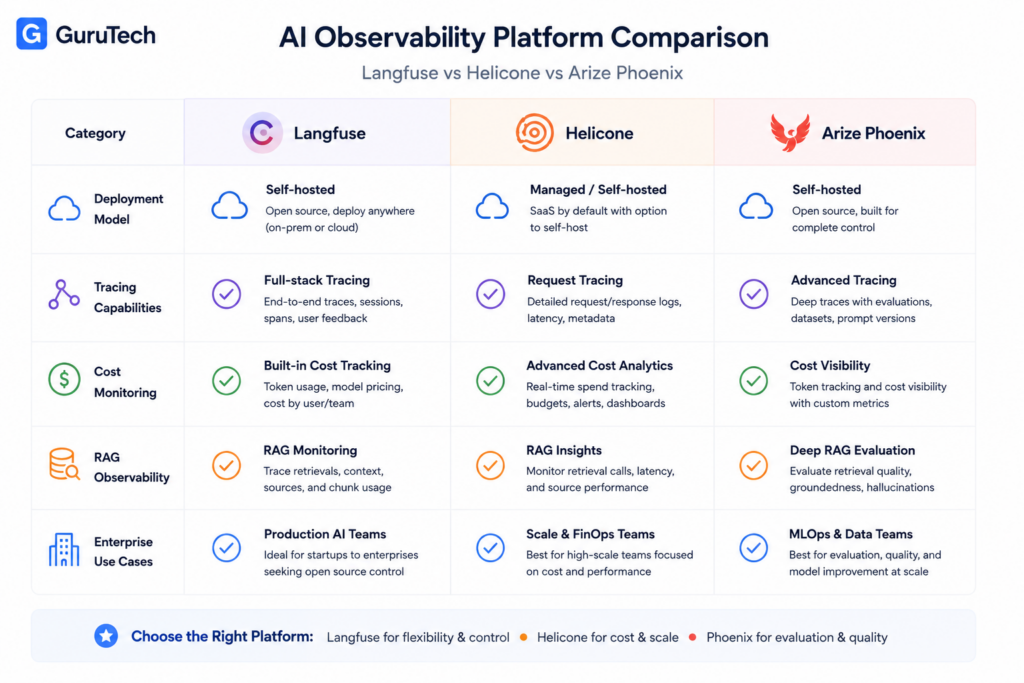
Langfuse operates as a full LLM engineering platform with prompt versioning and evaluation workflows, while Helicone positions itself as a gateway-first proxy with routing capabilities, and Phoenix focuses on OpenTelemetry-native tracing for AI systems.
Your choice depends on whether you need workflow management, request interception, or standards-based instrumentation.
Deployment Models
Phoenix runs as a lightweight collector that receives traces via OTLP over HTTP.
You can deploy it as a Docker container or Python package in your existing infrastructure.
It fits naturally into teams already running OpenTelemetry collectors because it acts as another OTLP endpoint.
Langfuse requires a heavier stack with Postgres for transactional data, ClickHouse for analytics, Redis or Valkey for caching and queuing, and S3-compatible storage for event persistence.
This architecture supports serious ingestion volume but demands more operational overhead.
The production teams shipping AI agents need to plan for database scaling, worker processes, and blob storage costs.
Helicone offers both cloud-hosted and self-hosted tiers.
The gateway model means you route all LLM traffic through Helicone’s proxy, which becomes part of your critical path.
You need health checks, autoscaling policies, and rollback procedures because gateway failures block all model requests.
| Platform | Infrastructure Requirements | Critical Path Risk | Self-Host Complexity |
|---|---|---|---|
| Phoenix | Collector + UI | Low (observability only) | Low |
| Langfuse | Postgres + ClickHouse + Redis + S3 + Workers | Low (observability only) | High |
| Helicone | Gateway proxy + observability backend | High (all requests pass through) | Medium |
Tracing Capabilities
Phoenix implements OpenInference semantic conventions on top of OpenTelemetry.
You instrument your application code with OpenTelemetry SDKs, emit spans with AI-specific attributes like prompt templates and token counts, and export them to Phoenix via OTLP.
This approach gives you distributed traces that connect retrieval steps, tool calls, and LLM invocations across services.
Langfuse supports both native SDKs and OpenTelemetry ingestion.
You can trace complex agent workflows where multiple models interact with tools and vector databases.
Langfuse stores traces in a format that links them to prompt versions, allowing you to see which prompt template version generated each production response.
Helicone captures traces automatically at the gateway level without code instrumentation.
Every request that passes through the proxy gets logged with input tokens, output tokens, latency, and cost.
This works well for simple use cases but struggles with multi-step agent workflows where you need to trace actions across different services.
Your tracing strategy should match your architecture.
If you run microservices with distributed agent workflows, you need span context propagation that OpenTelemetry provides.
If you make direct API calls to OpenAI or Anthropic without complex orchestration, gateway-level logging might suffice.
Cost Monitoring Features
All three platforms track token usage and calculate costs based on model pricing.
Phoenix displays token counts in span attributes and can aggregate costs across traces.
You need to configure model pricing tables manually because Phoenix focuses on tracing rather than financial analytics.
Langfuse maintains detailed cost tracking tied to users, sessions, and prompt versions.
You can attribute costs to specific customers or internal teams, which matters for chargeback models.
The ClickHouse backend enables fast aggregation queries across millions of traces to answer questions like “which prompt version costs the most per conversation?”
Helicone calculates costs at request time and stores them with each logged interaction.
The gateway position means it sees actual provider responses with exact token counts.
You can set budget alerts and rate limits at the gateway level to prevent cost spikes before they happen.
| Platform | Per-User Attribution | Per-Prompt Version | Budget Alerts | Real-Time Cost Calculation |
|---|---|---|---|---|
| Phoenix | Via custom attributes | Via custom attributes | No | No |
| Langfuse | Yes | Yes | Yes | Yes |
| Helicone | Yes | No | Yes | Yes |
RAG Observability
Phoenix excels at RAG observability because it treats retrieval as first-class spans in your trace tree.
You instrument your vector database queries with OpenTelemetry, emit spans with retrieved document IDs and similarity scores, and see them in context with the downstream LLM call.
This makes it easy to debug cases where bad retrieval caused poor generation.
Langfuse handles RAG workflows by letting you structure traces hierarchically.
You create a generation span that contains child spans for retrieval and reranking.
You can attach metadata like document chunks, embedding model versions, and retrieval parameters to understand what context the model received.
Helicone captures RAG workflows only if they pass through the gateway.
If your retrieval happens in application code before you call the LLM API, Helicone sees only the final generation request.
You lose visibility into which documents were retrieved or why certain chunks were selected.
For production RAG systems, you need to trace the full pipeline from query embedding through vector search, reranking, prompt construction, and generation.
Phoenix and Langfuse support this through span hierarchies.
Helicone requires you to structure requests carefully to maintain visibility.
Best Use Cases
Choose Phoenix when you already run OpenTelemetry instrumentation and want to add AI observability without changing your telemetry architecture.
It works well for teams with strong infrastructure practices who value portability over integrated product features.
Phoenix fits debugging workflows where you need to reproduce production issues by replaying trace data.
Select Langfuse when you need prompt management and evaluation workflows integrated with observability.
Engineering teams that iterate on prompts frequently benefit from version control and A/B testing capabilities.
Tracing Architectures for Multi-Agent Systems
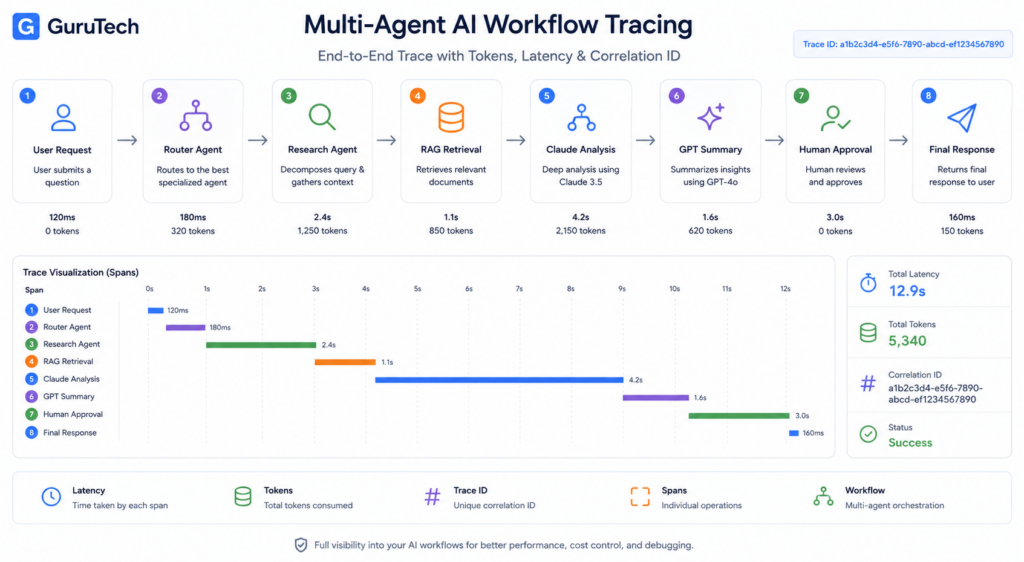
Multi-agent systems require structured tracing architectures that capture execution flows across agent boundaries, tool invocations, and model calls.
These architectures rely on hierarchical trace trees, correlation identifiers, and metadata tagging to reconstruct complex interactions between primary agents, sub-agents, and external services.
Traces
A trace represents the complete execution path of a request through your multi-agent system.
It starts when your application receives an initial user query and ends when the final response is returned.
Distributed tracing for agentic workflows tracks requests end-to-end across application workloads, MCP servers, and agent runtimes.
Each trace captures the full lifecycle of an agent interaction, including when the agent runtime initializes, which sub-agents are invoked, and how data flows between components.
Your trace architecture should capture:
- Agent initialization: When the primary agent starts processing
- Inter-agent handoffs: Transitions between specialist agents
- Tool execution: External API calls and database queries
- Model invocations: LLM requests with token counts
- Response assembly: How partial results combine into final outputs
Production implementations use OpenTelemetry to standardize trace collection.
Your agent monitoring platform receives these traces and reconstructs the complete execution timeline.
This becomes critical when debugging failures in multi-step workflows where an error in one agent cascades to others.
Spans
Spans are the individual units of work within a trace.
Each span represents a discrete operation with a start time, end time, and associated metadata.
Multi-agent tracing architectures define specific span types for AI systems.
The OpenTelemetry GenAI SIG standardizes these categories for agent observability.
| Span Type | Purpose | Key Attributes |
|---|---|---|
| Root Span | Entry point for the entire trace | trace_id, user_id, session_id |
| Agent Span | Individual agent execution | agent_name, agent_type, decision_logic |
| LLM Span | Model inference calls | model_name, prompt_tokens, completion_tokens, cost |
| Tool Span | External tool or API usage | tool_name, parameters, response_status |
| Retriever Span | Vector database queries | query_vector, top_k, similarity_scores |
| Embedding Span | Text-to-vector conversions | input_text_length, embedding_model, vector_dimensions |
Your span hierarchy mirrors your agent architecture.
A planning agent might create a parent span that spawns multiple child spans for research agents, analysis agents, and synthesis agents.
Each child span can itself spawn additional spans for LLM calls or tool usage.
Metadata Tags
Metadata tags enrich spans with contextual information needed for filtering, analysis, and cost attribution.
Tags transform raw execution data into actionable intelligence.
Building observable multi-agent systems requires capturing specialized signals like agent actions, tool usage, and response patterns.
Your tagging strategy should align with your operational needs.
Essential metadata tags include:
environment: production, staging, developmenttenant_id: For multi-tenant deploymentscost_center: Business unit or project codemodel_provider: OpenAI, Anthropic, Azure OpenAImodel_version: gpt-4-turbo, claude-3-opus-20240229agent_role: planner, executor, validatoruser_tier: free, premium, enterprise
Performance tags:
cache_hit: Whether response came from cachetoken_count: Input and output tokenslatency_ms: Response time in millisecondsretry_count: Failed attempts before success
Your AI token observability dashboard uses these tags to segment costs, identify performance bottlenecks, and track model usage patterns.
Tags enable you to answer questions like “How much did Claude API calls cost for the enterprise tier last month?” or “Which agent has the highest retry rate?”
Correlation IDs
Correlation IDs link related operations across distributed components in your agent system. They enable you to follow a single logical operation through multiple services, agents, and infrastructure layers.
Your primary correlation identifier is the trace_id generated when a request enters your system. This ID propagates to every span, log entry, and metric emission related to that request.
Additional correlation patterns:
conversation_id: Links multiple traces within a chat sessionworkflow_id: Connects traces across long-running multi-day processesparent_span_id: References the immediate parent operationagent_instance_id: Identifies specific agent containers or processes
When your orchestrator delegates tasks to sub-agents running in separate containers, correlation IDs ensure you can reconstruct the complete execution graph. Your agent logs include these identifiers so you can correlate trace data with structured log entries.
AI agent observability tools like Langfuse and Arize use correlation IDs to link traces with evaluation results. This enables you to identify which specific agent decisions led to poor outcomes.
Session Tracking
Session tracking aggregates multiple related traces into logical user interactions. A single chat session might generate dozens of traces as your agents process queries, maintain context, and execute multi-turn conversations.
Your session tracking implementation should capture:
Session metadata:
- Session start and end timestamps
- Total duration and active time
- Number of user messages
- Number of agent responses
- Unique agents involved
- Cumulative token usage
- Total cost per session
Context management:
Sessions in multi-agent systems maintain state across interactions. Your tracing architecture must capture when agents retrieve conversation history, update shared context, or access session-specific memory stores.
Implement session boundaries based on your application logic. Some systems define sessions by authentication tokens, others by conversation timeouts or explicit user resets.
Your session_id should persist across page reloads and reconnections. Live flow visualization tools display active sessions in real-time, showing which agents are processing requests and how context flows between them.
This becomes essential when debugging stuck workflows or investigating why an agent made unexpected decisions.
Example Trace Tree
A practical trace tree should make the full cost and latency path visible from the user request to the final response. The goal is not only to see that an AI workflow succeeded, but to understand which span consumed the most tokens, which tool added latency, and which model generated the final output.
TRACE: enterprise_ticket_resolution_workflow
├── SPAN: webhook_received
│   ├── latency_ms: 42
│   └── user_tier: enterprise
├── SPAN: classify_ticket_intent
│   ├── model: gpt-4o-mini
│   ├── input_tokens: 620
│   ├── output_tokens: 82
│   └── cost_usd: 0.0007
├── SPAN: retrieve_policy_context
│   ├── vector_db: Qdrant
│   ├── top_k: 5
│   ├── retrieved_chunks: 5
│   └── latency_ms: 184
├── SPAN: generate_response
│   ├── model: claude-3-5-sonnet
│   ├── input_tokens: 4,850
│   ├── output_tokens: 740
│   ├── cache_hit: true
│   └── cost_usd: 0.025
├── SPAN: validate_json_and_policy
│   ├── validation_status: passed
│   └── retry_count: 0
└── SPAN: human_approval_gate
    ├── approval_status: approved
    └── approval_latency_seconds: 96
This structure gives platform teams a single diagnostic view. If costs spike, they can inspect token-heavy generation spans. If users complain about slow responses, they can isolate retrieval latency, model latency, or human approval latency. If compliance teams need an audit trail, the same trace shows who triggered the workflow, which model was used, and what data sources were involved.
Monitoring AI Workflows in n8n
n8n workflows require granular observability at the node level to track token consumption across model calls, measure retrieval performance in RAG pipelines, and attribute costs to specific orchestration paths.
Production deployments demand real-time visibility into which nodes consume tokens, how routing decisions impact spending, and where bottlenecks occur in multi-step AI operations.
Tracking Token Usage by Node
You need to instrument individual nodes in your n8n workflows to capture token metrics at the execution level. Each AI model node—whether calling OpenAI’s GPT-4, Anthropic Claude, or other LLMs—should emit prompt tokens, completion tokens, and total token counts as execution metadata.
The AI Token Tracking Node for n8n provides middleware capabilities that sit between your workflow logic and AI language models.
This custom node intercepts requests and responses to extract token usage data without modifying your existing workflow structure. You deploy it as a wrapper around standard AI nodes to automatically collect consumption metrics.
For enterprise deployments, you should store this node-level data in structured tables.
The AI model usage dashboard template demonstrates a production pattern using n8n Data Tables with fields for sessionId, chatInput, output, promptTokens, completionTokens, totalTokens, modelName, and executionId.
This schema enables cost attribution by workflow execution, session tracking across multi-turn conversations, and model-specific analysis.
You must configure sub-workflow execution support to track token usage in nested workflow calls. When your main workflow triggers sub-workflows for specialized tasks—such as document processing, entity extraction, or validation—token consumption in those child workflows needs to roll up into parent execution metrics for accurate cost accounting.
Monitoring Retrieval Operations
RAG workflows in n8n require dedicated monitoring for vector database queries and document retrieval operations. You should track retrieval latency, the number of documents fetched per query, embedding token costs, and relevance scores to identify performance degradation.
Your monitoring infrastructure must capture embedding generation separately from LLM completion calls.
When you send user queries to OpenAI’s text-embedding-3-small or similar models, those API calls consume tokens at different pricing tiers than chat completions.
Create separate metric streams for embedding operations versus generation operations to prevent cost attribution errors.
Implement tracking for chunk retrieval counts and context window utilization.
If your RAG system retrieves 10 document chunks but only 6 fit within the model’s context window after prompt construction, you’re incurring retrieval costs without proportional value.
Monitor the ratio of retrieved chunks to utilized chunks across executions.
You need to measure semantic search performance metrics including query embedding time, vector similarity computation duration, and document fetch latency.
Platform teams should establish SLOs for retrieval operations—such as p95 latency under 200ms for vector queries—and alert when degradation occurs.
Tracking Model Routing Decisions
Multi-model workflows require observability into routing logic that directs requests to different LLMs based on complexity, cost, or capability requirements. You must track which percentage of requests route to each model and the resulting cost distribution.
Implement decision point tracking in your n8n workflows where routing logic executes.
When a workflow evaluates request complexity and routes simple queries to GPT-3.5-turbo while sending complex reasoning tasks to Claude Sonnet, you need metrics on routing frequency and accuracy.
Tag each execution with the routing decision criteria—such as simple_query, complex_analysis, or code_generation—to analyze model selection patterns.
Your agent tracking system should capture model routing as a distinct action type.
Record the input characteristics that triggered routing, the selected model, execution time, token consumption, and output quality indicators.
This data enables you to optimize routing logic by identifying cases where expensive models process simple requests or budget models fail on complex tasks.
Monitor fallback patterns when primary models encounter rate limits or errors.
If your workflow falls back from Claude to GPT-4 due to availability issues, track fallback frequency, latency impact, and cost differences.
Excessive fallback activity indicates infrastructure problems or quota misconfigurations.
Measuring Workflow Costs
You must implement real-time cost calculation across all AI operations in your n8n workflows.
The dashboard template approach uses a Model Price table storing promptTokensPrice and completionTokensPrice for each model, enabling dynamic cost computation as token prices change.
Cost Attribution Structure:
| Metric | Calculation | Example Value |
|---|---|---|
| Prompt Cost | promptTokens × promptTokensPrice | 139 tokens × $0.000003 = $0.000417 |
| Completion Cost | completionTokens × completionTokensPrice | 6 tokens × $0.000015 = $0.00009 |
| Total Request Cost | promptCost + completionCost | $0.000507 |
| Session Cost | SUM(requestCosts) WHERE sessionId = X | $0.0234 |
| Daily Workflow Cost | SUM(requestCosts) WHERE date = Y | $127.45 |
You should aggregate costs at multiple levels: per execution, per session, per workflow, per user, and per business unit.
AI FinOps teams require cost attribution that maps token consumption to revenue-generating activities or internal cost centers.
Implement budget alerts at the workflow level. Configure thresholds—such as $50 daily spend per workflow—that trigger notifications when exceeded.
Your monitoring system should expose current spend versus budget allocation in real-time dashboards accessible to platform teams and finance stakeholders.
Track cost efficiency metrics including cost per successful execution, cost per user session, and cost per output token. These ratios help you identify workflows with degrading efficiency where costs increase without proportional value delivery.
Practical Workflow Example
Consider a customer support automation workflow that receives support tickets, classifies urgency, retrieves relevant documentation through RAG, generates a suggested response, validates the output, and routes complex cases to a human support agent.
The classification node uses a lower-cost model for efficiency. You track prompt tokens, completion tokens, latency, confidence score, and the chosen category. The retrieval node logs the embedding model, vector database latency, number of chunks retrieved, and how many chunks were actually included in the final prompt.
The response generation node usually carries the highest cost because it receives the ticket, conversation history, retrieved documentation, policy instructions, and formatting requirements. Your dashboard should show whether this node is consuming more tokens because of long customer histories, excessive retrieval, or verbose prompt templates.
| Workflow Step | Primary Metric | Optimization Signal |
|---|---|---|
| Ticket Classification | Cost per classification | Use smaller models when accuracy remains stable |
| RAG Retrieval | Chunks retrieved vs. chunks used | Reduce top-k when unused chunks inflate prompt size |
| Response Generation | Input/output tokens and approval rate | Compress prompts or route easy cases to cheaper models |
| Validation | Retry count and schema failure rate | Improve structured output instructions or validators |
| Human Review | Approval latency and rejection rate | Use feedback to refine prompts and confidence thresholds |
This example shows why workflow-level observability is more useful than provider billing alone. The API bill tells you total spend. The observability dashboard tells you which workflow step is responsible, whether the cost is justified, and which change is most likely to reduce waste without hurting quality.
Cost Reduction Through Observability
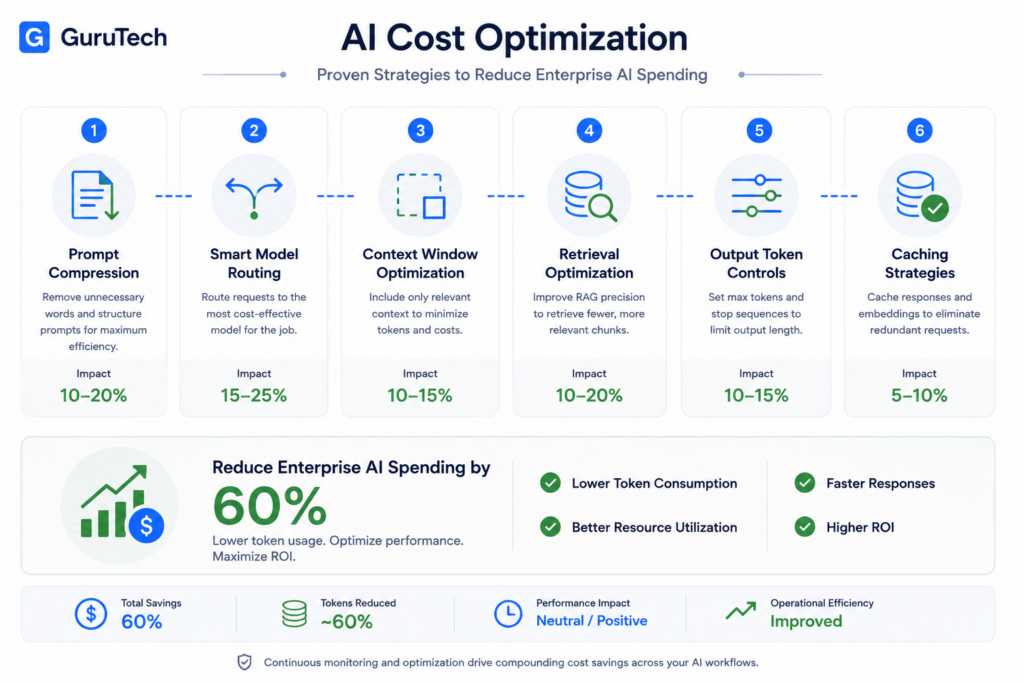
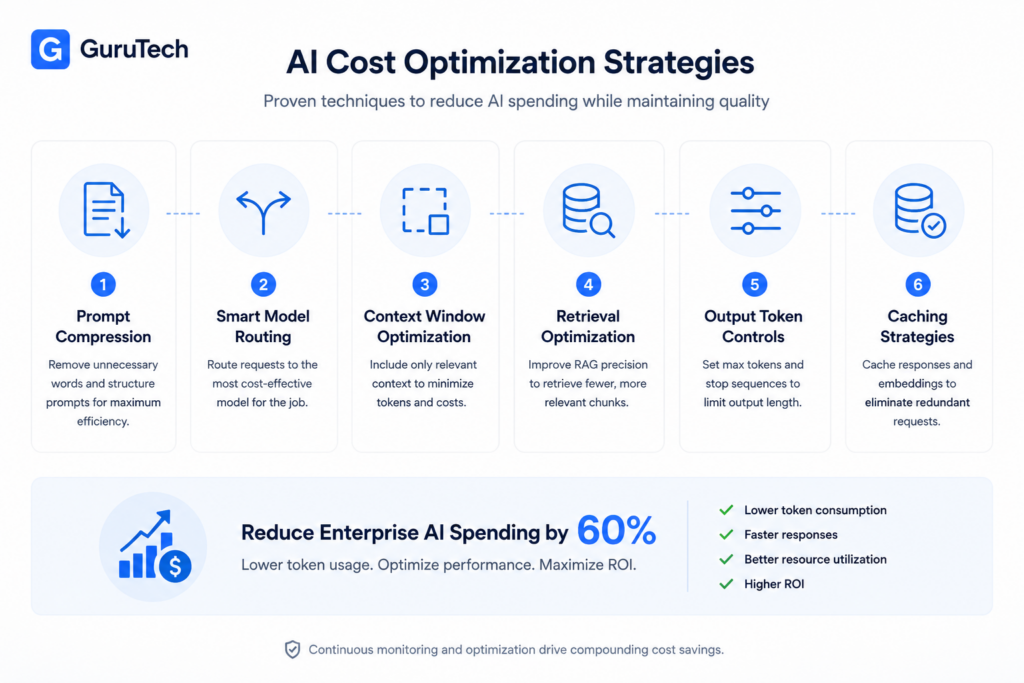
Real-time visibility into token consumption patterns enables platform teams to implement targeted optimization strategies that reduce AI infrastructure spend by 40-60% without degrading application performance.
Strategic interventions at the prompt, routing, context, retrieval, output, and caching layers compound to deliver measurable cost reductions across production workloads.
Prompt Compression
Your prompt engineering strategy directly impacts token consumption across every API call. Verbose instructions, redundant examples, and unnecessary formatting tokens inflate costs without improving model performance.
Implement systematic prompt compression by removing filler words, consolidating repetitive instructions, and replacing lengthy examples with concise patterns.
A typical enterprise prompt containing 800 tokens can often be compressed to 400-500 tokens while maintaining output quality.
Use your observability dashboard to A/B test compressed variants against baseline prompts. Track quality metrics like task completion rate, human approval percentage, and output accuracy alongside cost per request.
LangSmith provides prompt versioning with side-by-side performance comparisons.
Compression techniques for production systems:
- Replace natural language instructions with structured formats (JSON schemas, XML templates)
- Use abbreviations and domain-specific shorthand consistently
- Remove examples that don’t improve output quality in testing
- Consolidate role definitions and system instructions
- Strip unnecessary whitespace and formatting tokens
For RAG applications, compress retrieved context by extracting only relevant sentences rather than passing full document chunks.
If your retrieval system returns five 500-token chunks, semantic compression can reduce this to 800-1200 tokens of targeted content.
Arize Phoenix tracking shows this approach reduces context costs by 60-70% in document Q&A systems.
Smart Model Routing
Route requests to the most cost-effective model capable of handling each task’s complexity requirements.
GPT-4 costs approximately 30x more than GPT-3.5-turbo per token, yet many production requests don’t require frontier model capabilities.
Implement classification logic that routes simple queries, data transformations, and structured extractions to smaller models.
Reserve expensive models for complex reasoning and creative generation.
Your observability platform should track routing decisions, model performance by task type, and cost attribution by route.
Model routing decision matrix:
| Task Type | Recommended Model | Cost/1M Tokens | Use Case |
|---|---|---|---|
| Data extraction | GPT-3.5-turbo | $0.50 | Parsing emails, forms, structured data |
| Classification | Claude Haiku | $0.25 | Sentiment analysis, category assignment |
| Simple Q&A | GPT-3.5-turbo | $0.50 | FAQ responses, basic retrieval |
| Complex reasoning | GPT-4 | $30.00 | Multi-step analysis, strategic planning |
| Code generation | GPT-4 Turbo | $10.00 | Complex refactoring, architecture design |
| Summarization | Claude Haiku | $0.25 | Document summaries under 2000 words |
Configure n8n workflows with conditional routing nodes that evaluate request complexity before model selection.
Set complexity thresholds based on input length, detected question types, or explicit user requirements.
Helicone provides routing analytics showing cost savings per decision path.
Build fallback chains that attempt tasks with cheaper models first, escalating to more capable models only when quality checks fail.
This cascading approach reduces average request costs by 40-50% in heterogeneous workloads.
Context Window Optimization
Token costs scale linearly with context size, making context window management critical for RAG systems and conversational applications.
Each retrieval chunk, conversation turn, and system instruction consumes tokens on every request.
Implement sliding window strategies for multi-turn conversations that retain only essential context.
Rather than passing the full conversation history, maintain a summary of key points plus the most recent three exchanges.
OpenAI’s gpt-4-turbo-preview supports 128k context windows, but using the full window costs $1.28 per request at maximum capacity.
Context optimization strategies:
- Summarize conversation history beyond the most recent 5-10 turns
- Remove system instructions after initial request in multi-turn sessions
- Implement relevance scoring for retrieved chunks, passing only top-3 results
- Use separate context tiers for background information vs. immediate working memory
- Configure vector database retrieval limits based on query complexity
Your observability dashboard should display context token distribution across system prompts, conversation history, retrieved documents, and user input.
Grafana dashboards configured with OpenTelemetry instrumentation provide per-component token breakdowns.
For RAG architectures, implement hybrid retrieval that combines dense vector search with keyword filtering to reduce the number of chunks requiring evaluation.
This two-stage approach reduces average context size by 50-60% while maintaining retrieval quality.
Track retrieval cost vs. quality metrics to optimize your chunk count threshold.
Retrieval Optimization
Vector database queries and embedding generation contribute substantial costs in RAG systems.
Each user query typically triggers embedding generation ($0.0001 per 1k tokens) plus database operations, and retrieved content amplifies downstream LLM costs.
Optimize your retrieval pipeline by implementing query caching, embedding reuse, and retrieval result caching.
Langfuse tracing reveals that 30-40% of production queries are semantically similar enough to reuse cached embeddings and results.
Configure your vector database with appropriate similarity thresholds that balance recall against retrieved chunk count.
Lowering your cosine similarity threshold from 0.7 to 0.75 typically reduces retrieved chunks by 40% while maintaining answer quality for most queries.
Retrieval cost reduction techniques:
- Cache embeddings for common queries using Redis or similar
- Implement query deduplication before embedding generation
- Use metadata filtering to reduce vector search space
- Batch embedding generation requests when possible
- Configure chunk size and overlap to minimize redundancy
- Implement semantic caching for retrieved content
- Use hybrid search combining embeddings with keyword filters
Monitor retrieval effectiveness metrics alongside cost data.
Your observability platform should track retrieval precision, chunk utilization rate, and cost per relevant result.
If analytics show that only 2 of 5 retrieved chunks typically contribute to answers, reduce your retrieval count to 3 and measure quality impact.
Output Token Controls
Unconstrained output generation allows models to produce verbose responses that inflate costs and latency.
Setting explicit token limits forces models to generate concise, focused outputs.
Configure max_tokens parameters based on expected output requirements rather than using default or maximum values.
If your use case requires 200-word summaries, set max_tokens to 300 rather than 2048 or 4096.
Governance, Compliance, and Auditability
Enterprise AI deployments require complete visibility into who accessed which models, what prompts were sent, and how tokens were consumed.
Modern observability platforms provide detailed audit trails, version control for prompt templates, and compliance reporting capabilities that meet regulatory requirements for financial services, healthcare, and government sectors.
Audit Trails
Your AI token observability dashboard must capture comprehensive activity logs for every API request across OpenAI GPT-4, Claude, and self-hosted models.
Each log entry should include user identity, timestamp, model endpoint, token counts, prompt hash, and response metadata.
Enterprise platforms like LangSmith and Helicone provide audit trails for AI governance that retain detailed records for 30 to 90 days.
Your session logs should track workspace identifiers, API keys used, and whether requests originated from automated agents or human users.
For regulated industries, you need immutable audit records.
Implement write-once storage for session transcripts using S3 Object Lock or Azure Immutable Blob Storage.
This prevents tampering and satisfies legal discovery requirements.
Your audit pipeline should export logs to your SIEM platform using OpenTelemetry collectors.
Configure Grafana to visualize audit events by user, department, and model provider.
Set up alerts for unusual token consumption patterns or unauthorized model access attempts.
Prompt Version Control
Track every iteration of your prompt templates using Git-based versioning integrated into your observability platform.
Your AI token observability dashboard should link each API request to a specific prompt version, enabling you to correlate performance metrics with template changes.
Store prompt templates as YAML or JSON files with semantic versioning.
Include metadata fields for owner, approved date, and intended model.
When your n8n workflow invokes Claude with a prompt template, the session history should record the exact version identifier.
Implement a review workflow where prompt changes require approval before production deployment.
Your dashboard should show which prompts are in development, staging, or production environments.
This prevents unauthorized modifications to critical customer-facing agents.
Use Langfuse or Arize Phoenix to diff prompt versions and compare token efficiency.
If switching from GPT-4 to Claude 3.5 Sonnet requires prompt adjustments, version control lets you A/B test both variants while tracking cost per interaction in your observability dashboard.
Compliance Reporting
Generate compliance reports that document AI system usage for SOC 2, ISO 27001, HIPAA, and GDPR audits.
Your dashboard must export session transcripts with personally identifiable information redacted or encrypted based on retention policies.
Build scheduled reports showing token consumption by department, cost allocation by project, and model usage statistics.
Export these as CSV or JSON for your finance and compliance teams.
Include fields for total tokens, estimated costs, unique users, and peak usage periods.
For GDPR compliance, implement right-to-deletion workflows.
When a user requests data removal, your observability platform should purge all session logs, prompt inputs, and model responses associated with their identity.
Document this deletion in your audit trail.
Healthcare organizations using AI for clinical decision support need detailed activity logs showing which providers accessed which patient data through LLM interfaces.
Your compliance reporting must demonstrate that secure database connections were used and that all queries were logged with patient consent verification.
| Compliance Framework | Required Audit Fields | Retention Period | Export Format |
|---|---|---|---|
| SOC 2 Type II | User ID, timestamp, model, tokens | 12 months | JSON, CSV |
| HIPAA | Provider ID, patient ID, PHI access | 6 years | Encrypted JSON |
| GDPR | User consent, data processor, purpose | Until deletion request | Anonymized CSV |
| PCI DSS | Cardholder data access, masking | 12 months | Secure API |
Security Considerations
Encrypt all session transcripts at rest using AES-256 and in transit using TLS 1.3.
Your observability database should enforce role-based access control so only authorized personnel can view sensitive prompts and responses.
Implement token-level masking for PII, credit card numbers, and API keys appearing in prompts.
Use regex patterns or NER models to detect sensitive data before writing to your audit logs.
Helicone and LangSmith support automatic redaction of common PII patterns.
Restrict access to your AI token observability dashboard using SSO with MFA.
Assign read-only permissions to most users and limit administrative access to platform engineers.
Log all dashboard access attempts in your SIEM.
For RAG systems querying vector databases with proprietary documents, ensure your session history never logs the full retrieved context chunks.
Store only document identifiers and chunk references.
This prevents embedding trade secrets in audit trails.
Enterprise Retention Policies
Define retention policies based on data classification and regulatory requirements.
Production session logs containing customer data may require longer retention than development environment logs used for testing.
Configure tiered storage where recent session transcripts live in hot storage for 30 days, then move to cold storage for up to 7 years.
Use lifecycle policies in S3 or Azure Blob Storage to automate this transition.
Your dashboard should query both tiers seamlessly.
Set different retention periods by model type.
Logs from GPT-4 analyzing financial documents may need 7-year retention, while Claude sessions for internal documentation might only need 90 days.
| Data Type | Hot Storage | Cold Storage | Total Retention | Deletion Method |
|---|---|---|---|---|
| Production API logs | 30 days | 6 years 11 months | 7 years | Automated purge |
| Development sessions | 7 days | 83 days | 90 days | Automated purge |
| Compliance audit trails | 90 days | 4 years 9 months | 5 years | Manual review required |
| PII-containing transcripts | 0 days (redacted) | 30 days | 30 days | Secure deletion + audit |
Implement automated deletion workflows that trigger based on retention expiration dates.
Your observability platform should generate deletion certificates documenting what was purged, when, and by which process.
Future Trends in AI Observability
AI observability platforms are evolving beyond basic token counting to track reasoning processes, multi-agent workflows, and business impact attribution.
Enterprise teams need visibility into how AI systems make decisions, allocate resources across agent networks, and ultimately drive measurable ROI.
Reasoning Token Monitoring
Modern language models consume tokens during their internal reasoning process before generating outputs. Claude’s extended thinking and OpenAI’s o1 models use reasoning tokens that don’t appear in the final response but significantly impact costs and latency.
Your observability stack needs to separate reasoning tokens from completion tokens. These reasoning operations can account for 40-60% of total token usage in complex analytical tasks.
Traditional dashboards that only track input and output tokens miss this substantial cost center. Platforms like LangSmith and Arize Phoenix now expose reasoning token metrics as distinct telemetry streams.
You can analyze which prompts trigger excessive reasoning cycles and optimize your prompt engineering accordingly. For cost attribution in multi-tenant systems, reasoning tokens must be allocated to the correct business unit or customer account.
Monitor reasoning depth as a quality signal. Deeper reasoning correlates with better output quality on complex tasks but increases latency and cost.
Your team should establish thresholds that balance performance requirements against operational expenses.
Agent Execution Graphs
Multi-agent systems create complex execution patterns that linear trace views cannot adequately represent. Your AI observability dashboard must visualize agent-to-agent communication, task delegation, and parallel execution branches.
Agent graphs show which agents invoke others, how data flows between them, and where execution bottlenecks occur. A typical customer support workflow might involve a router agent, research agent, RAG retrieval agent, and response generator running in parallel or sequential patterns.
Tools like Langfuse and Helicone now provide graph-based visualizations for agent orchestration platforms including LangChain, AutoGen, and CrewAI. You can identify which agent consumes the most tokens, which relationships create circular dependencies, and where retry logic inflates costs.
Critical metrics for agent graphs:
- Agent invocation count per session
- Cross-agent latency for handoffs
- Token distribution across agent roles
- Failure propagation paths
OpenTelemetry’s distributed tracing now supports agent-specific spans with custom attributes for agent type, role, and decision rationale. Your platform team should instrument each agent as a distinct service in your observability backend.
Autonomous Workflow Tracing
Production AI systems increasingly operate within n8n workflows, Temporal orchestrations, and similar automation platforms. Your observability approach must trace AI operations across workflow boundaries, API calls, database queries, and human approval gates.
End-to-end traces should connect workflow triggers to final outcomes. When an n8n workflow processes customer feedback through sentiment analysis, entity extraction, ticket creation, and routing, your trace spans all these operations with consistent correlation IDs.
Integration between workflow engines and AI observability platforms remains challenging. You need custom instrumentation to emit structured logs from n8n nodes that invoke Claude or GPT-4.
Each workflow step should include the workflow ID, execution ID, and step name in telemetry metadata. Grafana deployments can aggregate traces from both workflow engines and LLM providers when configured with OpenTelemetry collectors.
Your architecture should route all AI-related telemetry through a centralized collector that enriches events with workflow context before storage. Human-in-the-loop steps require special handling.
Track approval latency, rejection rates, and the relationship between AI confidence scores and human override frequency. These metrics inform when autonomous workflows need additional guardrails or model fine-tuning.
Business Outcome Attribution
Tracking tokens and latency matters less if you cannot connect AI operations to business results. Your observability stack must link model invocations to customer actions, revenue events, and operational KPIs.
Implement correlation between AI session IDs and business transaction IDs. When a customer completes a purchase after interacting with an AI assistant, your telemetry should attribute the conversation cost against the revenue generated.
This requires passing business context through your entire AI pipeline.
Attribution mapping table:
| AI Operation | Business Metric | Attribution Method |
|---|---|---|
| Product recommendation | Conversion rate | Session ID linking |
| Document summarization | Time saved | User productivity tracking |
| Code generation | Development velocity | Git commit correlation |
| Customer support | CSAT score | Ticket resolution linking |
Vector database queries in RAG systems should include metadata about the downstream business function. When retrieving documents to answer customer questions, tag each query with customer tier, product category, and support priority level.
Your FinOps team needs cost data segmented by business unit, customer segment, and product feature. Arize Phoenix and similar platforms support custom dimensions that enable chargeback models.
You can allocate AI infrastructure costs based on actual usage patterns rather than estimated distributions.
AI ROI Dashboards
Executive stakeholders require simplified views that connect AI investments to financial outcomes. Your technical observability data must roll up into business-level dashboards showing cost per outcome, efficiency gains, and margin impact.
Calculate cost per successful transaction, not just cost per token. If your AI-powered support system costs $0.15 in tokens per resolved ticket but reduces average handle time by 3 minutes, the ROI calculation includes both token costs and labor savings.
Key ROI metrics:
- Cost per business outcome (lead, sale, resolution)
- Efficiency multiplier (tasks automated vs. human baseline)
- Quality metrics (accuracy, user satisfaction, error rates)
- Scaling economics (marginal cost trends as volume increases)
Build dashboards that compare AI operational costs against traditional process costs. Show the trend line as your team optimizes prompts, implements caching, and routes requests to smaller models.
Tools like monitoring AI token usage and costs provide starting templates for these financial views. Your CFO needs visibility into cost volatility.
Token prices fluctuate with model updates and provider pricing changes. Include budget variance reports that flag when actual spending deviates from forecasts by more than your acceptable threshold.
Connect model performance degradation to business impact. When hallucination rates increase or response quality drops, quantify the downstream effect on customer satisfaction scores or rework costs.
This creates urgency for model retraining or prompt refinement initiatives.
Frequently Asked Questions
Token observability in production AI systems raises practical questions about implementation, cost control, anomaly detection, and governance. The answers below focus on enterprise systems that use multiple models, RAG pipelines, workflow automation, and human approval layers.
What is an AI token observability dashboard?
An AI token observability dashboard is a monitoring layer that tracks how LLM applications consume tokens, generate costs, produce latency, and behave across workflows. It usually combines token counts, model names, prompt versions, traces, spans, user IDs, workflow IDs, error rates, and cost calculations in one interface.
The goal is to move from provider-level billing to operational visibility. Instead of only knowing that your OpenAI or Claude bill increased, you can see which workflow, user segment, agent, retrieval step, or prompt version caused the increase.
How do I set up token usage monitoring for LLM-based applications?
Start at the application layer where LLM calls are made. Capture the model name, provider, input tokens, output tokens, cached tokens where available, latency, status code, user ID, workflow ID, and prompt version for every request.
For custom applications, you can add SDK-based instrumentation with tools such as Langfuse, LangSmith, Phoenix, or OpenTelemetry. For gateway-based monitoring, you can route traffic through a proxy such as Helicone. For n8n workflows, add logging after each AI node and store the execution ID, node name, model, token counts, and calculated cost.
Which metrics matter most for AI token observability?
The most important metrics are input tokens, output tokens, cached tokens, cost per request, cost per workflow, cost per successful execution, latency, time to first token, retry count, error rate, retrieval volume, and agent iteration count.
For enterprise dashboards, the most useful views are usually cost by workflow, cost by department, cost by model, latency by provider, and token usage by prompt version. These views connect technical telemetry to business decisions.
How can token telemetry be correlated with traces?
Token telemetry should be attached to the same trace and span identifiers used for distributed tracing. A parent trace represents the full user request or workflow execution. Child spans represent retrieval, embedding generation, LLM calls, tool calls, validation steps, and human approval gates.
When each span includes token counts and model metadata, you can identify which step caused a cost spike or latency issue. This is especially important in multi-agent systems where one user request may trigger many internal model calls.
What anomaly detection approaches can flag unexpected token spikes?
Start with practical thresholds before moving to complex machine learning. Alert when tokens per request exceed a baseline, when daily workflow spend passes a budget threshold, when retry counts spike, or when output tokens suddenly increase for a stable prompt.
More advanced teams can use rolling averages, standard deviation bands, seasonality-aware forecasting, and per-user anomaly detection. The most useful alerts are tied to action: excessive RAG retrieval, recursive agent loops, failed validation retries, unusually long outputs, or unexpected use of expensive models.
How does token observability help reduce AI costs?
Token observability shows where waste occurs. Common savings opportunities include compressing prompts, reducing retrieved context, lowering output token limits, caching repeated prompts, routing simple tasks to smaller models, and stopping failed workflows earlier.
The strongest cost reductions usually come from combining several improvements. For example, an organization may reduce spend by compressing system prompts, lowering RAG top-k values, using prompt caching, and routing classification tasks away from flagship models.
How do Langfuse, Helicone, Phoenix, and LangSmith differ?
Langfuse is strong for LLM tracing, prompt management, evaluation, and cost visibility. Helicone is strong as a gateway or proxy layer for request logging, cost tracking, caching, and rate limiting. Phoenix is strong for OpenTelemetry-native tracing, RAG evaluation, and embedding/retrieval analysis. LangSmith is strong for LangChain-based applications, agent debugging, evaluations, and dataset management.
Many teams do not need all of them. The right choice depends on whether your priority is gateway-level monitoring, prompt engineering workflows, OpenTelemetry integration, or agent evaluation.
Can n8n track token consumption?
Yes, but the implementation depends on the nodes and providers you use. Some AI nodes expose token usage in their response metadata. In other cases, you need to capture usage from the provider response, calculate cost using a model pricing table, and store the result in a database or n8n Data Table.
For serious production use, track token usage per node, per workflow execution, and per session. This gives you a clear view of whether classification, retrieval, generation, validation, or human review is responsible for cost and latency.
What should enterprises include in an AI cost governance model?
An enterprise governance model should include per-user and per-department cost attribution, prompt version control, role-based dashboard access, budget alerts, model usage policies, retention rules, audit trails, and escalation procedures for abnormal spend.
For regulated environments, governance should also include redaction, encryption, access logging, prompt approval workflows, and clear rules for how long prompts, responses, and traces are retained.
What is the difference between AI observability and AI FinOps?
AI observability is the technical telemetry layer. It tracks tokens, latency, traces, prompts, errors, retrieval behavior, and model outputs. AI FinOps uses that telemetry to manage budgets, forecast spend, allocate costs, enforce limits, and connect AI usage to business value.
In practice, they work together. Observability tells you what happened. FinOps turns that data into cost controls, forecasts, chargeback reports, and executive dashboards.
What is AI FinOps?
AI FinOps is the discipline of managing AI spending using operational telemetry, governance controls, forecasting, chargeback models, and optimization practices. While AI observability focuses on collecting technical signals such as token usage, latency, traces, and model performance, AI FinOps uses that data to control budgets, forecast future spend, allocate costs to teams, and measure business value.
Conclusion: Token Visibility Is Now Part of Production AI Infrastructure
Production AI systems cannot be managed with provider billing dashboards alone. Once applications use RAG, multi-agent orchestration, model routing, workflow automation, and human approval gates, a single user request can trigger many hidden token-consuming operations.
An AI token observability dashboard gives engineering, finance, and governance teams the shared visibility they need to operate these systems responsibly. It shows where tokens are being consumed, which workflows create the most value, which prompts are inefficient, and where cost spikes or latency bottlenecks begin.
The best approach is incremental. Start by tracking input tokens, output tokens, latency, model name, workflow ID, and cost per request. Then add trace trees, prompt versioning, RAG diagnostics, budget alerts, and department-level attribution. As your AI systems mature, connect those technical metrics to business outcomes such as resolved tickets, completed documents, reduced manual effort, and customer satisfaction.
AI observability is becoming as important to modern software teams as cloud monitoring, application performance management, and security logging. Organizations that build this layer early will be better positioned to control costs, prove ROI, debug agent behavior, and scale enterprise AI safely.